<?xml version="1.0" encoding="utf-8"?><feed xmlns="http://www.w3.org/2005/Atom" ><generator uri="https://jekyllrb.com/" version="4.4.1">Jekyll</generator><link href="https://fortifylabs.io/feed.xml" rel="self" type="application/atom+xml" /><link href="https://fortifylabs.io/" rel="alternate" type="text/html" /><updated>2026-02-25T13:48:32+11:00</updated><id>https://fortifylabs.io/feed.xml</id><title type="html">Fortify Labs</title><subtitle>Technical Uncertainty to Evidence-Backed Answers. Based in Australia, Fortify Labs helps organisations secure modern connected systems by validating how they behave at their most fundamental layers.
</subtitle><entry><title type="html">Behind the Dashboard: Part 4Powering SYNC® 3 in the Lab</title><link href="https://fortifylabs.io/connected%20vehicles/vehicles/technical/ford%20ranger/forensics/2026/02/11/privacy-demonstration-ford-ranger-power-on-bench.html" rel="alternate" type="text/html" title="Behind the Dashboard: Part 4Powering SYNC® 3 in the Lab" /><published>2026-02-11T00:00:00+11:00</published><updated>2026-02-11T00:00:00+11:00</updated><id>https://fortifylabs.io/connected%20vehicles/vehicles/technical/ford%20ranger/forensics/2026/02/11/privacy-demonstration-ford-ranger-power-on-bench</id><content type="html" xml:base="https://fortifylabs.io/connected%20vehicles/vehicles/technical/ford%20ranger/forensics/2026/02/11/privacy-demonstration-ford-ranger-power-on-bench.html"><![CDATA[<p>Welcome to the fifth post in our blog series:</p>

<p><strong>Behind the Dashboard: Where the Data Lives – Inside the SYNC® 3 Filesystem – Ford Ranger</strong></p>

<p>In <strong>Parts 1 to 3</strong>, we introduced the project, examined the data recovered from the salvaged SYNC® 3 unit, and explored where Bluetooth, GPS, WiFi and driving‑related artefacts are stored within the filesystem.</p>

<p>Now, in <strong>Part 4</strong>, we move from static analysis to hands‑on work, powering the SYNC® 3 head unit on the bench. Here, we demonstrate how to power on the unit outside the vehicle, walk through our methodology, and provide details on the steps taken.</p>

<hr />

<p>To keep things clear and focused, here’s the series timeline:</p>

<div class="blog-series-timeline">

  <div class="timeline-item">
    <strong><a href="/information/connected%20vehicles/vehicles/privacy/ford%20ranger/2025/12/15/privacy-demonstration-ford-ranger-px3.html">Part 1 — Our Approach to Demonstrating Evidence-Based Privacy Concerns &amp; Data Extraction</a></strong>
    <p>Overview of strategy, vehicle selection, and introduction to SYNC® 3.</p>
  </div>

  <div class="timeline-item">
    <strong><a href="/information/connected%20vehicles/vehicles/privacy/ford%20ranger/data%20analysis/2026/01/11/privacy-demonstration-ford-ranger-px3-data-analysis.html">Part 2 — What We Found Inside SYNC® 3</a></strong>
    <p>A review of the data we extracted and analyzed.</p>
  </div>

  <div class="timeline-item">
    <strong><a href="/technical/connected%20vehicles/vehicles/privacy/ford%20ranger/data%20analysis/forensics/2026/01/19/privacy-demonstration-ford-ranger-px3-data-deep-dive_A-BT.html">Part 3A — Technical Deep Dive into SYNC® 3 Data - Bluetooth</a></strong>
    <p>Where the Bluetooth Device data lives in the file system and the formats used.</p>
  </div>

  <div class="timeline-item ">
    <strong><a href="/technical/connected%20vehicles/vehicles/privacy/ford%20ranger/data%20analysis/forensics/2026/01/29/privacy-demonstration-ford-ranger-px3-data-deep-dive_B-GPS-Other.html">Part 3B — Technical Deep Dive into SYNC® 3 Data - GPS, WiFi and driving data</a></strong>
    <p>Where the GPS, WiFi and driving data lives in the file system and the formats used.</p>
  </div>

  <div class="timeline-item current">
    <strong>Part 4 — Powering SYNC® 3 in the Lab</strong>
    <p>This post: How to run the infotainment system outside the vehicle.</p>
  </div>

  <div class="timeline-item">
    <strong>Part 5 — How We Extracted the Data</strong>
    <p>Methods and tools used to access and read the memory chip.</p>
  </div>

  <div class="timeline-item">
    <strong><a href="/connected%20vehicles/vehicles/privacy/ford%20ranger/data%20analysis/forensics/2026/02/02/privacy-demonstration-ford-ranger-factory-reset-hu.html">Addendum: Effects of a Factory Reset</a></strong>
    <p>What does, and more importantly does not, get erased after a "factory reset.</p>
  </div>

</div>

<hr />

<h2 id="table-of-contents">Table Of Contents</h2>

<ul>
  <li><a href="#table-of-contents">Table Of Contents</a></li>
  <li><a href="#observations">Observations</a>
    <ul>
      <li><a href="#equipment-used">Equipment used:</a></li>
      <li><a href="#possible-follow-up-work">Possible Follow-Up Work</a></li>
    </ul>
  </li>
  <li><a href="#research-summary">Research Summary</a>
    <ul>
      <li><a href="#power-testing">Power Testing</a></li>
      <li><a href="#narrowing-down-the-can-messages">Narrowing down the CAN messages</a></li>
    </ul>
  </li>
  <li><a href="#short-procedure-to-power-on-unit">Short Procedure to Power on Unit</a></li>
  <li><a href="#fortify-labs-github-repository">Fortify Labs Github Repository</a></li>
  <li><a href="#disclaimer">Disclaimer</a></li>
</ul>

<hr />

<h2 id="observations">Observations</h2>

<p>We successfully powered on the Ranger’s SYNC® 3 Infotainment system on the bench and made the following observations throughout our research:</p>

<ol>
  <li>
    <p>The wrecked infotainment system needed more than 3 Amps to properly power on. A power supply capable of supplying 5 Amps was required.</p>
  </li>
  <li>
    <p>Different SYNC® 3 Infotainment systems required different CAN messages sequences to power on.</p>
  </li>
  <li>
    <p>The SYNC® 3 system is provided with constant 12v power.</p>
  </li>
  <li>
    <p>Basic functionality of SYNC® 3 system appears to be controlled by CAN messages on <code class="language-plaintext highlighter-rouge">Pins 19/20</code> only. The other CAN connections (i.e. <code class="language-plaintext highlighter-rouge">Pins 41/42</code> and <code class="language-plaintext highlighter-rouge">Pins 53/54</code>) were not required to power on the infotainment unit.</p>
  </li>
  <li>
    <p>When powering off the vehicle, the infotainment system appears to go into standby mode with the screen going blank, but is still listening to CAN messages.</p>
  </li>
  <li>
    <p>After going to sleep, the infotainment system continues to receive CAN messages from the vehicle for approx. 4 minutes after turning off the ignition.</p>
  </li>
</ol>

<hr />

<h3 id="equipment-used">Equipment used:</h3>

<table>
  <thead>
    <tr>
      <th>Item</th>
      <th>Version</th>
      <th>Note</th>
      <th>Link</th>
    </tr>
  </thead>
  <tbody>
    <tr>
      <td>Laptop</td>
      <td>OS: Ubuntu 24.04.3 LTS</td>
      <td> </td>
      <td><a href="https://ubuntu.com/download/desktop">Ubuntu Download Site</a></td>
    </tr>
    <tr>
      <td>can-utils</td>
      <td>2023.03-1</td>
      <td>Collection of CAN (Controller Area Network) utilities for Linux</td>
      <td><a href="https://github.com/linux-can/can-utils">can-utils - Linux SocketCAN userspace utilities</a></td>
    </tr>
    <tr>
      <td>Inno-Maker USB2CAN Cable</td>
      <td>N/A</td>
      <td>USB to CAN device used to capture and replay CAN messages.</td>
      <td><a href="inno-maker.com/product-category/products/automotive-network/usb-can-analyzer/">Inno-Maker Website</a></td>
    </tr>
    <tr>
      <td>Bench Power Supply</td>
      <td>N/A</td>
      <td>Capable of supplying 5A.</td>
      <td> </td>
    </tr>
  </tbody>
</table>

<hr />

<h3 id="possible-follow-up-work">Possible Follow-Up Work</h3>

<p>Determine:</p>

<ol>
  <li>Specific CAN messages required to power on and shut down each specific version of SYNC® 3 Infotainment system.</li>
  <li>Specific CAN messages required to enable/disable certain functionality (i.e. identify the messages that indicate the vehicle is in gear or moving that disables certain functionality).</li>
  <li>Specific CAN messages required to enable/disable dark &amp; light mode on the system.</li>
  <li>How the climate control system is integrated into the infotainment system.</li>
  <li>Specific CAN messages required to power down the system.</li>
</ol>

<hr />

<h2 id="research-summary">Research Summary</h2>

<p>In order to power on the SYNC® 3 Infotainment system in the Lab we performed the following:</p>

<h3 id="power-testing">Power Testing</h3>

<blockquote>
  <p>Note: We used a personal vehicle (Ford Ranger) to perform the following testing.</p>
</blockquote>

<ol>
  <li>
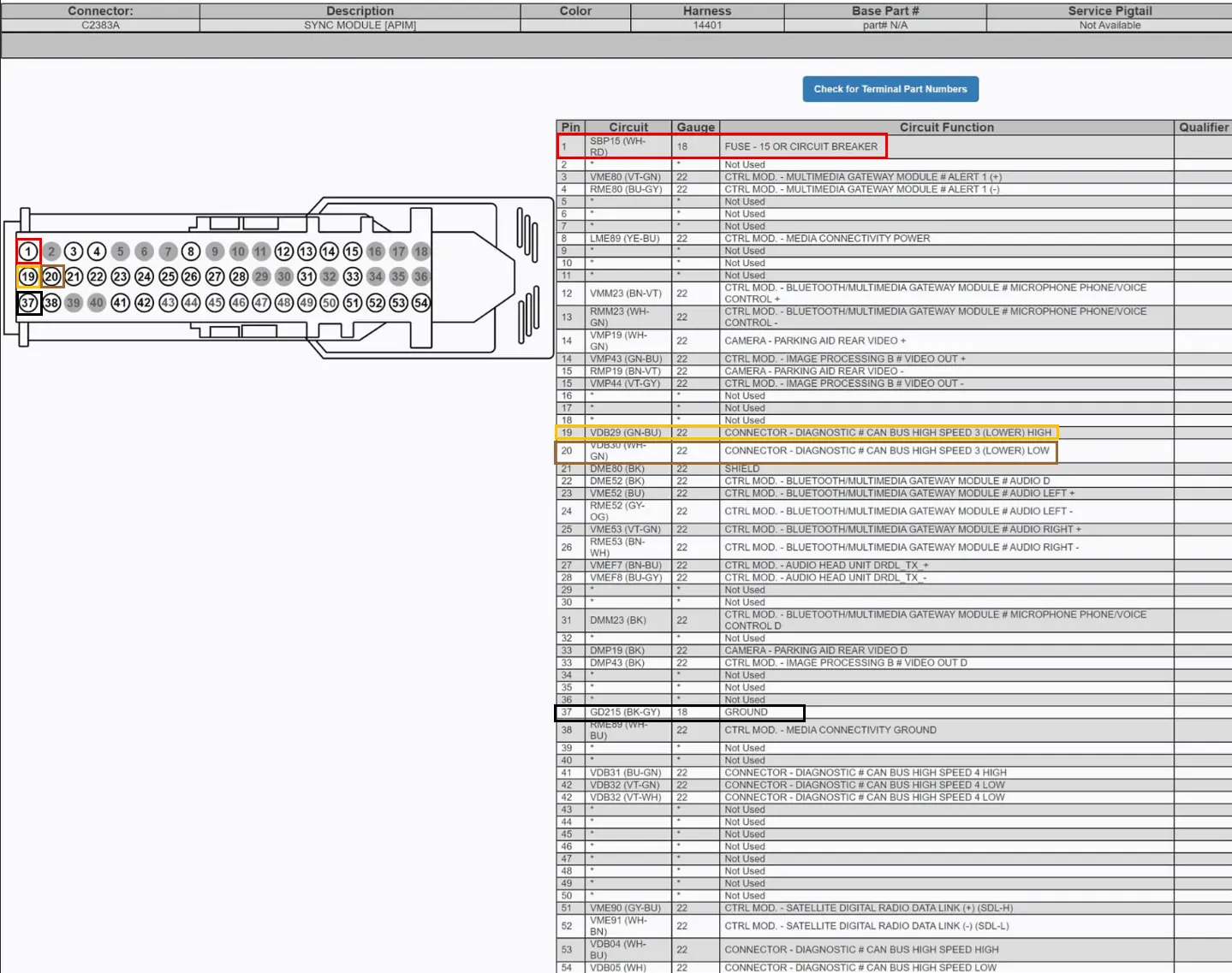
    <p>Found a Pin-Out diagram of the SYNC® 3 Infotainment system’s main connector using open source searches.</p>

    <div style="display: flex; justify-content: center; margin: 20px 0;">
   <img src="/assets/images/blog_images/2026-02-11-privacy-demonstration-ford-ranger-power-on-bench/001_001_ConnectorPinOut.webp" alt="Connector Pin Out" style="max-width: 500px; width: 50%; height: auto; border: 1px solid #333; background-color: #DADADA; border-radius: 4px;" />
 </div>

    <blockquote>
      <p>Note: The Pin Out diagram was found from this post from <a href="https://community.cyanlabs.net/t/newer-acms-compatible-with-apim-jr3t-14g371-cha/8401/39">CyanLabs</a>.</p>
    </blockquote>
  </li>
  <li>
    <p>Ensuring that the diagram pins was consistent with our donor/test vehicle, we:</p>

    <ul>
      <li>
        <p>Verified that <code class="language-plaintext highlighter-rouge">pin 37</code> (GND) had electrical continuity between it and a chassis grounding point.</p>
      </li>
      <li>
        <p>Verified that <code class="language-plaintext highlighter-rouge">pin 1</code> (12v) to <code class="language-plaintext highlighter-rouge">pin 37</code> (GND) connections were consistent with a constant 12v (Battery +) connection.</p>

        <ul>
          <li>
            <blockquote>
              <p>Note: Approx. 11.8v when the vehicle was off and over 12v when the vehicle was running.</p>
            </blockquote>
          </li>
        </ul>
      </li>
      <li>
        <p>Verified that <code class="language-plaintext highlighter-rouge">pin 19</code> (CAN H) to <code class="language-plaintext highlighter-rouge">pin 37</code> (GND) showed a fluctuating voltage from approximately 2.6v - 2.8v when the vehicle was running (consistent with CAN bus readings).</p>

        <div style="display: flex; justify-content: center; margin: 20px 0;">
   <img src="/assets/images/blog_images/2026-02-11-privacy-demonstration-ford-ranger-power-on-bench/001_002_CANH-Voltage-r.webp" alt="CAN H Voltage Reading" style="max-width: 500px; width: 25%; height: auto; border: 1px solid #333; background-color: #DADADA; border-radius: 4px;" />
 </div>
      </li>
      <li>
        <p>Verified that <code class="language-plaintext highlighter-rouge">pin 20</code> (CAN L) to <code class="language-plaintext highlighter-rouge">pin 37</code> (GND) showed a fluctuating voltage from approximately 2.2v - 2.4v when the vehicle was running (consistent with CAN bus readings).</p>

        <div style="display: flex; justify-content: center; margin: 20px 0;">
   <img src="/assets/images/blog_images/2026-02-11-privacy-demonstration-ford-ranger-power-on-bench/001_003_CANL-Voltage-r.webp" alt="CAN L Voltage Reading" style="max-width: 500px; width: 25%; height: auto; border: 1px solid #333; background-color: #DADADA; border-radius: 4px;" />
 </div>
      </li>
      <li>
        <p>Used the donor vehicle to capture CAN messages coming from the vehicle to the SYNC® 3 connector. With the infotainment system removed, we captured CAN messages for approximately 4 minutes of run time while the vehicle ignition was turned on. The capture continued until the CAN messages stopped (approx. 4 mins after powering off the ignition).</p>
      </li>
      <li>
        <p>The command used to capture CAN messages:</p>

        <div class="scrollable-block">
 <pre>
 # Install can-utils
 $ sudo apt install can-utils -y

 # The following commands were used to initialize the USB2CAN Device
 sudo ip link set can0 up type can bitrate 500000
 sudo ifconfig can0 txqueuelen 100000

 # Monitor CAN traffic in the terminal window
 $ candump can0

 # Capture CAN messages to a log file from the can0 interface
 # This will save the output log file as 'candump-yyyy-mm-dd_hhmmss.log'
 $ candump -l can0

 # Renaming the capture file
 $ cp candump-yyyy-mm-dd_hhmmss.log can-capture-vehicle-on-4mins-off.log
 </pre>
 </div>
      </li>
    </ul>
  </li>
  <li>
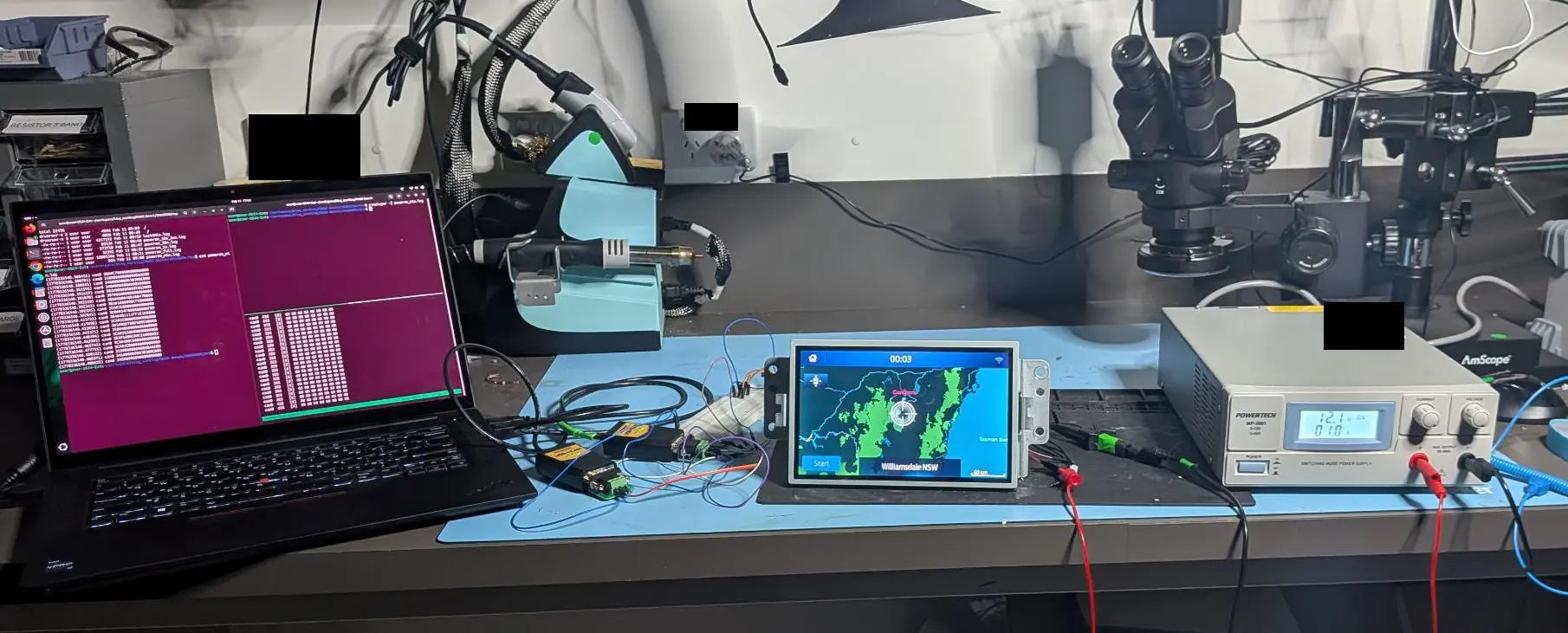
    <p>Setup the wrecked infotainment System on the Lab bench. Connected the following Pins:</p>

    <table>
      <thead>
        <tr>
          <th>Function</th>
          <th>Pin</th>
        </tr>
      </thead>
      <tbody>
        <tr>
          <td>Power (12v, 5A)</td>
          <td>1</td>
        </tr>
        <tr>
          <td>Ground</td>
          <td>37</td>
        </tr>
        <tr>
          <td>CAN High</td>
          <td>19</td>
        </tr>
        <tr>
          <td>CAN Low</td>
          <td>20</td>
        </tr>
      </tbody>
    </table>

    <div style="display: flex; justify-content: center; margin: 20px 0;">
   <img src="/assets/images/blog_images/2026-02-11-privacy-demonstration-ford-ranger-power-on-bench/001_004_HU-Connections.webp" alt="Head Unit Connections" style="max-width: 500px; width: 50%; height: auto; border: 1px solid #333; background-color: #DADADA; border-radius: 4px;" />
 </div>

    <blockquote>
      <p>Note: We experienced issues connecting the SYNC® 3 Infotainment system to a power supply with a limit of 3 Amps where the infotainment system would not boot properly. We found we had to use a power supply that was capable of supplying 5 Amps for the wrecked head unit to power on.</p>
    </blockquote>
  </li>
  <li>
    <p>Powered on the Power Supply.</p>
  </li>
  <li>
    <p>Used <code class="language-plaintext highlighter-rouge">canplayer</code> (can-utils) to replay the capture of CAN messages obtained from the donor vehicle.</p>
  </li>
</ol>

<ul>
  <li>This successfully powered on the infotainment system.</li>
  <li>If we replayed the capture in full (i.e. from vehicle power on to power off), the head unit also powered down at towards the end of the CAN capture.</li>
  <li>
    <p>The command used to replay the CAN capture:</p>

    <div class="scrollable-block">
<pre>
canplayer -I can-capture-vehicle-on-4mins-off.log
</pre>
</div>
  </li>
</ul>

<h3 id="narrowing-down-the-can-messages">Narrowing down the CAN messages</h3>

<ol>
  <li>We started with the full capture that we captured from the vehicle.</li>
  <li>We knew from testing that powering on the head unit would occur very soon after starting the replay.</li>
  <li>In an attempt to cut down the required number of CAN messages required to power on the head unit we:</li>
</ol>

<ul>
  <li>
    <p>Examined the CAN Capture’s message format. For example:</p>

    <div class="scrollable-block">
<pre>
  (1770336455.092014) can0 04C#20A57F1E00000000
  (1770336455.093539) can0 3CA#6F80000000000000
  (1770336455.095489) can0 3A8#010027DF00000000
  (1770336455.097220) can0 171#1400000000000000
  (1770336455.098169) can0 156#6300000003000000
  (1770336455.098414) can0 163#0000000096000000
  (1770336455.099114) can0 166#79000016AB590000
  (1770336455.099365) can0 167#727FFF10001A0F00
  (1770336455.100161) can0 175#0000000000000BB8
  (1770336455.100316) can0 178#000002000E5CB656
</pre>
</div>
  </li>
  <li>The first field is a Unix timestamp with microsecond precision.</li>
  <li>
    <p>To cut down the capture we used the timestamp field from the first message in the CAN capture. For example:</p>

    <div class="scrollable-block">
<pre>
  (1770336455.093539) can0 3CA#6F80000000000000
      
  Timestamp with Second precision = 1770336455
</pre>
</div>
  </li>
  <li>
    <p>To convert it to human readable:</p>

    <div class="scrollable-block">
<pre>
  $ date -d @1770336455
  Fri Feb  6 11:07:35 AEDT 2026

  # We could now determine that increasing the last digit of the timestamp (before the decimal place) by one, would increase the capture by 1 second.
</pre>
</div>
  </li>
  <li>Now we could narrow the full CAN message capture by using these timestamps.</li>
  <li>
    <p>The following commands could be used and modified using the timestamps to narrow down each CAN message capture.</p>

    <div class="scrollable-block">
<pre>
  # Extract the first 60 seconds
  # 1770336455 + 60 = 1770336515
  awk -F'[()]' '$2 &gt;= 1770336455 &amp;&amp; $2 &lt; 1770336515' can-capture-vehicle-on-4mins-off.log &gt; can-first60s.log

  # Extract the last 90 seconds
  # Last timestamp
  # (1770336765.608752) can0 3CA#0480000000000000
  # 1770336765 - 90 = 1770336675 (note that the command below ensures we capture the last messages by increasing the end timestamp by 1 to 1770336766)

  $ awk -F'[()]' '$2 &gt;= 1770336675 &amp;&amp; $2 &lt;= 1770336766' can-capture-vehicle-on-4mins-off.log &gt; can-last90s.log
</pre>
</div>

    <ul>
      <li>
        <p>At each stage, we powered down the head unit and continued to replay the narrowed CAN message logs until we were left with a short timeframe to work with.</p>
      </li>
      <li>
        <p>Based on other Github projects analysing Ford CAN messages (such as: <a href="https://github.com/v-ivanyshyn/parse_can_logs">https://github.com/v-ivanyshyn/parse_can_logs</a>), we theorized that the infotainment system was monitoring the <code class="language-plaintext highlighter-rouge">0x3XX</code> CAN IDs. These IDs appear to be associated to body control and infotainment functions.</p>
      </li>
      <li>
        <p>We used the <code class="language-plaintext highlighter-rouge">grep</code> utility to extract only messages from CAN ID <code class="language-plaintext highlighter-rouge">0x3xx</code> with a command similar to:</p>
      </li>
    </ul>

    <div class="scrollable-block">
<pre>
  # Extract only messages with CAN IDs starting with 0x3xx

  $ grep "can0 0x3" can-last90s.log &gt; can-last90s-only-0x3xx.log
</pre>
</div>

    <ul>
      <li>We extracted only the <code class="language-plaintext highlighter-rouge">0x3XX</code> CAN IDs from the CAN capture log and continued to narrow down the required CAN messages to the following messages, which we saved the log to a file called <code class="language-plaintext highlighter-rouge">poweron.log</code>.</li>
    </ul>

    <div class="scrollable-block">
<pre>
  (1770336540.380455) can0 30A#C700000000000000
  (1770336540.380701) can0 318#00000000000AAE00
  (1770336540.380845) can0 346#000000030300C000
  (1770336540.381595) can0 348#0000000000000000
  (1770336540.391619) can0 303#000008060E052000
  (1770336540.391870) can0 307#0600000000000000
  (1770336540.392120) can0 38A#4000400100470000
  (1770336540.392345) can0 3B3#1080000CFE000000
  (1770336540.392595) can0 3CA#2E80000000000000
  (1770336540.392845) can0 3D0#034F000088000F89
  (1770336540.413723) can0 3B4#401111FF1E1E0000
  (1770336540.417698) can0 3CA#2E80000000000000
  (1770336540.423056) can0 3B5#00D700D500E600E8
  (1770336540.445371) can0 3E8#4088000000000000
  (1770336540.448496) can0 3CA#2E80000000000000
  (1770336540.462985) can0 3B2#1080C00CE6000002
  (1770336540.465743) can0 3C3#400C000000008000
  (1770336540.477715) can0 3CA#2E80000000000000
  (1770336540.480122) can0 318#00000000000AAE00
  (1770336540.480371) can0 346#000000030300C000
  (1770336540.480622) can0 348#0000000000000000
</pre>
</div>

    <ul>
      <li>We could then power on the system by running:</li>
    </ul>

    <div class="scrollable-block">
<pre>
  $ canplayer -I poweron.log
</pre>
</div>

    <div style="display: flex; justify-content: center; margin: 20px 0;">
  <img src="/assets/images/blog_images/2026-02-11-privacy-demonstration-ford-ranger-power-on-bench/001_005_PowerOn.webp" alt="Powering On" style="max-width: 500px; width: 60%; height: auto; border: 1px solid #333; background-color: #DADADA; border-radius: 4px;" />
</div>

    <div style="display: flex; justify-content: center; margin: 20px 0;">
  <img src="/assets/images/blog_images/2026-02-11-privacy-demonstration-ford-ranger-power-on-bench/002_001_Lab-Photo.webp" alt="Powered On" style="max-width: 500px; width: 60%; height: auto; border: 1px solid #333; background-color: #DADADA; border-radius: 4px;" />
</div>

    <blockquote>
      <p>Note: We noticed that the SYNC® 3 systems from PX3 Rangers required different CAN messages to power on. As such, this specific capture may not work for all SYNC® 3 units. If you are attempting this and do not have access to a donor Ford Ranger, please <a href="/#contact">contact us</a> and can attempt to assist.</p>
    </blockquote>

    <ul>
      <li>We verified some of the system functionality while powered on:</li>
    </ul>

    <div style="display: flex; justify-content: center; margin: 20px 0;">
  <img src="/assets/images/blog_images/2026-02-11-privacy-demonstration-ford-ranger-power-on-bench/001_006_PowerOn-r.webp" alt="Power On - Verifying WiFi" style="max-width: 500px; width: 50%; height: auto; border: 1px solid #333; background-color: #DADADA; border-radius: 4px;" />
</div>

    <div style="display: flex; justify-content: center; margin: 20px 0;">
  <img src="/assets/images/blog_images/2026-02-11-privacy-demonstration-ford-ranger-power-on-bench/001_007_PowerOn-r.webp" alt="Power On - Verifying WiFi" style="max-width: 500px; width: 50%; height: auto; border: 1px solid #333; background-color: #DADADA; border-radius: 4px;" />
</div>
  </li>
</ul>

<hr />

<h2 id="short-procedure-to-power-on-unit">Short Procedure to Power on Unit</h2>

<p>Visit our <a href="https://github.com/fortify-labs-io/fortify-labs-automotive-forensics/tree/main/ford-sync3-CAN">Fortify Labs Automotive Forensics Github repository - Ford Sync CAN</a></p>

<ol>
  <li>
    <p>Connect Infotainment Unit to Power Supply Pins as follows:</p>

    <table>
      <thead>
        <tr>
          <th>Function</th>
          <th>Pin</th>
        </tr>
      </thead>
      <tbody>
        <tr>
          <td>Power</td>
          <td>1</td>
        </tr>
        <tr>
          <td>Ground</td>
          <td>37</td>
        </tr>
        <tr>
          <td>CAN High</td>
          <td>19</td>
        </tr>
        <tr>
          <td>CAN Low</td>
          <td>20</td>
        </tr>
      </tbody>
    </table>

    <blockquote>
      <p>Note: Ensure power supply is capable of supplying 5 Amps.</p>
    </blockquote>
  </li>
  <li>
    <p>Install can-utils and initialize the USB2CAN device.</p>

    <div class="scrollable-block">
   <pre>
   # Install can-utils
   $ sudo apt install can-utils -y

   # The following commands were used to initialize the USB2CAN Device
   sudo ip link set can0 up type can bitrate 500000
   sudo ifconfig can0 txqueuelen 100000

   # Monitor CAN traffic in the terminal window
   $ candump can0

   # Capture CAN messages to a log file from the can0 interface
   # This will save the output log file as 'candump-yyyy-mm-dd_hhmmss.log'
   $ candump -l can0
   </pre>
   </div>
  </li>
  <li>
    <p>Save the following CAN messages to a log file and play it with <code class="language-plaintext highlighter-rouge">canplayer</code>:</p>

    <ul>
      <li>
        <p>CAN messages to be played:</p>

        <div class="scrollable-block">
<pre>
  (1770336540.380455) can0 30A#C700000000000000
  (1770336540.380701) can0 318#00000000000AAE00
  (1770336540.380845) can0 346#000000030300C000
  (1770336540.381595) can0 348#0000000000000000
  (1770336540.391619) can0 303#000008060E052000
  (1770336540.391870) can0 307#0600000000000000
  (1770336540.392120) can0 38A#4000400100470000
  (1770336540.392345) can0 3B3#1080000CFE000000
  (1770336540.392595) can0 3CA#2E80000000000000
  (1770336540.392845) can0 3D0#034F000088000F89
  (1770336540.413723) can0 3B4#401111FF1E1E0000
  (1770336540.417698) can0 3CA#2E80000000000000
  (1770336540.423056) can0 3B5#00D700D500E600E8
  (1770336540.445371) can0 3E8#4088000000000000
  (1770336540.448496) can0 3CA#2E80000000000000
  (1770336540.462985) can0 3B2#1080C00CE6000002
  (1770336540.465743) can0 3C3#400C000000008000
  (1770336540.477715) can0 3CA#2E80000000000000
  (1770336540.480122) can0 318#00000000000AAE00
  (1770336540.480371) can0 346#000000030300C000
  (1770336540.480622) can0 348#0000000000000000
</pre>
</div>
      </li>
      <li>
        <p>Using <code class="language-plaintext highlighter-rouge">canplayer</code> to start the system.</p>

        <div class="scrollable-block">
<pre>
  $ canplayer -I poweron.log
</pre>
</div>
      </li>
    </ul>
  </li>
  <li>
    <p>The head unit should now be powered on.</p>
  </li>
</ol>

<hr />

<h2 id="fortify-labs-github-repository">Fortify Labs Github Repository</h2>

<p>Please visit our <a href="https://github.com/fortify-labs-io/fortify-labs-automotive-forensics">Fortify Labs Automotive Forensics Github repository</a> for additional tools related to our Automotive research.</p>

<hr />

<h2 id="disclaimer">Disclaimer</h2>

<p>This analysis is based on our professional experience and reflects our best interpretation of the results.</p>

<p>Anyone choosing to replicate these procedures does so at their own risk.</p>

<p>Disassembling a vehicle (or components) and interacting directly with its electronic components carries an inherent risk of damage to the vehicle or its systems. Fortify Labs does not guarantee that any procedure described will be free of risk, nor do we accept responsibility for any resulting damage.</p>

<hr />]]></content><author><name>Fortify Labs</name></author><category term="connected vehicles" /><category term="vehicles" /><category term="technical" /><category term="Ford Ranger" /><category term="forensics" /><summary type="html"><![CDATA[Technical Procedure - Powering SYNC® 3 in the Lab]]></summary></entry><entry><title type="html">Behind the Dashboard: AddendumWhat a Factory Reset Really Deletes</title><link href="https://fortifylabs.io/connected%20vehicles/vehicles/privacy/ford%20ranger/data%20analysis/forensics/2026/02/02/privacy-demonstration-ford-ranger-factory-reset-hu.html" rel="alternate" type="text/html" title="Behind the Dashboard: AddendumWhat a Factory Reset Really Deletes" /><published>2026-02-02T00:00:00+11:00</published><updated>2026-02-02T00:00:00+11:00</updated><id>https://fortifylabs.io/connected%20vehicles/vehicles/privacy/ford%20ranger/data%20analysis/forensics/2026/02/02/privacy-demonstration-ford-ranger-factory-reset-hu</id><content type="html" xml:base="https://fortifylabs.io/connected%20vehicles/vehicles/privacy/ford%20ranger/data%20analysis/forensics/2026/02/02/privacy-demonstration-ford-ranger-factory-reset-hu.html"><![CDATA[<p>Welcome to an addendum post related to our blog series:</p>

<ul>
  <li><strong>Behind the Dashboard: Where the Data Lives – Inside the SYNC® 3 Filesystem – Ford Ranger</strong></li>
</ul>

<p>In this addendum, we explore what a factory reset of the Ranger’s SYNC® 3 head unit truly achieves. And, as you’ll see, the reset wipes far less than you might expect.</p>

<hr />

<h2 id="summary">Summary</h2>

<p>Our analysis revealed that performing a factory reset in the Ford Ranger’s SYNC® 3’s infotainment system resulted in a narrow slice of user facing data being removed, while leaving a large amount of log information completely intact including:</p>

<ul>
  <li><strong>Core system logs</strong>,</li>
  <li><strong>Historical GPS traces</strong>,</li>
  <li><strong>WiFi records</strong>,</li>
  <li><strong>Bluetooth connection histories</strong>,</li>
  <li><strong>Phone Numbers</strong>, and some</li>
  <li><strong>Driving related data</strong>.</li>
</ul>

<p>Certainly enough to provide a detailed timeline of the previous owner’s movements, behaviour, and device usage long after the vehicle changed hands.</p>

<p>Although some files were cleared or removed entirely (such as phonebooks, call logs, and stored WiFi credentials), most operational and diagnostic logs remained, including some containing:</p>

<ul>
  <li><strong>MAC addresses</strong>,</li>
  <li><strong>Device names</strong>,</li>
  <li><strong>Timestamps</strong>, and</li>
  <li><strong>Thousands of GPS points</strong>.</li>
</ul>

<p>In some cases, older data was only removed by powering on the head unit which created new logs which overwrote old ones. The reset itself did not purge these artefacts.</p>

<p>Importantly, even though the phonebook and call log databases were deleted, fragments of phone related information (call log records including <strong>names</strong>, <strong>phone numbers</strong> and <strong>call timestamps</strong>) were still found within error logs. While this was not as comprehensive as the full datasets available prior to the reset, it demonstrates that personal data continued to exist.</p>

<p>These findings demonstrate that although the SYNC® 3’s factory reset option does clean up what the user can see from the system’s user interface, it does little to address the substantial amount of sensitive information retained beneath the surface.</p>

<p>For <strong>vehicle owners</strong>, and importantly for <strong>rented or shared vehicles</strong>, this raises important privacy questions and considerations.</p>

<p>Please continue reading below for details on how we came to this conclusion.</p>

<p>What are your thoughts? <a href="/#contact">Contact us</a> to share any insights or questions you might have.</p>

<hr />

<h2 id="background">Background</h2>

<p>For background information see our previous blog posts:</p>

<ul>
  <li><a href="/information/connected%20vehicles/vehicles/privacy/ford%20ranger/data%20analysis/2026/01/11/privacy-demonstration-ford-ranger-px3-data-analysis.html">Part 2 — What We Found Inside SYNC® 3</a></li>
  <li><a href="/technical/connected%20vehicles/vehicles/privacy/ford%20ranger/data%20analysis/forensics/2026/01/19/privacy-demonstration-ford-ranger-px3-data-deep-dive_A-BT.html">Part 3A — Technical Deep Dive into SYNC® 3 Data - Bluetooth</a></li>
  <li><a href="/technical/connected%20vehicles/vehicles/privacy/ford%20ranger/data%20analysis/forensics/2026/01/29/privacy-demonstration-ford-ranger-px3-data-deep-dive_B-GPS-Other.html">Part 3B — Deep Dive on where GPS &amp; WiFi and Driving data is stored</a></li>
</ul>

<hr />

<h2 id="table-of-contents">Table Of Contents</h2>

<ul>
  <li><a href="#summary">Summary</a></li>
  <li><a href="#background">Background</a></li>
  <li><a href="#table-of-contents">Table Of Contents</a></li>
  <li><a href="#our-procedure">Our Procedure</a></li>
  <li><a href="#verification---user-interface">Verification - User Interface</a></li>
  <li><a href="#verification---data-analysis">Verification - Data Analysis</a>
    <ul>
      <li><a href="#bluetooth-data---before--after-factory-reset">Bluetooth Data - Before / After Factory Reset</a></li>
      <li><a href="#gps-data---before--after-factory-reset">GPS Data - Before / After Factory Reset</a></li>
      <li><a href="#wifi-data---before--after-factory-reset">WiFi Data - Before / After Factory Reset</a></li>
      <li><a href="#driving-data---before--after-factory-reset">Driving Data - Before / After Factory Reset</a></li>
      <li><a href="#selector-searches">Selector Searches</a></li>
    </ul>
  </li>
  <li><a href="#residual-artefacts-beyond-the-scope-of-analysis">Residual Artefacts Beyond the Scope of Analysis</a></li>
  <li><a href="#conclusion">Conclusion</a></li>
  <li><a href="#fortify-labs-github-repository">Fortify Labs Github Repository</a></li>
  <li><a href="#disclaimer">Disclaimer</a></li>
</ul>

<hr />

<h2 id="our-procedure">Our Procedure</h2>

<p>As we navigated around the Ranger’s SYNC® 3 user interface, we came across the option to perform a “Factory Reset” in the Settings menu.</p>

<p>Given how much we were able to determine about the previous owner in our work outlined in <strong>Parts 2 and 3</strong>, we were curious to see what data would remain after we performed one.</p>

<p>With that in mind, we powered on the head unit and selected the “Factory Reset” function:</p>

<div style="display: flex; justify-content: center; margin: 20px 0;">
  <img src="/assets/images/blog_images/2026-02-02-privacy-demonstration-ford-ranger-factory-reset-hu/001_001_Factory-Reset-HU-s.webp" alt="Factory Reset" style="max-width: 500px; width: 50%; height: auto; border: 1px solid #333; background-color: #DADADA; border-radius: 4px;" />
</div>

<div style="display: flex; justify-content: center; margin: 20px 0;">
  <img src="/assets/images/blog_images/2026-02-02-privacy-demonstration-ford-ranger-factory-reset-hu/001_002_Factory-Reset-HU-s.webp" alt="Factory Reset" style="max-width: 500px; width: 50%; height: auto; border: 1px solid #333; background-color: #DADADA; border-radius: 4px;" />
</div>

<hr />

<h2 id="verification---user-interface">Verification - User Interface</h2>

<p>We navigated through the menu system to verify whether the previous user’s information had been deleted. At first glance, it appeared that most of the user facing data was gone. No previously paired phones were visible, and the navigation system no longer displayed any stored destinations.</p>

<p>However, one detail caught our attention. The map still showed the last known vehicle location.</p>

<p>The fact that the head unit still continued to “remember” it’s last GPS location indicated to us that underlying data remained and was not fully erased. This was the only logical explanation on why it was still able to display it’s last position at the vehicle wrecker’s yard.</p>

<hr />

<h2 id="verification---data-analysis">Verification - Data Analysis</h2>

<p>As before, we extracted the SYNC® 3 memory and analysed the data using the same methodology described in <a href="/technical/connected%20vehicles/vehicles/privacy/ford%20ranger/data%20analysis/forensics/2026/01/19/privacy-demonstration-ford-ranger-px3-data-deep-dive_A-BT.html">Part 3A</a> and <a href="/technical/connected%20vehicles/vehicles/privacy/ford%20ranger/data%20analysis/forensics/2026/01/29/privacy-demonstration-ford-ranger-px3-data-deep-dive_B-GPS-Other.html">Part 3B</a>.</p>

<blockquote>
  <p>Note: For a detailed overview of our methodology, see the earlier posts in the series.</p>
</blockquote>

<p>In addition to repeating our previous analysis steps, we also performed keyword searches across the entire filesystem for specific selectors such as:</p>

<ul>
  <li>Names of previous owners / users,</li>
  <li>Phone numbers,</li>
  <li>phonebook name entries,</li>
  <li>Bluetooth device MAC addresses,</li>
  <li>WiFi Network Names,</li>
  <li>WiFi Network Passwords.</li>
</ul>

<p>Details of the data that remained is provided below.</p>

<hr />

<h3 id="bluetooth-data---before--after-factory-reset">Bluetooth Data - Before / After Factory Reset</h3>

<p>From our previous analysis, we revisited the files and directories that had previously contained Bluetooth related data. The table below summarizes each file, including its location, a brief description of its contents, and whether it remained after the factory reset:</p>

<table>
  <thead>
    <tr>
      <th>Filename</th>
      <th>Directory Path</th>
      <th>File Type</th>
      <th>Personal Information Found in Initial Analysis</th>
      <th>User Data Still Exists? (Y/N)</th>
    </tr>
  </thead>
  <tbody>
    <tr>
      <td><code class="language-plaintext highlighter-rouge">BEZEL_DIAGNOSTICS_LOG.txt</code></td>
      <td><code class="language-plaintext highlighter-rouge">./</code></td>
      <td>Text File</td>
      <td>SYNC® 3 System MAC Address</td>
      <td>Yes</td>
    </tr>
    <tr>
      <td><code class="language-plaintext highlighter-rouge">osapi_01.log*</code></td>
      <td><code class="language-plaintext highlighter-rouge">./fordlogs/BTLogs</code></td>
      <td>Log / Text File</td>
      <td>Connected Device BT MAC Addresses</td>
      <td>Yes</td>
    </tr>
    <tr>
      <td><code class="language-plaintext highlighter-rouge">devlog_xx_xx_xx_xx_xx_xx.txt</code></td>
      <td><code class="language-plaintext highlighter-rouge">./BT</code></td>
      <td>SQLite 3 Database</td>
      <td>Bluetooth Pairing and Profile Information for Individual Phones</td>
      <td>No</td>
    </tr>
    <tr>
      <td><code class="language-plaintext highlighter-rouge">btpersist</code></td>
      <td><code class="language-plaintext highlighter-rouge">./BT</code></td>
      <td>SQLite 3 Database</td>
      <td>Contains information on connected phones such as:<br />- Device Friendly Name<br />- Phone Number<br />- BT MAC Access<br />- Make, Model, SW Version<br />- Device order in <code class="language-plaintext highlighter-rouge">btpbk</code><br />- etc.</td>
      <td>No</td>
    </tr>
    <tr>
      <td><code class="language-plaintext highlighter-rouge">btpbk</code></td>
      <td><code class="language-plaintext highlighter-rouge">./BT</code></td>
      <td>SQLite 3 Database</td>
      <td>Phone Data:<br />- Call Logs<br />- Phonebook Entries</td>
      <td>No</td>
    </tr>
    <tr>
      <td><code class="language-plaintext highlighter-rouge">device.sqlite</code></td>
      <td><code class="language-plaintext highlighter-rouge">./Nuance/NuanceVCAdb</code></td>
      <td>SQLite 3 Database</td>
      <td>Contains:<br />- Connected Device Friendly Names<br />- ID Associations of Connected devices</td>
      <td>No</td>
    </tr>
    <tr>
      <td><code class="language-plaintext highlighter-rouge">PhoneXXXX.sqlite</code></td>
      <td><code class="language-plaintext highlighter-rouge">./Nuance/NuanceVCAdb</code></td>
      <td>SQLite 3 Database</td>
      <td>- XXXX refers to the ID found in the <code class="language-plaintext highlighter-rouge">device.sqlite</code> file.<br />- Contains phonebook entries for that device</td>
      <td>No</td>
    </tr>
    <tr>
      <td><code class="language-plaintext highlighter-rouge">NET_BT_Service.log</code></td>
      <td><code class="language-plaintext highlighter-rouge">./fordlogs/BTLogs</code></td>
      <td>Log / Text File</td>
      <td>Bluetooth Connection Events - Newer File</td>
      <td>Yes</td>
    </tr>
    <tr>
      <td><code class="language-plaintext highlighter-rouge">NET_BT_Service.log.1</code></td>
      <td><code class="language-plaintext highlighter-rouge">./fordlogs/BTLogs</code></td>
      <td>Log / Text File</td>
      <td>Bluetooth Connection Events - Older File</td>
      <td>Yes</td>
    </tr>
  </tbody>
</table>

<hr />

<h4 id="bluetooth---files-deleted-by-factory-reset">Bluetooth - Files Deleted by Factory Reset</h4>

<p>After performing the factory reset, the following files were no longer present in the SYNC® 3 system’s memory:</p>

<ul>
  <li><code class="language-plaintext highlighter-rouge">devlog_xx_xx_xx_xx_xx_xx.txt</code>: Text files containing information related to each of the connected Bluetooth devices.</li>
  <li><code class="language-plaintext highlighter-rouge">btpbk</code>: Call log and phonebook database.</li>
  <li><code class="language-plaintext highlighter-rouge">PhoneXXXX.sqlite</code>: Device specific phonebook database files.</li>
</ul>

<p>The remaining files persisted in some capacity and we evaluate their contents in the following sections.</p>

<hr />

<h4 id="bezel_diagnostics_logtxt-file">“BEZEL_DIAGNOSTICS_LOG.txt” File</h4>

<p>Unsurprisingly, the <code class="language-plaintext highlighter-rouge">BEZEL_DIAGNOSTICS_LOG.txt</code> remained intact.</p>

<p>This file contained system information such as the head unit’s Bluetooth MAC address. As this relates to device identity rather than user data, its presence would be expected.</p>

<hr />

<h4 id="osapi_01log-files">“osapi_01.log*” Files</h4>

<p>These files also remained after the factory reset.</p>

<p>Because these logs contained MAC addresses of previously connected devices, we re-examined them for those identifiers. Our review confirmed that multiple entries referencing the previous user’s iPhones were still present.</p>

<p>Using the previously identified MAC addresses as search terms, we found evidence that multiple entries of the original MAC addresses from the previous user’s iPhones were still present.</p>

<p>The following data was exactly as it was in our previous analysis:</p>

<div style="display: flex; justify-content: center; margin: 20px 0;">
  <img src="/assets/images/blog_images/2026-02-02-privacy-demonstration-ford-ranger-factory-reset-hu/099_003_step-summary_other-MACs.webp" alt="osapi Log Files - BT MAC Addresses" style="max-width: 500px; width: 60%; height: auto; border: 1px solid #333; background-color: #DADADA; border-radius: 4px;" />
</div>

<hr />

<h4 id="btpersist-database-file">“btpersist” Database File</h4>

<p>The <code class="language-plaintext highlighter-rouge">btpersist</code> database remained after the factory reset.</p>

<p>However, the <code class="language-plaintext highlighter-rouge">PairedDevInfo</code> table contained no device information, indicating that this file was cleared by the reset operation.</p>

<p>Notably, the other Bluetooth related databases in the <code class="language-plaintext highlighter-rouge">./fordlogs/BTLogs</code> directory (<code class="language-plaintext highlighter-rouge">btpbk</code> and <code class="language-plaintext highlighter-rouge">PhoneXXXX.sqlite</code>), which stored call logs and phonebook entries, were absent after the reset.</p>

<hr />

<h4 id="devicesqlite-database-file">“device.sqlite” Database File</h4>

<p>The <code class="language-plaintext highlighter-rouge">device.sqlite</code> file in the Nuance directory also remained. However, all data relating to previously connected devices had been removed.</p>

<p>This behaviour is consistent with what we saw in the <code class="language-plaintext highlighter-rouge">btpersist</code> file.</p>

<hr />

<h4 id="net_bt_servicelog-files">“NET_BT_Service.log” Files</h4>

<p>Most concerningly, these files remained completely intact following the reset.</p>

<p>As documented in <strong>Part 3A</strong>, the <code class="language-plaintext highlighter-rouge">NET_BT_Service.log</code> files contained detailed Bluetooth connection history, including:</p>

<ul>
  <li>Device names (and as a result the names of the users).</li>
  <li>Timestamps of each connection.</li>
  <li>Approximately 4 months of connection history (April-July 2025) .</li>
</ul>

<p>After the reset, all of this data was still present. This allowed us to perform the same analysis as before and identify the vehicle’s primary user and likely owner:</p>

<div style="display: flex; justify-content: center; margin: 20px 0;">
  <img src="/assets/images/blog_images/2026-02-02-privacy-demonstration-ford-ranger-factory-reset-hu/099_016_step-summary_NET-SERVICE-LOG_Number-of-Connections.webp" alt="BTLogs Folder - Determining Main User - Device Connections" style="max-width: 500px; width: 50%; height: auto; border: 1px solid #333; background-color: #DADADA; border-radius: 4px;" />
</div>

<hr />

<h4 id="other-files-containing-references">Other Files Containing References</h4>

<p>After performing keyword searches across the entire filesystem, we found remnants of Bluetooth selectors, such as:</p>

<ul>
  <li>MAC addresses,</li>
  <li>Device names (user’s names).</li>
</ul>

<p>These appeared in more than 150 files, including:</p>

<ul>
  <li>Rotating diagnostic logs (pas_debug.log*),</li>
  <li>Error logs,</li>
  <li>Various process‑related logs.</li>
</ul>

<p>While we did not analyse these files, their presence demonstrates that large portions of the previous logs remain untouched by a factory reset.</p>

<p>The content in these log files may rotate over time and therefore it is possible that these entries would eventually be overwritten with new log entries. However, the key finding is that the reset procedure does not remove them.</p>

<hr />

<h3 id="gps-data---before--after-factory-reset">GPS Data - Before / After Factory Reset</h3>

<p>As with the Bluetooth related files above, we looked for previously found files related to GPS information:</p>

<table>
  <thead>
    <tr>
      <th>Filename</th>
      <th>Directory Path</th>
      <th>File Type</th>
      <th>Personal Information Found in Initial Analysis</th>
      <th>User Data Still Exists? (Y/N)</th>
    </tr>
  </thead>
  <tbody>
    <tr>
      <td><code class="language-plaintext highlighter-rouge">unifiedsearch.log</code></td>
      <td><code class="language-plaintext highlighter-rouge">./NAV</code></td>
      <td>Log / Text File</td>
      <td>Historical record of every system startup including:<br />- Timestamps<br />- GPS location</td>
      <td>Yes</td>
    </tr>
    <tr>
      <td><code class="language-plaintext highlighter-rouge">pas_debug.log*</code></td>
      <td><code class="language-plaintext highlighter-rouge">./fordlogs</code></td>
      <td>Log / Text File</td>
      <td>Detailed Operational Information including<br />- GPS track info<br />- Detected WiFi networks<br />- Emergency Crash Event Detection Events<br />- etc.</td>
      <td>Yes - Some data overwritten by booting the head unit but not deleted by the reset.</td>
    </tr>
    <tr>
      <td><code class="language-plaintext highlighter-rouge">wifiRemeberedAPList_MY17WIFI_MID</code></td>
      <td><code class="language-plaintext highlighter-rouge">/storage/NPS/</code><br /><code class="language-plaintext highlighter-rouge">UserData/AllUserAppData/</code><br /><code class="language-plaintext highlighter-rouge">__ImmNotfn</code></td>
      <td>Text File</td>
      <td>Connected WiFi details such as:<br />- Network Names<br />- BSSIDs<br />- Passwords<br />- Security information</td>
      <td>No</td>
    </tr>
  </tbody>
</table>

<hr />

<h4 id="gps---files-deleted-by-factory-reset">GPS - Files Deleted by Factory Reset</h4>

<p>None of the GPS related files we originally analysed were removed by performing the factory reset.</p>

<hr />

<h4 id="unifiedsearchlog-file">“unifiedsearch.log” File</h4>

<p>We performed the same analysis as outlined in <strong>Part 3B</strong> and found that our analysis produced the exact same results before and after the factory reset, indicating that the file remained completely intact.</p>

<p>Example of the <code class="language-plaintext highlighter-rouge">AI-analysis_unifiedsearch-log.log</code> output File:</p>

<div style="display: flex; justify-content: center; margin: 20px 0;">
  <img src="/assets/images/blog_images/2026-02-02-privacy-demonstration-ford-ranger-factory-reset-hu/099_065_step-summary_unifiedsearch-AI-output-Summary-reset.webp" alt="unifiedsearch.log - AI Analysis Output" style="max-width: 500px; width: 30%; height: auto; border: 1px solid #333; background-color: #DADADA; border-radius: 4px;" />
</div>

<p>Example of the <code class="language-plaintext highlighter-rouge">GPS_Location_Analysis_Report_2025.txt</code> output File:</p>

<div style="display: flex; justify-content: center; margin: 20px 0;">
  <img src="/assets/images/blog_images/2026-02-02-privacy-demonstration-ford-ranger-factory-reset-hu/099_066_step-summary_unifiedsearch-AI-output-GPS-Timestamps.webp" alt="unifiedsearch.log - AI Extracted GPS/Timestamps" style="max-width: 500px; width: 30%; height: auto; border: 1px solid #333; background-color: #DADADA; border-radius: 4px;" />
</div>

<blockquote>
  <p>Note: GPS positions have been redacted or randomized in the screenshots above.</p>
</blockquote>

<hr />

<h4 id="pas_debuglog-files-gps">“pas_debug.log*” Files (GPS)</h4>

<p>We copied all <code class="language-plaintext highlighter-rouge">pas_debug.log*</code> files into a folder to repeat the same analysis. We observed the following:</p>

<table>
  <thead>
    <tr>
      <th>Item</th>
      <th>Original Analysis</th>
      <th>After Reset</th>
    </tr>
  </thead>
  <tbody>
    <tr>
      <td>Trip Tracks</td>
      <td>66</td>
      <td>67</td>
    </tr>
    <tr>
      <td>Valid GPS Points</td>
      <td>44,709</td>
      <td>42,650</td>
    </tr>
    <tr>
      <td>Date Range</td>
      <td>27 July 2025 to 10 November 2025</td>
      <td>27 July 2025 to 28 January 2026</td>
    </tr>
  </tbody>
</table>

<p>Comparing that to our original results we can see:</p>

<ul>
  <li>The same starting date, but one additional day of GPS track information:
    <ul>
      <li>28 January 2026: The day we booted the head unit to perform the factory reset.</li>
    </ul>
  </li>
  <li>Fewer valid GPS points:
    <ul>
      <li>Some GPS points from 27 July 2025 were missing (but many points from this date remained).</li>
      <li>New GPS points were added for 28 January 2026.</li>
    </ul>
  </li>
  <li>One additional trip:
    <ul>
      <li>Trip added for 28 January 2026: The day we booted the head unit to perform the factory reset.</li>
    </ul>
  </li>
</ul>

<p>From this we can determine:</p>

<ul>
  <li>Most the data still remained.</li>
  <li>Some of the older data was overwritten. Specifically there were fewer points from 27 July 2025 after the reset.</li>
  <li>The only original data that appears to have been overwritten was on 27 July 2025. Although we did not analyse each track in detail, all other GPS tracks appeared to contain the same amount of data.</li>
</ul>

<p>Considering the vast majority of data still existed, the missing data was almost certainly due to the head unit being powered on and recording new information during our testing, rather than resulting from the factory reset operation. This supports our original hypothesis that these are rotating log files.</p>

<hr />

<h3 id="wifi-data---before--after-factory-reset">WiFi Data - Before / After Factory Reset</h3>

<p>Next we looked for previously found files we associated to WiFi information:</p>

<table>
  <thead>
    <tr>
      <th>Filename</th>
      <th>Directory Path</th>
      <th>File Type</th>
      <th>Personal Information Found in Initial Analysis</th>
      <th>User Data Still Exists? (Y/N)</th>
    </tr>
  </thead>
  <tbody>
    <tr>
      <td><code class="language-plaintext highlighter-rouge">pas_debug.log*</code></td>
      <td><code class="language-plaintext highlighter-rouge">./fordlogs</code></td>
      <td>Log / Text File</td>
      <td>Detailed Operational Information including<br />- GPS track info<br />- Detected WiFi networks<br />- Emergency Crash Event Detection Events<br />- etc.</td>
      <td>Yes - Some data overwritten by booting the head unit but not deleted by the reset.</td>
    </tr>
    <tr>
      <td><code class="language-plaintext highlighter-rouge">wifiRemeberedAPList_MY17WIFI_MID</code></td>
      <td><code class="language-plaintext highlighter-rouge">/storage/NPS/</code><br /><code class="language-plaintext highlighter-rouge">UserData/AllUserAppData/</code><br /><code class="language-plaintext highlighter-rouge">__ImmNotfn</code></td>
      <td>Text File</td>
      <td>Connected WiFi details such as:<br />- Network Names<br />- BSSIDs<br />- Passwords<br />- Security information</td>
      <td>No</td>
    </tr>
  </tbody>
</table>

<hr />

<h4 id="wifi---files-deleted-by-factory-reset">WiFi - Files Deleted by Factory Reset</h4>

<p>After performing the factory reset, the following files were no longer present in the SYNC® 3 system’s memory:</p>

<ul>
  <li><code class="language-plaintext highlighter-rouge">wifiRemeberedAPList_MY17WIFI_MID</code>: Text files containing information of the connected WiFi access points, including passwords.</li>
</ul>

<hr />

<h4 id="pas_debuglog-files-wifi">“pas_debug.log*” Files (WiFi)</h4>

<p>As with the GPS data we analysed above, the <code class="language-plaintext highlighter-rouge">pas_debug.log*</code> remained largely intact. We repeated our analysis for WiFi information and we were able to reproduce the same results as before when associating the WiFi access points to the previously found <strong>Home</strong> and <strong>Work</strong> locations.</p>

<p>Work location results:</p>

<div style="display: flex; justify-content: center; margin: 20px 0;">
  <img src="/assets/images/blog_images/2026-02-02-privacy-demonstration-ford-ranger-factory-reset-hu/099_078_step-summary_WiFi-Location-Script-results.webp" alt="WiFi Tied to Work Location - Results" style="max-width: 500px; width: 30%; height: auto; border: 1px solid #333; background-color: #DADADA; border-radius: 4px;" />
</div>

<p>Home location results:</p>

<div style="display: flex; justify-content: center; margin: 20px 0;">
  <img src="/assets/images/blog_images/2026-02-02-privacy-demonstration-ford-ranger-factory-reset-hu/099_079_step-summary_WiFi-Location-Script-results-home.webp" alt="WiFi Tied to Home Location - Results" style="max-width: 500px; width: 30%; height: auto; border: 1px solid #333; background-color: #DADADA; border-radius: 4px;" />
</div>

<hr />

<h3 id="driving-data---before--after-factory-reset">Driving Data - Before / After Factory Reset</h3>

<table>
  <thead>
    <tr>
      <th>Filename</th>
      <th>Directory Path</th>
      <th>File Type</th>
      <th>Personal Information Found in Initial Analysis</th>
      <th>User Data Still Exists? (Y/N)</th>
    </tr>
  </thead>
  <tbody>
    <tr>
      <td><code class="language-plaintext highlighter-rouge">pas_debug.log*</code></td>
      <td><code class="language-plaintext highlighter-rouge">./fordlogs</code></td>
      <td>Log / Text File</td>
      <td>Detailed Operational Information including<br />- GPS track info<br />- Detected WiFi networks<br />- Emergency Crash Event Detection Events<br />- etc.</td>
      <td>Yes - Some data overwritten by booting the head unit but not deleted by the reset.</td>
    </tr>
    <tr>
      <td><code class="language-plaintext highlighter-rouge">00000.zip.(txt)</code></td>
      <td><code class="language-plaintext highlighter-rouge">./ccl</code></td>
      <td>Minified JSON</td>
      <td>Telemetry Data such as:<br />- Fuel Levels<br />- Gear Changes<br />- Speed<br />- Lock/unlock events<br />- Door open/close events</td>
      <td>No</td>
    </tr>
    <tr>
      <td><code class="language-plaintext highlighter-rouge">00001.zip.(txt)</code></td>
      <td><code class="language-plaintext highlighter-rouge">./ccl</code></td>
      <td>Minified JSON</td>
      <td>Telemetry Data such as:<br />- Fuel Levels<br />- Gear Changes<br />- Speed<br />- Lock/unlock events<br />- Door open/close events</td>
      <td>No</td>
    </tr>
  </tbody>
</table>

<hr />

<h4 id="driving-data---files-deleted-by-factory-reset">Driving Data - Files Deleted by Factory Reset</h4>

<p>After performing the factory reset, the following files were no longer present in the SYNC® 3 system’s memory:</p>

<ul>
  <li><code class="language-plaintext highlighter-rouge">00000.zip.(txt)</code> and <code class="language-plaintext highlighter-rouge">00001.zip.(txt)</code>: Telemetry Data.</li>
</ul>

<hr />

<h4 id="pas_debuglog-files-driving-data">“pas_debug.log*” Files (Driving Data)</h4>

<p>It was confirmed that the “Emergency crash event received” event remained in the <code class="language-plaintext highlighter-rouge">pas_debug.log*</code> files as did the majority of the GPS and WiFi information.</p>

<p>This event would likely be eventually overwritten if the head unit was in continuous use.</p>

<h3 id="selector-searches">Selector Searches</h3>

<p>Through our previous analysis, we only skimmed the surface of the files stored within the infotainment system. There were many additional files that we did not analyse. Most of the work we performed in this blog post was focused on those previously analysed files.</p>

<p>To determine if other files contained remnants of the previous owner, and the other user’s devices, we performed keyword searches using specific identifiers. Those are results are summarized below:</p>

<table>
  <thead>
    <tr>
      <th>Keyword Used</th>
      <th>Number of References Found</th>
      <th>Number of Files Found</th>
    </tr>
  </thead>
  <tbody>
    <tr>
      <td>Phone Number - Main User/Owner</td>
      <td>287</td>
      <td>31</td>
    </tr>
    <tr>
      <td>Phone Number - Child 1</td>
      <td>337</td>
      <td>16</td>
    </tr>
    <tr>
      <td>Phone Number - Child 2</td>
      <td>134</td>
      <td>13</td>
    </tr>
    <tr>
      <td>Name - Main User/Owner</td>
      <td>4254</td>
      <td>152</td>
    </tr>
    <tr>
      <td>Name - Partner</td>
      <td>62</td>
      <td>20</td>
    </tr>
    <tr>
      <td>Name - Child 1</td>
      <td>1288</td>
      <td>59</td>
    </tr>
    <tr>
      <td>Name - Child 2</td>
      <td>1240</td>
      <td>452</td>
    </tr>
    <tr>
      <td>Names found in Phonebooks</td>
      <td>Varied</td>
      <td>Varied</td>
    </tr>
    <tr>
      <td>WiFi Network Names</td>
      <td>Varied</td>
      <td>Varied</td>
    </tr>
    <tr>
      <td>WiFi Network Passwords - From previously connected networks</td>
      <td>0</td>
      <td>0</td>
    </tr>
  </tbody>
</table>

<p>We include these results to demonstrate that a significant amount of personal information remains in these files. Although we did not analyse these artefacts in depth, we provide additional details on call log remnants below:</p>

<h4 id="call-log-entries">Call Log Entries</h4>

<p>When searching for the various names found in the phonebooks extracted prior to the factory reset, we came across a variety of entries that were found in potential error logs. These logs contained references to call log records such as:</p>

<div style="display: flex; justify-content: center; margin: 20px 0;">
  <img src="/assets/images/blog_images/2026-02-02-privacy-demonstration-ford-ranger-factory-reset-hu/010_001_Error-log-call-logs.webp" alt="unifiedsearch.log - AI Extracted GPS/Timestamps" style="max-width: 500px; width: 30%; height: auto; border: 1px solid #333; background-color: #DADADA; border-radius: 4px;" />
</div>

<p>These entries were found in the following file:</p>

<p><code class="language-plaintext highlighter-rouge">./fordlogs/BTLogs/DAlog01_4U5T-xxxxxx-DAE_MAP_CONNECTIONFailure2_HCILogging_202505xx_xxxxxx_xxx.log</code></p>

<blockquote>
  <p>Note: Names, timestamps, and phone numbers have been randomized in the photo above.</p>
</blockquote>

<p>We did not conduct any further analysis beyond this point. However, these findings demonstrate that although the system removed much of the phonebook and call log information, some remnants still persisted within the log files.</p>

<hr />

<h2 id="residual-artefacts-beyond-the-scope-of-analysis">Residual Artefacts Beyond the Scope of Analysis</h2>

<p>During our examination, we encountered a substantial amount of additional files that were not analysed in depth. This means the SYNC® 3 system likely contains far more information that could provide further insights on the previous users.</p>

<p>Of particular interest were several image files that persisted even after performing a “factory reset.” These appear to be screenshots or captured frames from the head unit itself. While we have not attempted to determine their purpose or origin, their mere presence is significant.</p>

<p>Among these were images such as:</p>

<ul>
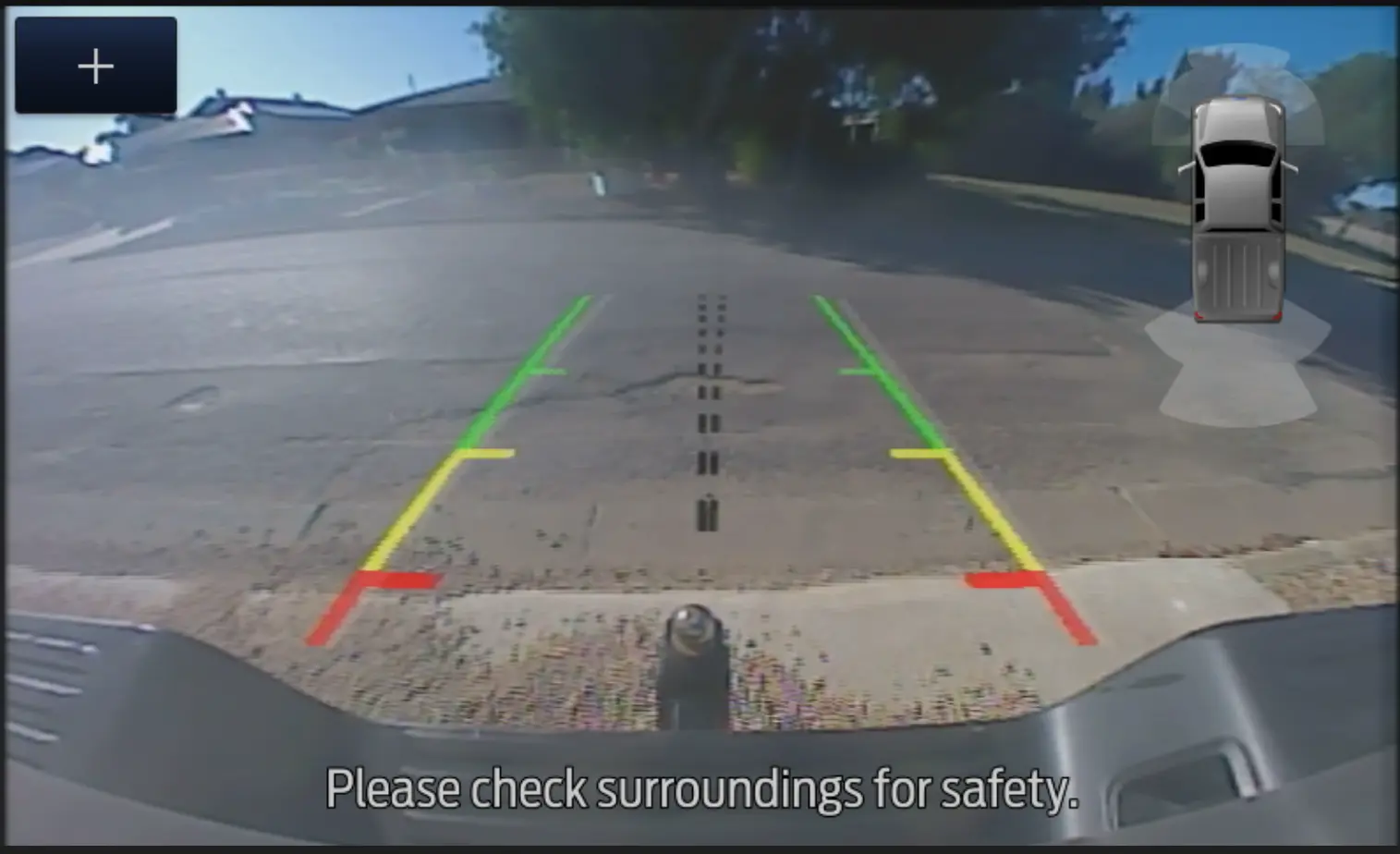
  <li>Rear view camera captures:</li>
</ul>

<div style="display: flex; justify-content: center; margin: 20px 0;">
  <img src="/assets/images/blog_images/2026-02-02-privacy-demonstration-ford-ranger-factory-reset-hu/015_001_rear-camera-01.webp" alt="Rear View Camera - Screenshot" style="max-width: 500px; width: 50%; height: auto; border: 1px solid #333; background-color: #DADADA; border-radius: 4px;" />
</div>

<div style="display: flex; justify-content: center; margin: 20px 0;">
  <img src="/assets/images/blog_images/2026-02-02-privacy-demonstration-ford-ranger-factory-reset-hu/015_002_rear-camera-02.webp" alt="Rear View Camera - Screenshot" style="max-width: 500px; width: 50%; height: auto; border: 1px solid #333; background-color: #DADADA; border-radius: 4px;" />
</div>

<ul>
  <li>A screen image displaying the primary owner’s phone actively connecting to the head unit:</li>
</ul>

<div style="display: flex; justify-content: center; margin: 20px 0;">
  <img src="/assets/images/blog_images/2026-02-02-privacy-demonstration-ford-ranger-factory-reset-hu/015_003_phone-connect.webp" alt="Connecting Phone - Screenshot" style="max-width: 500px; width: 50%; height: auto; border: 1px solid #333; background-color: #DADADA; border-radius: 4px;" />
</div>

<p>Although we have not conducted a full analysis of these files, their presence provides further evidence of the incomplete nature of the reset process.</p>

<hr />

<h2 id="conclusion">Conclusion</h2>

<p>Our findings make one point clear, the SYNC® 3 factory reset falls well short of providing a true data purge.</p>

<p>While it removes the limited set of information visible through the user interface, it leaves behind a substantial and revealing amount of operational logs, location artefacts, device identifiers, and personal data. This residual information is more than enough to reconstruct patterns of behaviour, travel history, and the users’ phone interactions.</p>

<p>For everyday owners, this represents an unexpected (and largely invisible) privacy exposure. For shared, rented, corporate, or fleet vehicles, the implications are even more significant, raising questions about data handling practices, informed consent, and the adequacy of current “reset” mechanisms to protect individuals’ personal information.</p>

<p>For connected vehicles, this also raises additional questions on what is data is transferred to and kept by vehicle manufacturers (and for what purpose). Considering some personal information was found in what might be considered “system logs”, it also begs the question:</p>

<ul>
  <li>Does a vehicle manufacturer consider this information system/vehicle logs? Or is it treated more like personal information?</li>
</ul>

<p>This answer might have implications on how manufacturers treat this information. Without being able to peek into the manufacturer’s data archives, this is not a question that is easily answered.</p>

<p>Ultimately, our analysis highlights a clear gap between what is a reasonable expectation should mean and the actual behaviour of the system.</p>

<hr />

<h2 id="fortify-labs-github-repository">Fortify Labs Github Repository</h2>

<p>All Python scripts generated and used in this post are available in our <a href="https://github.com/fortify-labs-io/fortify-labs-automotive-forensics">Fortify Labs Automotive Forensics Github repository</a> in the <a href="https://github.com/fortify-labs-io/fortify-labs-automotive-forensics/tree/main/ford-sync"><code class="language-plaintext highlighter-rouge">ford-sync</code> folder</a>.</p>

<hr />

<h2 id="disclaimer">Disclaimer</h2>

<p>This analysis is based on our professional experience and represents our best interpretation of the available log entries. It should not be considered definitive evidence for legal proceedings without independent verification of the data and validation of any assumptions made during the analysis.</p>

<p>We have made every attempt to obfuscate any information that could reveal any information that could help identify the previous owner(s) or their devices.</p>

<p>In the interest of brevity, the screenshots included do not reflect all the files or folders that exist on the head unit’s filesystem. We have made every attempt to include the locations and files that we used in our analysis.</p>

<hr />]]></content><author><name>Fortify Labs</name></author><category term="connected vehicles" /><category term="vehicles" /><category term="privacy" /><category term="Ford Ranger" /><category term="data analysis" /><category term="forensics" /><summary type="html"><![CDATA[What Factory Resetting the Head Unit actually deletes, much less than you think...]]></summary></entry><entry><title type="html">Behind the Dashboard: Part 3BGPS, WiFi &amp;amp; Driving Data</title><link href="https://fortifylabs.io/technical/connected%20vehicles/vehicles/privacy/ford%20ranger/data%20analysis/forensics/2026/01/29/privacy-demonstration-ford-ranger-px3-data-deep-dive_B-GPS-Other.html" rel="alternate" type="text/html" title="Behind the Dashboard: Part 3BGPS, WiFi &amp;amp; Driving Data" /><published>2026-01-29T00:00:00+11:00</published><updated>2026-01-29T00:00:00+11:00</updated><id>https://fortifylabs.io/technical/connected%20vehicles/vehicles/privacy/ford%20ranger/data%20analysis/forensics/2026/01/29/privacy-demonstration-ford-ranger-px3-data-deep-dive_B-GPS-Other</id><content type="html" xml:base="https://fortifylabs.io/technical/connected%20vehicles/vehicles/privacy/ford%20ranger/data%20analysis/forensics/2026/01/29/privacy-demonstration-ford-ranger-px3-data-deep-dive_B-GPS-Other.html"><![CDATA[<p>Welcome to the fourth post in our blog series:</p>

<p><strong>Behind the Dashboard: Where the Data Lives – Inside the SYNC® 3 Filesystem – Ford Ranger</strong></p>

<p>In <strong>Part 1</strong>, we kicked things off by walking through the project and our approach to this privacy demonstration. In <strong>Part 2</strong>, we dug into the data extracted from the Ranger’s SYNC® 3 head unit, the one salvaged from a wrecked vehicle.</p>

<p>From there, <strong>Part 3</strong> takes a deeper technical turn, examining how data is stored inside the SYNC® 3 system, where specific information resides, and what we uncovered as we worked through the filesystem layer by layer.</p>

<p>Because <strong>Part 3</strong> contains a substantial amount of material, we divided it into two standalone sections:</p>

<ul>
  <li><strong>3A</strong>: How and where we found <strong>Bluetooth data</strong>.</li>
  <li><strong>3B</strong>: How and where we found <strong>GPS, WiFi and driving data</strong>.</li>
</ul>

<p>You’re now reading <strong>Part 3B</strong>, where we explore the GPS traces, location history, WiFi and driving related records that SYNC® 3 retains: what’s captured, where it’s stored, and how we analysed it.</p>

<hr />

<p>To keep things clear and focused, here’s the series timeline:</p>

<div class="blog-series-timeline">

  <div class="timeline-item">
    <strong><a href="/information/connected%20vehicles/vehicles/privacy/ford%20ranger/2025/12/15/privacy-demonstration-ford-ranger-px3.html">Part 1 — Our Approach to Demonstrating Evidence-Based Privacy Concerns &amp; Data Extraction</a></strong>
    <p>Overview of strategy, vehicle selection, and introduction to SYNC® 3.</p>
  </div>

  <div class="timeline-item">
    <strong><a href="/information/connected%20vehicles/vehicles/privacy/ford%20ranger/data%20analysis/2026/01/11/privacy-demonstration-ford-ranger-px3-data-analysis.html">Part 2 — What We Found Inside SYNC® 3</a></strong>
    <p>A review of the data we extracted and analyzed.</p>
  </div>

  <div class="timeline-item">
    <strong><a href="/technical/connected%20vehicles/vehicles/privacy/ford%20ranger/data%20analysis/forensics/2026/01/19/privacy-demonstration-ford-ranger-px3-data-deep-dive_A-BT.html">Part 3A — Technical Deep Dive into SYNC® 3 Data - Bluetooth</a></strong>
    <p>Where the Bluetooth Device data lives in the file system and the formats used.</p>
  </div>

  <div class="timeline-item current">
    <strong>Part 3B — Technical Deep Dive into SYNC® 3 Data - GPS, WiFi and driving data</strong>
    <p>Where the GPS, WiFi and driving data lives in the file system and the formats used.</p>
  </div>

  <div class="timeline-item">
    <strong><a href="/connected%20vehicles/vehicles/technical/ford%20ranger/forensics/2026/02/11/privacy-demonstration-ford-ranger-power-on-bench.html">Part 4 — Powering SYNC® 3 in the Lab</a></strong>
    <p>How to run the infotainment system outside the vehicle.</p>
  </div>

  <div class="timeline-item">
    <strong>Part 5 — How We Extracted the Data</strong>
    <p>Methods and tools used to access and read the memory chip.</p>
  </div>

  <div class="timeline-item">
    <strong><a href="/connected%20vehicles/vehicles/privacy/ford%20ranger/data%20analysis/forensics/2026/02/02/privacy-demonstration-ford-ranger-factory-reset-hu.html">Addendum: Effects of a Factory Reset</a></strong>
    <p>What does, and more importantly does not, get erased after a "factory reset.</p>
  </div>

</div>

<hr />

<h2 id="a-note-on-our-intended-audience">A Note on Our Intended Audience</h2>

<p>Similar to <a href="/technical/connected%20vehicles/vehicles/privacy/ford%20ranger/data%20analysis/forensics/2026/01/19/privacy-demonstration-ford-ranger-px3-data-deep-dive_A-BT.html"><strong>Part 3A</strong></a>, this post provides technical details such as command‑line examples, raw log output, and the methodology we used to uncover and analyse the information.</p>

<p>Because the <strong>GPS</strong>, <strong>WiFi</strong> and <strong>Driving Data</strong> files examined in this post are highly varied and contain a substantial volume of information, documenting every step in full isn’t practical. Instead, we’ve aimed to include enough detail to clearly convey our reasoning, workflow, and the overall approach we used to reach our results.</p>

<p>If you’d like to discuss any part of this analysis (or if you’re interested in a deeper, step‑by‑step breakdown in a dedicated follow‑up post) please feel free to <a href="/#contact">contact us</a>. We’d love to hear from you!</p>

<hr />

<h2 id="use-of-ai-to-assist-with-analysis-of-logs">Use of AI to assist with analysis of logs</h2>

<p>Although we have years of experience in extracting and analysing data from vehicles to assist law enforcement with their investigations, we deliberately incorporated the use of a popular AI tool (<a href="https://claude.ai">Claude - Anthropic’s AI assistant</a>) to highlight that, even in the hands of relative novices, these tools can assist in processing and analysing the data extracted from a vehicle head unit.</p>

<p>This is important as it shows not only how much data is present and accessible, but also because it raises questions about how OEMs and vehicle manufacturers are making use of this data.</p>

<hr />

<h2 id="files-of-interest---table">Files Of Interest - Table</h2>

<p>The files listed below represent the data sources we examined throughout our analysis. They are presented in the order in which they were discovered.</p>

<h4 id="bluetooth-related-files">Bluetooth Related Files</h4>

<table>
  <thead>
    <tr>
      <th>Filename</th>
      <th>Directory Path</th>
      <th>File Type</th>
      <th>Information Contained</th>
    </tr>
  </thead>
  <tbody>
    <tr>
      <td><code class="language-plaintext highlighter-rouge">BEZEL_DIAGNOSTICS_LOG.txt</code></td>
      <td><code class="language-plaintext highlighter-rouge">./</code></td>
      <td>Text File</td>
      <td>SYNC® 3 System MAC Address</td>
    </tr>
    <tr>
      <td><code class="language-plaintext highlighter-rouge">osapi_01.log*</code></td>
      <td><code class="language-plaintext highlighter-rouge">./fordlogs/BTLogs</code></td>
      <td>Log / Text File</td>
      <td>Connected Device BT MAC Addresses</td>
    </tr>
    <tr>
      <td><code class="language-plaintext highlighter-rouge">devlog_xx_xx_xx_xx_xx_xx.txt</code></td>
      <td><code class="language-plaintext highlighter-rouge">./BT</code></td>
      <td>SQLite 3 Database</td>
      <td>Bluetooth Pairing and Profile Information for Indivdual Phones</td>
    </tr>
    <tr>
      <td><code class="language-plaintext highlighter-rouge">btpersist</code></td>
      <td><code class="language-plaintext highlighter-rouge">./BT</code></td>
      <td>SQLite 3 Database</td>
      <td>Contains information on connected phones such as:<br />- Device Friendly Name<br />- Phone Number<br />- BT MAC Access<br />- Make, Model, SW Version<br />- Device order in <code class="language-plaintext highlighter-rouge">btpbk</code><br />- etc.</td>
    </tr>
    <tr>
      <td><code class="language-plaintext highlighter-rouge">btpbk</code></td>
      <td><code class="language-plaintext highlighter-rouge">./BT</code></td>
      <td>SQLite 3 Database</td>
      <td>Phone Data:<br />- Call Logs<br />- Phonebook Entries</td>
    </tr>
    <tr>
      <td><code class="language-plaintext highlighter-rouge">device.sqlite</code></td>
      <td><code class="language-plaintext highlighter-rouge">./Nuance/NuanceVCAdb</code></td>
      <td>SQLite 3 Database</td>
      <td>Contains:<br />- Connected Device Friendly Names<br />- ID Associations of Connected devices</td>
    </tr>
    <tr>
      <td><code class="language-plaintext highlighter-rouge">PhoneXXXX.sqlite</code></td>
      <td><code class="language-plaintext highlighter-rouge">./Nuance/NuanceVCAdb</code></td>
      <td>SQLite 3 Database</td>
      <td>- XXXX refers to the ID found in the <code class="language-plaintext highlighter-rouge">device.sqlite</code> file.<br />- Contains phonebook entries for that device</td>
    </tr>
    <tr>
      <td><code class="language-plaintext highlighter-rouge">NET_BT_Service.log</code></td>
      <td><code class="language-plaintext highlighter-rouge">./fordlogs/BTLogs</code></td>
      <td>Log / Text File</td>
      <td>Bluetooth Connection Events - Newer File</td>
    </tr>
    <tr>
      <td><code class="language-plaintext highlighter-rouge">NET_BT_Service.log.1</code></td>
      <td><code class="language-plaintext highlighter-rouge">./fordlogs/BTLogs</code></td>
      <td>Log / Text File</td>
      <td>Bluetooth Connection Events - Older File</td>
    </tr>
  </tbody>
</table>

<h4 id="gps-wifi-and-driving-data-related-files">GPS, WiFi and driving data Related Files</h4>

<table>
  <thead>
    <tr>
      <th>Filename</th>
      <th>Directory Path</th>
      <th>File Type</th>
      <th>Information Contained</th>
    </tr>
  </thead>
  <tbody>
    <tr>
      <td><code class="language-plaintext highlighter-rouge">unifiedsearch.log</code></td>
      <td><code class="language-plaintext highlighter-rouge">./NAV</code></td>
      <td>Log / Text File</td>
      <td>Historical record of every system startup including:<br />- Timestamps<br />- GPS location</td>
    </tr>
    <tr>
      <td><code class="language-plaintext highlighter-rouge">pas_debug.log*</code></td>
      <td><code class="language-plaintext highlighter-rouge">./fordlogs</code></td>
      <td>Log / Text File</td>
      <td>Detailed Operational Information including<br />- GPS track info<br />- Detected WiFi networks<br />- Emergency Crash Event Detection Events<br />- etc.</td>
    </tr>
    <tr>
      <td><code class="language-plaintext highlighter-rouge">wifiRemeberedAPList_MY17WIFI_MID</code></td>
      <td><code class="language-plaintext highlighter-rouge">/storage/NPS/</code><br /><code class="language-plaintext highlighter-rouge">UserData/AllUserAppData/</code><br /><code class="language-plaintext highlighter-rouge">__ImmNotfn</code></td>
      <td>Text File</td>
      <td>Connected WiFi details such as:<br />- Network Names<br />- BSSIDs<br />- Passwords<br />- Security information</td>
    </tr>
    <tr>
      <td><code class="language-plaintext highlighter-rouge">00000.zip.(txt)</code></td>
      <td><code class="language-plaintext highlighter-rouge">./ccl</code></td>
      <td>Minified JSON</td>
      <td>Telemetry Data such as:<br />- Fuel Levels<br />- Gear Changes<br />- Speed<br />- Lock/unlock events<br />- Door open/close events</td>
    </tr>
    <tr>
      <td><code class="language-plaintext highlighter-rouge">00001.zip.(txt)</code></td>
      <td><code class="language-plaintext highlighter-rouge">./ccl</code></td>
      <td>Minified JSON</td>
      <td>Telemetry Data such as:<br />- Fuel Levels<br />- Gear Changes<br />- Speed<br />- Lock/unlock events<br />- Door open/close events</td>
    </tr>
  </tbody>
</table>

<hr />

<h2 id="table-of-contents">Table Of Contents</h2>

<ul>
  <li><a href="#a-note-on-our-intended-audience">A Note on Our Intended Audience</a></li>
  <li><a href="#use-of-ai-to-assist-with-analysis-of-logs">Use of AI to assist with analysis of logs</a></li>
  <li><a href="#files-of-interest---table">Files Of Interest - Table</a></li>
  <li><a href="#table-of-contents">Table Of Contents</a></li>
  <li><a href="#whats-inside-the-sync3-filesystem">What’s Inside the SYNC® 3 Filesystem?</a></li>
  <li><a href="#locating-relevant-data">Locating Relevant Data</a>
    <ul>
      <li><a href="#1-where-we-started---gps-data">1. Where we Started - GPS Data</a></li>
      <li><a href="#2-determining-home-and-work-locations">2. Determining Home and Work Locations</a></li>
      <li><a href="#3-extracted-detailed-trip-logs-tracks">3. Extracted Detailed Trip Logs (Tracks)</a></li>
      <li><a href="#4-analysing-wifi-data">4. Analysing WiFi Data</a></li>
      <li><a href="#5-saved-wifi-networks-names-and-passwords">5. Saved WiFi Networks Names and Passwords</a></li>
      <li><a href="#6-other-driving-data---crash-event">6. Other Driving Data - Crash Event</a></li>
      <li><a href="#7-where-driving-sessions-and-vehicle-state-data-lives-ccl">7. Where Driving Sessions and Vehicle State Data Lives (ccl)</a></li>
    </ul>
  </li>
  <li><a href="#conclusion---end-of-part-3b">Conclusion - End of Part 3B</a></li>
  <li><a href="#fortify-labs-github-repository">Fortify Labs Github Repository</a></li>
  <li><a href="#verfication-of-ai-script-results">Verfication of AI Script Results</a></li>
  <li><a href="#next-up">Next Up</a></li>
  <li><a href="#disclaimer">Disclaimer</a></li>
</ul>

<h2 id="whats-inside-the-sync3-filesystem">What’s Inside the SYNC® 3 Filesystem?</h2>

<p>To begin, here’s a visual summary of the type of data we revealed during our analysis:</p>

<div style="display: flex; justify-content: center; margin: 20px 0;">
  <img src="/assets/images/blog_images/2026-01-19-privacy-demonstration-ford-ranger-px3-data-deep-dive/001_001_Overview-of-Data.webp" alt="Found Data - Visual Summary" style="max-width: 500px; width: 50%; height: auto; border: 1px solid #333; background-color: #DADADA; border-radius: 4px;" />
</div>

<hr />

<h2 id="locating-relevant-data">Locating Relevant Data</h2>

<p>This section outlines our methodology and analysis results.</p>

<hr />

<h3 id="1-where-we-started---gps-data">1. Where we Started - GPS Data</h3>

<p>We’ll begin with the GPS related artefacts and walk through how we found and analysed them.</p>

<hr />

<h4 id="approaches-to-find-gps-related-files">Approaches to find GPS related files</h4>

<p>In <strong>Part 3A</strong>, we demonstrated how the Linux <code class="language-plaintext highlighter-rouge">grep</code> utility helped us locate Bluetooth‑related artefacts across the extracted filesystem. We applied the same approach here for GPS data.</p>

<p>There are several ways to search for GPS‑relevant files. Below are examples of the commands we used, starting with broad searches and then narrowing the results:</p>

<ul>
  <li>
    <p>Search for common GPS‑related keywords across the filesystem:</p>

    <ul>
      <li>Command: <code class="language-plaintext highlighter-rouge">grep -rli 'gps\|latitude\|longitude\|coordinates'</code></li>
      <li>Keyword hits in: 52 Files</li>
      <li>Screenshot:</li>
    </ul>
  </li>
</ul>

<div style="display: flex; justify-content: center; margin: 20px 0;">
  <img src="/assets/images/blog_images/2026-01-29-privacy-demonstration-ford-ranger-px3-data-deep-dive_B-GPS-Other/099_051_step-summary_GPS-Search-01.webp" alt="Grep Command Results" style="max-width: 500px; width: 25%; height: auto; border: 1px solid #333; background-color: #DADADA; border-radius: 4px;" />
</div>

<ul>
  <li>
    <p>Search specifically for gps:</p>

    <ul>
      <li>Command: <code class="language-plaintext highlighter-rouge">grep -rli "gps" .</code></li>
      <li>Keyword hits in: 45 Files</li>
      <li>Screenshot:</li>
    </ul>
  </li>
</ul>

<div style="display: flex; justify-content: center; margin: 20px 0;">
  <img src="/assets/images/blog_images/2026-01-29-privacy-demonstration-ford-ranger-px3-data-deep-dive_B-GPS-Other/099_052_step-summary_GPS-Search-02.webp" alt="Grep Command Results" style="max-width: 500px; width: 25%; height: auto; border: 1px solid #333; background-color: #DADADA; border-radius: 4px;" />
</div>

<ul>
  <li>
    <p>Search for decimal‑degree coordinate patterns (e.g., -34.123456, 138.654321):</p>

    <ul>
      <li>Command: <code class="language-plaintext highlighter-rouge">grep -rl -E '\-?[0-9]{1,3}\.[0-9]{5,}.*\-?[0-9]{1,3}\.[0-9]{5,}' .</code></li>
      <li>Keyword hits in: 29 Files</li>
      <li>Screenshot:</li>
    </ul>
  </li>
</ul>

<div style="display: flex; justify-content: center; margin: 20px 0;">
  <img src="/assets/images/blog_images/2026-01-29-privacy-demonstration-ford-ranger-px3-data-deep-dive_B-GPS-Other/099_053_step-summary_GPS-Search-03.webp" alt="Grep Command Results" style="max-width: 500px; width: 25%; height: auto; border: 1px solid #333; background-color: #DADADA; border-radius: 4px;" />
</div>

<hr />

<h4 id="gps-files-chosen-to-review">GPS Files Chosen to Review</h4>

<p>From these results, several files stood out:</p>

<ul>
  <li>The <code class="language-plaintext highlighter-rouge">pas_debug.log*</code> files appeared in large sequential sets, suggesting they might contain a significant amount of information. Since their location (i.e. in the <code class="language-plaintext highlighter-rouge">./fordlogs/</code> directory) was the same as previously found artefacts relating to Bluetooth devices, we earmarked these for further investigation.</li>
  <li>The <code class="language-plaintext highlighter-rouge">unifiedsearch.log</code> was located in the <code class="language-plaintext highlighter-rouge">./NAV</code> directory, indicating that it might contain navigation‑related data.</li>
</ul>

<p>We began with <code class="language-plaintext highlighter-rouge">unifiedsearch.log</code> simply because it was a single file and therefore might be quicker to assess before moving on to the larger datasets.</p>

<hr />

<h3 id="2-determining-home-and-work-locations">2. Determining Home and Work Locations</h3>

<h4 id="characterizing-unifiedsearchlog">Characterizing “unifiedsearch.log”</h4>

<p><code class="language-plaintext highlighter-rouge">unifiedsearch.log</code> was large in size (over 110 MB) suggesting it might contain logs covering extensive activity. When opened, we noticed that the log contained a repeating pattern where each sequence:</p>

<ul>
  <li>Started with the text <code class="language-plaintext highlighter-rouge">System:QNX</code>.</li>
  <li>Contained timestamps (down to the second precision).</li>
  <li>Conained lines that included <strong>GPS coordinates</strong> along with keywords such as <code class="language-plaintext highlighter-rouge">current_location</code> and <code class="language-plaintext highlighter-rouge">category</code>.</li>
  <li>A line containing <code class="language-plaintext highlighter-rouge">rgc=&amp;current_location=-xx.xxxxxx,xxx.xxxxxx&amp;lang=en-GB&amp;Priority=17</code>.</li>
</ul>

<p>Below is a screen shot of one such full entry.</p>

<div style="display: flex; justify-content: center; margin: 20px 0;">
  <img src="/assets/images/blog_images/2026-01-29-privacy-demonstration-ford-ranger-px3-data-deep-dive_B-GPS-Other/099_056_step-summary_unifiedsearch-logentry.webp" alt="unifiedsearch.log - Full Log Entry REDACTED" style="max-width: 500px; width: 50%; height: auto; border: 1px solid #333; background-color: #DADADA; border-radius: 4px;" />
</div>

<p><strong>RGC</strong> here was taken to mean <em>Reverse Geocoding</em>, which is the process of converting raw GPS coordinates into human readable locations, such as street addresses or nearby points of interest (e.g., fuel stations, restaurants, parking areas).</p>

<p>Navigation systems rely on this information to help drivers quickly find relevant nearby services. For example, when your infotainment system detects low fuel, reverse geocoding allows it to identify nearby service stations based on your current coordinates.</p>

<blockquote>
  <p>For more details, see the <a href="https://pro.arcgis.com/en/pro-app/latest/help/data/geocoding/fundamentals-of-reverse-geocoding.htm">Fundamentals of reverse geocoding</a> post from Esri.</p>
</blockquote>

<hr />

<h4 id="determining-file-timeframe">Determining File Timeframe</h4>

<p>The timestamps appeared in sequential order, therefore determining the timeframe covered by the file simply required checking the first entry and scrolling to the end. From this, we found:</p>

<ul>
  <li><strong>First entry:</strong> 3 February 2022</li>
  <li><strong>Last entry:</strong> 10 November 2025</li>
</ul>

<p>Assuming that each log entry started with the keyword <code class="language-plaintext highlighter-rouge">System:QNX</code>, we could estimate the total number of entries by counting it’s occurrences. To do this, we ran:</p>

<ul>
  <li>Command: <code class="language-plaintext highlighter-rouge">grep -c "System:QNX" unifiedsearch.log</code></li>
</ul>

<div style="display: flex; justify-content: center; margin: 20px 0;">
  <img src="/assets/images/blog_images/2026-01-29-privacy-demonstration-ford-ranger-px3-data-deep-dive_B-GPS-Other/099_063_step-summary_unifiedsearch-logentry-EntryCount.webp" alt="unifiedsearch.log - Basic Analysis - No. of Boot Occurances" style="max-width: 500px; width: 40%; height: auto; border: 1px solid #333; background-color: #DADADA; border-radius: 4px;" />
</div>

<p>Based on that output, we can estimate that the log file contained a total of <code class="language-plaintext highlighter-rouge">8,886</code> entries spanning <strong>3 years and 9 months</strong>.</p>

<p>As this Ranger was a 2022 Model Year, the file appears to represent a long term record capturing nearly every system boot sequence, providing almost four years of history showing details on when and where the Ranger was started.</p>

<blockquote>
  <p>Note: This analysis method may not reflect the actual number of full boot cycles, but it does provide a general characteraization of how many log entries the <code class="language-plaintext highlighter-rouge">unifiedsearch.log</code> file contains. Further analysis of this file would be required if an accurate determination of boot sequences was required.</p>
</blockquote>

<hr />

<h4 id="analysing-unifiedsearchlog">Analysing “unifiedsearch.log”</h4>

<p>Based on this finding, this appeared to be a very powerful file. Through further analysis we could reveal a great deal about the previous owner(s) &amp; users, including <strong>home</strong> and <strong>work</strong> locations.</p>

<p>By analyzing this data over a period of time, we theorised that the most frequent startup locations would likely correspond to the vehicle owner’s home and work addresses.</p>

<p>To achieve this, we developed custom scripts to extract only the relevant data (GPS coordinates and timestamps). Because the log contained entries dating back to early 2022, we restricted our analysis to data from 2025. This was to avoid skewing results (in case the vehicle was purchased second-hand or the owner had moved or changed jobs since the vehicle was new).</p>

<p>The steps required to make use of this data were more complex than the earlier types of analysis we performed, where we could simply count entries or search for keywords and patterns. This time, we needed to:</p>

<ul>
  <li>Process a larger volume of raw data,</li>
  <li>Identify and extract only the relevant parts, and</li>
  <li>Analyse those data points in a way that revealed meaningful patterns.</li>
</ul>

<p>Adding to the challenge, analysing GPS points can naturally produce skewed or inconsistent results because:</p>

<ul>
  <li>The vehicle may be parked a few metres differently each time, even though it’s still “at home” or “at work”,</li>
  <li>Consumer grade GPS is only accurate to roughly 5–15 metres, so slight shifts are completely normal, and</li>
  <li>Environmental factors such as trees or buildings can all cause small variations in the recorded location.</li>
</ul>

<hr />

<h4 id="creating-unifiedsearchlog-analysis-script">Creating “unifiedsearch.log” Analysis Script</h4>

<p>We used the following prompt in <code class="language-plaintext highlighter-rouge">Claude</code> to create our Python script</p>

<div class="scrollable-block">
<pre>

Write a Python script that:
- parses a log file 
  - where each entry starts with "System:QNX"
  - contains timestamps in the following "YYYY-MM-DD HH:MM:SS"
  - contains Reverse Geocoding as the GPS position such as "rgc=&amp;current_location=-xx.xxxxxx,xxx.xxxxxx&amp;lang=en-GB&amp;Priority=17"
- Considers only entries from 2025 and
  - Summarizes the top 3 locations (based on a radius of 100m)
  - For locations within the radius of 100m, calculate the centre point
- Provide a summary text file that looks like the attached output format
- Save all points (timestamp and original GPS position) from 2025 to an output file called "AI-analysis_unifiedsearch-log.log"
- An example of one log file entry is provided below

Note: Pasted the following in the prompt box:
- an example of the desired output format
- an example log file entry
</pre>
</div>

<blockquote>
  <p>Note: The same prompt can produce different results for different people as AI tools use conversation histories and settings to structure their answers.</p>
</blockquote>

<p>Our AI assistant completed the task and performed the following:</p>

<ul>
  <li>Created a Python script to our specifications.</li>
  <li>Created a <code class="language-plaintext highlighter-rouge">README</code> file that explains what the script does and how.</li>
  <li>Generated test data automatically and ran the created script against it.</li>
  <li>Provided test data results for the:
    <ul>
      <li>Summary text file.</li>
      <li>Output file with extracted timestamps and GPS positions.</li>
    </ul>
  </li>
</ul>

<p>We ran our generated script against the <code class="language-plaintext highlighter-rouge">unifiedsearch.log</code> file and the script successfully generated the output files as instructed. Screenshots of these files can be seen below:</p>

<p>Example of the <code class="language-plaintext highlighter-rouge">AI-analysis_unifiedsearch-log.log</code> output File:</p>

<div style="display: flex; justify-content: center; margin: 20px 0;">
  <img src="/assets/images/blog_images/2026-01-29-privacy-demonstration-ford-ranger-px3-data-deep-dive_B-GPS-Other/099_065_step-summary_unifiedsearch-AI-output-Summary.webp" alt="unifiedsearch.log - AI Analysis Output" style="max-width: 500px; width: 25%; height: auto; border: 1px solid #333; background-color: #DADADA; border-radius: 4px;" />
</div>

<p>Example of the <code class="language-plaintext highlighter-rouge">GPS_Location_Analysis_Report_2025.txt</code> output File:</p>

<div style="display: flex; justify-content: center; margin: 20px 0;">
  <img src="/assets/images/blog_images/2026-01-29-privacy-demonstration-ford-ranger-px3-data-deep-dive_B-GPS-Other/099_066_step-summary_unifiedsearch-AI-output-GPS-Timestamps.webp" alt="unifiedsearch.log - AI Extracted GPS/Timestamps" style="max-width: 500px; width: 25%; height: auto; border: 1px solid #333; background-color: #DADADA; border-radius: 4px;" />
</div>

<blockquote>
  <p>Note: GPS positions have been redacted or randomized in the screenshots above.</p>
</blockquote>

<blockquote>
  <p>Observation: The last recorded visits to all three top locations occurred on the accident date in August 2025, but startup entries continued until 10 November 2025.</p>
</blockquote>

<p>From those output files we could click on the generated Google Maps links and see:</p>

<ul>
  <li><strong>Location #1</strong>: This cluster corresponded to a point immediately outside a business.</li>
</ul>

<blockquote>
  <p>Note: This was confirmed through publicly visible Facebook posts that this business was the correct <strong>workplace of the main user</strong>. The business name also appeared in one of the synced phonebooks.</p>
</blockquote>

<ul>
  <li><strong>Location #2</strong>: This cluster centred directly on the driveway of a residential property. As it accounted for over 28% of all start events in 2025, it is very likely the <strong>owner’s home</strong>.</li>
</ul>

<blockquote>
  <p>Note: This was confirmed through an Open Source search including the driveway address as well as the owner’s surname which uncovered a publicly listed record from a local council in 2017 referring to a shed and carport development application. This document included the land Lot number, street name, and last name of our family, supporting this conclusion.</p>
</blockquote>

<ul>
  <li><strong>Location #3</strong>: While visited less frequently, this point appeared consistently enough to indicate a regular destination (potentially a secondary workplace, school, family member or friend’s residence, or recurring errand location).</li>
</ul>

<hr />

<h4 id="visualizing-the-data">Visualizing the Data</h4>

<p>From here we used <code class="language-plaintext highlighter-rouge">Claude</code> to generate an additional script that enabled us to visualize the GPS point clusters of the three most common locations found in 2025. The script was instructed to:</p>

<ul>
  <li>Ingest all GPS points saved in the previously generated output file (<code class="language-plaintext highlighter-rouge">GPS_Location_Analysis_Report_2025.txt</code>),</li>
  <li>Use the same logic used in the earlier script (<code class="language-plaintext highlighter-rouge">parse_unifiedsearch_log.py</code>) to calculate the three most common locations,</li>
  <li>Identify and group all GPS points within a 100m radius of the three most common locations, and</li>
  <li>Generate a KML file that can be ingested into a mapping program such as Google Maps so we could visualize the data.</li>
</ul>

<p>We used the following AI prompt:</p>

<div class="scrollable-block">
<pre>

Write a Python script that:

- Takes in all the GPS Points from GPS_Location_Analysis_Report_2025.txt
- Use the same logic to calculate the three most common locations from a previous Python script
- Verify that the same number of points found matches the number of points represented in the output file generated from ```parse_unifiedsearch_log.py```, "```AI-analysis_unifiedsearch-log.log```".
- Generate an output KML file of all the points that correspond to those three most common locations that can be ingested in Google Maps.
      
Note: Copy/Pasted the following files into the Claude AI prompt box:
- GPS_Location_Analysis_Report_2025.txt
- AI-analysis_unifiedsearch-log.log
- parse_unifiedsearch_log.py

</pre>
</div>

<blockquote>
  <p>Note: A <em>KML file</em> stores geographic data (such as GPS points and paths) for display in mapping tools.</p>
</blockquote>

<p>When the resulting script was run, it generated a KML file representing the cluster of points (or <em>heat map</em>) that could be imported into Google Maps as well as the following output:</p>

<div style="display: flex; justify-content: center; margin: 20px 0;">
  <img src="/assets/images/blog_images/2026-01-29-privacy-demonstration-ford-ranger-px3-data-deep-dive_B-GPS-Other/099_069_step-summary_unifiedsearch_script-output.webp" alt="unifiedsearch.log - KML Script Output" style="max-width: 500px; width: 35%; height: auto; border: 1px solid #333; background-color: #DADADA; border-radius: 4px;" />
</div>

<p>This <em>heat map</em> provided an overview of all points within the top three clusters, while the summary output above provided the GPS position at the center of each cluster.</p>

<p>For privacy reasons, we are not publishing the actual heat map. Instead, we created an example using randomized coordinates across Sydney. While the locations are fictional, the point density reflects the real data:</p>

<div style="display: flex; justify-content: center; margin: 20px 0;">
  <img src="/assets/images/blog_images/2026-01-29-privacy-demonstration-ford-ranger-px3-data-deep-dive_B-GPS-Other/002_005_randomized-heat-map_top-three-2025.webp" alt="Randomized Heat Map of Top Three Locations" style="max-width: 500px; width: 75%; height: auto; border: 1px solid #333; background-color: #DADADA; border-radius: 4px;" />
</div>

<hr />

<h4 id="other-possible-analysis">Other Possible Analysis</h4>

<p>Alhtough not performed in our analysis, we could have done further anlaysis to determine things such as:</p>

<ul>
  <li>Categorizing vehicle use by time of day or day of week.</li>
  <li>Correlating GPS data with connected phone logs to determine which drivers were associated with specific locations.</li>
  <li>Detecting other frequent locations during different time periods (e.g., early entries showed points near a Ford dealership, likely where the vehicle was originally sold).</li>
  <li>Investigating potential ownership changes by comparing location patterns over time.</li>
</ul>

<hr />

<h3 id="3-extracted-detailed-trip-logs-tracks">3. Extracted Detailed Trip Logs (Tracks)</h3>

<p>Recalling our results from <strong>Step 1</strong>, we had a closer look at the other files we identified as interesting.</p>

<hr />

<h4 id="characterizing-pas_debuglog-files">Characterizing “pas_debug.log*” Files</h4>

<p>We can see from the partial <code class="language-plaintext highlighter-rouge">fordlogs</code> directory listing below that there were a total of 26 <code class="language-plaintext highlighter-rouge">pas_debug.log*</code> files, each distinguished only by the final number in the filename.</p>

<div style="display: flex; justify-content: center; margin: 20px 0;">
  <img src="/assets/images/blog_images/2026-01-29-privacy-demonstration-ford-ranger-px3-data-deep-dive_B-GPS-Other/002_006_fordlogs-folder.webp" alt="fordlogs Folder Contents" style="max-width: 500px; width: 60%; height: auto; border: 1px solid #333; background-color: #DADADA; border-radius: 4px;" />
</div>

<p>Each one of the files was very similar in size (approx. 10 MB). Considering this and the similar names, this appeared to be a series of rotating log files.</p>

<p>Looking inside the files and scrolling through the entries we noticed that each line contained:</p>

<ul>
  <li>A timestamp (down to the second precision).</li>
  <li>A reference to what appeared to be related to specific services or functions, for example:
    <ul>
      <li><code class="language-plaintext highlighter-rouge">BT_Service</code>,</li>
      <li><code class="language-plaintext highlighter-rouge">NET_BT_Service</code>,</li>
      <li><code class="language-plaintext highlighter-rouge">NAV_FRAMEWORK_IF</code>,</li>
      <li><code class="language-plaintext highlighter-rouge">WIFI_MID</code>,</li>
      <li><code class="language-plaintext highlighter-rouge">WiFiHotspotMessageHandler</code>,</li>
      <li><code class="language-plaintext highlighter-rouge">SendGPSCanData</code>,</li>
      <li>etc.</li>
    </ul>
  </li>
  <li>A large variety of log information.</li>
</ul>

<p>Therefore, each <code class="language-plaintext highlighter-rouge">pas_debug.log*</code> file appeared to contain extensive information about SYNC® 3 system operations, including:</p>

<ul>
  <li>Bluetooth services logs.</li>
  <li>Navigation/GPS data.</li>
  <li>Wi-Fi access point details.</li>
  <li>CAN bus communications.</li>
  <li>And more.</li>
</ul>

<p>Below is an example snippet from one of these logs, with a GPS entry highlighted:</p>

<div style="display: flex; justify-content: center; margin: 20px 0;">
  <img src="/assets/images/blog_images/2026-01-29-privacy-demonstration-ford-ranger-px3-data-deep-dive_B-GPS-Other/002_007_pas-debug-snippet.webp" alt="GPS Tracks - pas_debug Log File Snippet" style="max-width: 500px; width: 95%; height: auto; border: 1px solid #333; background-color: #DADADA; border-radius: 4px;" />
</div>

<p>Zooming in on the GPS line of interest:</p>

<div style="display: flex; justify-content: center; margin: 20px 0;">
  <img src="/assets/images/blog_images/2026-01-29-privacy-demonstration-ford-ranger-px3-data-deep-dive_B-GPS-Other/002_008_pas-debug_GPS-Line.webp" alt="GPS Tracks - pas_debug Log File - GPS Line" style="max-width: 500px; width: 95%; height: auto; border: 1px solid #333; background-color: #DADADA; border-radius: 4px;" />
</div>

<p>We observed two types of GPS output lines:</p>

<ul>
  <li>DR (Dead Reckoning): Estimates position based on a previous known location and movement data.</li>
  <li>MM (Map Matching): Adjusts raw GPS or DR positions to the most likely location on a digital road map.</li>
</ul>

<blockquote>
  <p>For more details, see <a href="https://www.u-blox.com/en/technologies/automotive-dead-reckoning-technology">Automotive Dead Reckoning - Ublox</a> and <a href="https://arxiv.org/pdf/1910.13065">A Survey on Map-Matching Algorithms - Paper </a> - [P. Chao, Y. Xu, W. Hua, and X. Zhou, “A Survey on Map‑Matching Algorithms,” arXiv:1910.13635, 2019. [Online]. Available: https://arxiv.org/abs/1910.13635].</p>
</blockquote>

<p>Here again, a script was created to extract these positions and generate separate KML files for DR and MM data.</p>

<p>After we performed a comparison of the two, <strong>MM</strong> positions proved more accurate, as they aligned better with actual road layouts in mapping platforms like Google Maps and Google Earth.</p>

<p>We used the following AI Prompt:</p>

<div class="scrollable-block">
<pre>
Develop a Python script that:
- Searches and assesses all files in a directory that begins with "pas_debug.log*"
- Ensure that a total of 26 files can be seen and opened.
- Look for lines that match the pattern pasted below

11/06/2025 18:04:34.551/248/23/NAV_FRAMEWORK_IF/SendGPSCanData/2187/=[DR Output: <SD2>Lon.d:xxx  
Lon.m:xx.000000 Lon.s:0.xxxxxx Lat.d:-32  lat.m:xx.000000 lat.s:0.xxxxxx alt.Ft:xxx Hd:xx.xxxxxx</SD2>], 
[signal_type:1 SatInView:17], [MM Output: <SD2>Lon:xxxxxxxx.xxxxxx Lat:-xxxxxxx.xxxxxx 
Alt:xxx.000000 Hd:xx.000000</SD2>]

- Extract the timestamp and GPS position (MM position only, not the DR position)
- Save the timestamp and GPS position to an output file called extracted_detailed_GPS_pas-debug.log
</pre>
</div>

<p>We copied the 26 <code class="language-plaintext highlighter-rouge">pas_debug.log*</code> files to a folder and ran the extracted script and observed the following output.</p>

<div style="display: flex; justify-content: center; margin: 20px 0;">
  <img src="/assets/images/blog_images/2026-01-29-privacy-demonstration-ford-ranger-px3-data-deep-dive_B-GPS-Other/099_072_step-summary_script-output_pas-debug_extract-GPS.webp" alt="GPS Track - Track Example" style="max-width: 500px; width: 40%; height: auto; border: 1px solid #333; background-color: #DADADA; border-radius: 4px;" />
</div>

<p>The extracted GPS information could now be examined in the script output file, <code class="language-plaintext highlighter-rouge">extracted_detailed_GPS_pas-debug.log</code></p>

<div style="display: flex; justify-content: center; margin: 20px 0;">
  <img src="/assets/images/blog_images/2026-01-29-privacy-demonstration-ford-ranger-px3-data-deep-dive_B-GPS-Other/099_073_step-summary_script-output_pas-debug_extracted-GPS-only.webp" alt="GPS Track - Track Example" style="max-width: 500px; width: 40%; height: auto; border: 1px solid #333; background-color: #DADADA; border-radius: 4px;" />
</div>

<blockquote>
  <p>Note: The output format of the file above is accurate, however, the timestamps and GPS positions randomized.</p>
</blockquote>

<p>When scrolling through this data, we could see that GPS positions appeared to be taken every second while the Ranger was running. We theorized that if we could look for gaps in the timestamps of 120 seconds (2 mins), and count the next set of GPS points as a seperate trip, this would provide a reasonable estimation that this would represent different trips.</p>

<p>Using <code class="language-plaintext highlighter-rouge">Claude</code> we developed another script that would process this data.</p>

<div class="scrollable-block">
<pre>
Develop a Python script that:
- Opens and evaluates the data in all pas_debug.log.* files 
- Look for lines that match the pattern pasted below

11/06/2025 18:04:34.551/248/23/NAV_FRAMEWORK_IF/SendGPSCanData/2187/=[DR Output: <SD2>Lon.d:xxx  
Lon.m:xx.000000 Lon.s:0.xxxxxx Lat.d:-32  lat.m:xx.000000 lat.s:0.xxxxxx alt.Ft:xxx Hd:xx.xxxxxx</SD2>], 
[signal_type:1 SatInView:17], [MM Output: <SD2>Lon:xxxxxxxx.xxxxxx Lat:-xxxxxxx.xxxxxx 
Alt:xxx.000000 Hd:xx.000000</SD2>]

- Extract the timestamp and GPS position (MM position only, not the DR position)
- Analyses the timestamp information and seperates tracks if there is a difference of 
120 seconds between timestamps
- Exports each track in a different KML file named "output_YYYYMMDD-HHMMSS.kml into 
a subfolder called "gps-tracks_pas-debug".
</pre>
</div>

<hr />

<h4 id="obtaining-gps-track-results">Obtaining GPS Track Results</h4>

<p>After running the generated script we received the following output:</p>

<div style="display: flex; justify-content: center; margin: 20px 0;">
  <img src="/assets/images/blog_images/2026-01-29-privacy-demonstration-ford-ranger-px3-data-deep-dive_B-GPS-Other/099_075_step-summary_script-output_pas-debug_tracks-kml.webp" alt="GPS Track - Track Example" style="max-width: 500px; width: 25%; height: auto; border: 1px solid #333; background-color: #DADADA; border-radius: 4px;" />
</div>

<p>From this script, we were able to obtain:</p>

<ul>
  <li><strong>66 individual trip tracks</strong>.</li>
  <li><strong>44,709 GPS points</strong>.</li>
  <li>Information from a date range of 27 July 2025 to 10 November 2025.</li>
</ul>

<p>The screenshot below demonstrates how a subset of the exported GPS points can be visualised in Google Maps/Google Earth to reconstruct the vehicle’s path.</p>

<div style="display: flex; justify-content: center; margin: 20px 0;">
  <img src="/assets/images/blog_images/2026-01-29-privacy-demonstration-ford-ranger-px3-data-deep-dive_B-GPS-Other/002_009_gps-track-example.webp" alt="GPS Track - Track Example" style="max-width: 500px; width: 75%; height: auto; border: 1px solid #333; background-color: #DADADA; border-radius: 4px;" />
</div>

<blockquote>
  <p>Note: All geographic specifics have been deliberately obfuscated. Start and end points have been removed to avoid revealing any information about the previous owners or their locations.</p>
</blockquote>

<hr />

<h4 id="results-of-gps-track-analysis">Results of GPS Track Analysis</h4>

<p>Using these logs, we were able to determine the date, time, and precise location of the accident that occurred in August of 2025.</p>

<p>After the accident, additional GPS data continued to appear, but with minimal movement. This would be consistent with the vehicle being powered on at repair facilities, tow yards, and eventually the wrecking yard.</p>

<p>As you can see from the track screenshot above, it provides very detailed information about the route taken and gave us a complete picture of the Ranger’s movements. These tracks demonstrate just how much detail modern vehicles record during everyday use.</p>

<hr />

<h4 id="other-possible-analysis-1">Other Possible Analysis</h4>

<p>While we did not analyze further, deeper examination could reveal:</p>

<ul>
  <li>Common destinations and stop points.</li>
  <li>Travel patterns over time.</li>
  <li>Correlation with timestamps to determine routines.</li>
</ul>

<hr />

<p>Next, we’ll shift focus from GPS tracks to <strong>other types of data stored on the head unit</strong> to see what else we can uncover about our owner and the locations the vehicle travelled.</p>

<hr />

<h3 id="4-analysing-wifi-data">4. Analysing WiFi Data</h3>

<p>From the work we did earlier with the <code class="language-plaintext highlighter-rouge">pas_debug.log*</code> file characterization, we noticed that there was also references to <code class="language-plaintext highlighter-rouge">WiFi</code> (as referenced in <strong>Step 3</strong>).</p>

<h4 id="analysis-of-wifi-data">Analysis of WiFi Data</h4>

<p>Continuing our searches through the <code class="language-plaintext highlighter-rouge">pas_debug.log*</code> files, we searched for the keyword <code class="language-plaintext highlighter-rouge">wifi</code> to identify potentially relevant log entries. By focusing on the lines that contained this keyword, and manually examining surrounding entries, we began to form an idea of the system’s behaviour with respect to WiFi.</p>

<p>We noticed several items as we scrolled through the data:</p>

<h5 id="scan-initiation">Scan Initiation</h5>

<p>The text below was seen at the start of the WiFi scans.</p>

<div class="scrollable-block">
<pre>
11/06/2025 17:04:32.386  ScanAccessPoints: SCAN: command_SCAN called - try no 1, scan response = OK
11/06/2025 17:04:32.386  ScanAccessPoints: SCAN: SCAN is done. Querying results
11/06/2025 17:04:32.386  ScanAccessPoints: SCAN: scanCompletEvent wait time = 10
</pre>
</div>

<h5 id="scan-completion">Scan Completion</h5>

<p>The following log entries were seen as part of the WiFi scan cycle.</p>

<div class="scrollable-block">
<pre>
11/06/2025 17:04:35.597  WifiServiceNetworkScanResulthandle: SCAN: scan comeplete event received from wpa_supplicant!!
11/06/2025 17:04:36.395  ScanAccessPoints: SCAN: scanCompletEvent = TRUE
11/06/2025 17:04:36.498  SetScanBuffer: File /tmp/wifi_databkp.txt Opened successfully!!!. Writing data to file!
</pre>
</div>

<blockquote>
  <p>Note: We attempted to find the <code class="language-plaintext highlighter-rouge">/tmp/wifi_databkp.txt</code> file but it was not present in our memory image. As this file was located in the <code class="language-plaintext highlighter-rouge">/tmp</code> directory, it is plausible that this file was routinely deleted or saved in a directory that does not persist across reboots.</p>
</blockquote>

<h5 id="access-points-detected">Access Points Detected</h5>

<p>Below are specific log entries that reference the WiFi Access Points seen by the system.</p>

<blockquote>
  <p>Note: The BSSID (WiFi router’s MAC address) and SSID (WiFi network name) have been redacted for privacy.</p>
</blockquote>

<div class="scrollable-block">
<pre>
11/06/2025 17:04:36.502  GetBssid: Extracted BSSID = 04:42:1a:xx:xx:xx
11/06/2025 17:04:36.502  populate_ap_info: SSID: REDACTED_SSID ; Signal Strength: 2

11/06/2025 17:04:36.502  GetBssid: Extracted BSSID = 36:60:f9:xx:xx:xx
11/06/2025 17:04:36.502  populate_ap_info: SSID: REDACTED_SSID ; Signal Strength: 2
</pre>
</div>

<h5 id="tying-wifi-aps-to-location">Tying WiFi APs to Location</h5>

<p>To associate the detected WiFi networks with specific locations, we examined the log entries immediately before and after each WiFi network detection cycle described above. We reasoned that if the system recorded it’s GPS locations within a few seconds of detecting the WiFi access points, we could reliably infer where the vehicle was when it detected the WiFi Networks.</p>

<p>This approach would allow us to narrow down which Wi‑Fi networks or devices were physically located near the previously identified Home and Work locations.</p>

<p>By searching for the keyword <code class="language-plaintext highlighter-rouge">gps</code> in the log file, we found the same type of log message we saw in <strong>Step 3</strong> (seen below). We also saw that the GPS position was recorded less a second from when the WiFi scan took place. This strongly suggested that the detected WiFi neworks could be tied to specific locations.</p>

<div class="scrollable-block">
<pre>
11/06/2025 17:04:36.912/2702/23/NAV_FRAMEWORK_IF/SendGPSCanData/2187/=[DR Output: <SD2>Lon.d:xxx  Lon.m:xx.xxxxxx Lon.s:x.xxxxxx Lat.d:-xx  lat.m:xx.xxxxxx lat.s:x.xxxxxx alt.Ft:xx Hd:xxx.xxxxxx</SD2>], [signal_type:2 SatInView:20], [MM Output: <SD2>Lon:xxxxxxxx.xxxxxx Lat:-xxxxxxx.xxxxxx Alt:xx.xxxxxx Hd:xxx.xxxxxx</SD2>]
</pre>
</div>

<h5 id="script-to-find-wifi-at-work-and-home">Script to Find WiFi at Work and Home</h5>

<p>Since we knew the GPS coordinates of the <strong>Home</strong> and <strong>Work</strong> locations, we now had enough knowledge of what to look for within the <code class="language-plaintext highlighter-rouge">pas_Debug.log*</code> files to generate a scipt that would search the files and tie specific WiFi Networks to our locations of interest.</p>

<div class="scrollable-block">
<pre>
Develop a Python script that:
- Takes in GPS Coordinates from the user in the following format [xxx.xxxxxx, xxx.xxxxxx] (i.e. lat and long coordinates)
- Opens and evaluates the data in all pas_debug.log.* files located in the current directory
- Look for lines that match the patterns pasted below

11/06/2025 17:04:36.502  GetBssid: Extracted BSSID = xx:xx:xx:xx:xx:xx
11/06/2025 17:04:36.502  populate_ap_info: SSID: REDACTED_SSID ; Signal Strength: 2

- Extract the timestamp, BSSID, and SSID.
- Search the log file entries up to 2 seconds before and 2 seconds after the patterns containing "GetBssid: Extracted BSSID"
- Search for lines that match the following pattern that are within that 4 second window of the "GetBssid: Extracted BSSID" line:

11/06/2025 17:04:36.912/2702/23/NAV_FRAMEWORK_IF/SendGPSCanData/2187/=[DR Output: <SD2>Lon.d:xxx  Lon.m:xx.xxxxxx Lon.s:x.xxxxxx Lat.d:-xx  lat.m:xx.xxxxxx lat.s:x.xxxxxx alt.Ft:xx Hd:xxx.xxxxxx</SD2>], [signal_type:2 SatInView:20], [MM Output: <SD2>Lon:xxxxxxxx.xxxxxx Lat:-xxxxxxx.xxxxxx Alt:xx.xxxxxx Hd:xxx.xxxxxx</SD2>]

- Extract the GPS position (MM position only, not the DR position)
- If the GPS position is within 50 meters of the user entered GPS position, save the Timestamp, GPS position, BSSID, SSID, WiFi signal strength, distance between user provided and logged GPS position, to an output file of the user's choosing.
- In the summary output include:
  - Number of pas_debug.log* files found and analyzed
  - Total number of unique WiFi Networks found
  - Total number of WiFi Networks found within 50 meters of the user entered position
- The python script should be called as follows, "python3 match_wifi_to_GPS_location.py -g [xxx.xxxxxx, xxx.xxxxxx] -o outputfile.log
</pre>
</div>

<h5 id="finding-wifi-at-work">Finding WiFi at Work</h5>

<p>After running the generated script we obtained the following output:</p>

<div style="display: flex; justify-content: center; margin: 20px 0;">
  <img src="/assets/images/blog_images/2026-01-29-privacy-demonstration-ford-ranger-px3-data-deep-dive_B-GPS-Other/099_077_step-summary_WiFi-Location-Script-Output.webp" alt="WiFi Tied to Work Location - Output" style="max-width: 500px; width: 50%; height: auto; border: 1px solid #333; background-color: #DADADA; border-radius: 4px;" />
</div>

<p>And if we examine the output file of this script we see results that include:</p>

<div style="display: flex; justify-content: center; margin: 20px 0;">
  <img src="/assets/images/blog_images/2026-01-29-privacy-demonstration-ford-ranger-px3-data-deep-dive_B-GPS-Other/099_078_step-summary_WiFi-Location-Script-results.webp" alt="WiFi Tied to Work Location - Results" style="max-width: 500px; width: 35%; height: auto; border: 1px solid #333; background-color: #DADADA; border-radius: 4px;" />
</div>

<hr />

<p>With those results we could now begin to make an exucated guess on which networks might belong to the work business and can also determine that there are likely WiFi based security cameras (i.e. ARLO security cameras) in the vicinity.</p>

<h5 id="finding-wifi-at-home">Finding WiFi at Home</h5>

<p>As we did with the <strong>Work</strong> location, we re-ran the script with the <strong>Home</strong>’s GPS coordinates and obtained results that included the following:</p>

<div style="display: flex; justify-content: center; margin: 20px 0;">
  <img src="/assets/images/blog_images/2026-01-29-privacy-demonstration-ford-ranger-px3-data-deep-dive_B-GPS-Other/099_079_step-summary_WiFi-Location-Script-results-home.webp" alt="WiFi Tied to Home Location - Results" style="max-width: 500px; width: 35%; height: auto; border: 1px solid #333; background-color: #DADADA; border-radius: 4px;" />
</div>

<p>While confirming the exact home WiFi network would require further analysis or on-site verification, our testing showed that if the Ranger had connected to any of these networks, the infotainment system would store the SSID and password in plain text. We’ll cover that in the next section.</p>

<hr />

<h3 id="5-saved-wifi-networks-names-and-passwords">5. Saved WiFi Networks Names and Passwords</h3>

<p>Although we found no evidence that the Ranger’s SYNC® 3 system had previously connected to WiFi networks, we conducted a test to see what data would be stored if it had.</p>

<p>To do this, we booted the Ranger’s head unit and connected it to two separate WiFi networks requiring passwords. After confirming successful connections, we re-imaged the device’s memory and searched for files containing the network names used in the test.</p>

<p>We successfully located:</p>

<ul>
  <li>Both WiFi network names.</li>
  <li>Passwords stored in plain text.</li>
  <li>Security methods used by the networks.</li>
  <li>The BSSID (MAC addresses) of the WiFi routers.</li>
</ul>

<p>The information was found in:</p>

<ul>
  <li>Folder: <code class="language-plaintext highlighter-rouge">/storage/NPS/UserData/AllUserAppData/__ImmNotfn</code></li>
  <li>Filename: <code class="language-plaintext highlighter-rouge">wifiRemeberedAPList_MY17WIFI_MID</code></li>
</ul>

<div style="display: flex; justify-content: center; margin: 20px 0;">
  <img src="/assets/images/blog_images/2026-01-29-privacy-demonstration-ford-ranger-px3-data-deep-dive_B-GPS-Other/002_017_wifi-passwords-file.webp" alt="WiFi Passwords - File Location" style="max-width: 500px; width: 50%; height: auto; border: 1px solid #333; background-color: #DADADA; border-radius: 4px;" />
</div>

<p>Opening the file reveals raw contents:</p>

<div style="display: flex; justify-content: center; margin: 20px 0;">
  <img src="/assets/images/blog_images/2026-01-29-privacy-demonstration-ford-ranger-px3-data-deep-dive_B-GPS-Other/002_018_wifi-passwords-raw-content.webp" alt="WiFi Passwords - File - Raw Contents" style="max-width: 500px; width: 40%; height: auto; border: 1px solid #333; background-color: #DADADA; border-radius: 4px;" />
</div>

<p>Extracting the text provides a clearer view of the stored details:</p>

<div style="display: flex; justify-content: center; margin: 20px 0;">
  <img src="/assets/images/blog_images/2026-01-29-privacy-demonstration-ford-ranger-px3-data-deep-dive_B-GPS-Other/002_019_wifi-passwords-extracted-text.webp" alt="WiFi Passwords - File - Extracted Text" style="max-width: 500px; width: 50%; height: auto; border: 1px solid #333; background-color: #DADADA; border-radius: 4px;" />
</div>

<hr />

<h3 id="6-other-driving-data---crash-event">6. Other Driving Data - Crash Event</h3>

<p>Moving on from WiFi data, we next looked if the logs contained any other driving related data. Knowing that the vehicle had been in an accident in early August 2025, we return to using <code class="language-plaintext highlighter-rouge">grep</code> to try and find relevant data.</p>

<p>We started by casting a wide net, searching for the word “crash”. This resulted in hits across 53 files. As we reviewed the results we saw references to the <code class="language-plaintext highlighter-rouge">pas_debug.log*</code> files and as we already knew these files contained a great deal of information, we focused our attention on them.</p>

<p>As we knew the timestamp pattern in these files and knew the exact date and approximate time of the crash (from <strong>Step 3</strong>), we honed the search to look for the word “crash” that was on the same line as the date and starting hour of where we saw the crash.</p>

<ul>
  <li>Command used:</li>
</ul>

<div class="scrollable-block">
<pre>
grep -i "crash" pas_debug.log* | grep "08/xx/2025 xx"
</pre>
</div>

<p>We now had 153 lines to review. As we reviewed these lines we continued to try and narrow our search results to try and find a unique line that might indicate that the system detected a crash. Our next search included the word emergency:</p>

<ul>
  <li>Command used:</li>
</ul>

<div class="scrollable-block">
<pre>
grep -i "emergency" pas_debug.log* | grep "08/01/2025 17" | grep -i "crash"
</pre>
</div>

<p>This produced results of what we were looking for:</p>

<div style="display: flex; justify-content: center; margin: 20px 0;">
  <img src="/assets/images/blog_images/2026-01-29-privacy-demonstration-ford-ranger-px3-data-deep-dive_B-GPS-Other/099_076_step-summary_crash-event-detection.webp" alt="grep search - Emergency Events" style="max-width: 500px; width: 75%; height: auto; border: 1px solid #333; background-color: #DADADA; border-radius: 4px;" />
</div>

<p>If we focus on the the second line in the results above, we can see that the <code class="language-plaintext highlighter-rouge">EmergencyService</code> logged <code class="language-plaintext highlighter-rouge">Emergency crash event received</code> in the <code class="language-plaintext highlighter-rouge">pas_debug.log.5</code> file.</p>

<p>To determine if this was actually the crash event we ran a <code class="language-plaintext highlighter-rouge">grep</code> search across the file system to look speficially for <code class="language-plaintext highlighter-rouge">Emergency crash event received</code>.  Only a single instance of this message was found and as such could therefore be confident that this was the actual crash event that was detected by the vehicle.</p>

<h4 id="emergency-service-receives-crash-event">Emergency Service Receives Crash Event</h4>

<p>Extracting this log event, we see From the about we could now see the Emergency Service module logging the crash event:</p>

<div class="scrollable-block">
<pre>
08/xx/2025 17:xx:09.931/186/23/EmergencyService/OnRCMStateHandler/11347/=Emergency crash event received. HFP status:1, HMI status:1, crash status:0
</pre>
</div>

<h4 id="location-of-the-crash">Location of the Crash</h4>

<p>We knew from previous work that the system also logged it’s position every second while travelling. Using this, we searched for the same GPS position messages we found previously and found one that logged the vehicle’s position within a half second of the crash event detection.</p>

<div class="scrollable-block">
<pre>
08/xx/2025 17:xx:10.337/1407/23/NAV_FRAMEWORK_IF/SendGPSCanData/2187/=[DR Output: <SD2>Lon.d:xxx  Lon.m:xx.xxxxxx Lon.s:xxx.xxxxxx Lat.d:-xxx  lat.m:xx.xxxxxx lat.s:xx.xxxxxx alt.Ft:xxx Hd:xxx.xxxxxx</SD2>], [signal_type:2 SatInView:22], [MM Output: <SD2>Lon:xxxxxxxxxx.xxxxxx Lat:-xxxxxxxxxx.xxxxxx Alt:xxx.xxxxxx Hd:xxx.xxxxxx</SD2>]
</pre>
</div>

<p>Based on this we were now confident on being able to associate the crash event to a specific time and place.</p>

<hr />

<h3 id="7-where-driving-sessions-and-vehicle-state-data-lives-ccl">7. Where Driving Sessions and Vehicle State Data Lives (ccl)</h3>

<p>As we now had evidence that the vehicle logged events related to Emergency events, we performed an additional search to see if we could locate data realted to vehicle telematics such as speed, gear changes, door opening/closing, lock related functions, etc.</p>

<p>We started with the following keywords:</p>

<div class="scrollable-block">
<pre>
Gear
Transmission
Seatbelt
Fuel
Camera
Speed
Ignition
</pre>
</div>

<p>Based on our search results for <code class="language-plaintext highlighter-rouge">gear</code> we had files to examine further:</p>

<div class="scrollable-block">
<pre>

  $ grep -ril "Gear"
  ccl/00000.zip.(txt)
  ccl/00001.zip.(txt)
  ccl/00002.dat
  ccl/stringed.txt
  fordlogs/pas_debug.log
  ...REDACTED for Brevity...
  logs/9057.ns_perf.log
  logs/sys_slog_info
  slogs/9057.slog
  storage/sdl/policy

</pre>
</div>

<p>The first two files found <code class="language-plaintext highlighter-rouge">ccl/00000.zip.(txt)</code> and <code class="language-plaintext highlighter-rouge">ccl/00001.zip.(txt)</code> were text files that could be opened and examined and contained raw log data resembling:</p>

<div style="display: flex; justify-content: center; margin: 20px 0;">
  <img src="/assets/images/blog_images/2026-01-29-privacy-demonstration-ford-ranger-px3-data-deep-dive_B-GPS-Other/002_020_ccl-logs-raw-snippet.webp" alt="Detailed Vehicle Log Info - Raw Data" style="max-width: 500px; width: 75%; height: auto; border: 1px solid #333; background-color: #DADADA; border-radius: 4px;" />
</div>

<p>As you can see, this raw data is difficult to interpret. To make it more readable, we converted it into a “pretty” JSON structured format using a Python script we created. This allowed us to identify key insights, including:</p>

<ul>
  <li><strong>Timestamps</strong> showing events from <strong>6 - 10 November 2025</strong>.</li>
  <li>A URL that appears to be used by Ford for data uploads.</li>
  <li>References to the Ford’s internal specific identifiers for the vehicle and user.</li>
  <li>Detailed usage events such as:
    <ul>
      <li>Gear changes</li>
      <li>Door open/close events</li>
      <li>Lock/unlock actions</li>
      <li>Ignition state changes</li>
    </ul>
  </li>
</ul>

<blockquote>
  <p>Note: The <code class="language-plaintext highlighter-rouge">convert-to-json_ccl-files.py</code> Python script to convert the (hard to read) “Minified JSON” found in these files to “Pretty” JSON is included in our <a href="https://github.com/fortify-labs-io/fortify-labs-automotive-forensics/tree/main/ford-sync">GitHub repository</a>.</p>
</blockquote>

<p>The following images (redacted) illustrate how structuring the data enabled us to focus on specific events and build a picture of vehicle usage during this timeframe. If the vehicle had connected to WiFi (no evidence suggests this occurred), this data would likely have been transmitted to the manufacturer.</p>

<p>Example Insights:</p>

<ul>
  <li><strong>URL</strong>, <strong>Vehicle and User Identifiers</strong>, Mileage, and Fuel Level:</li>
</ul>

<div style="display: flex; justify-content: center; margin: 20px 0;">
  <img src="/assets/images/blog_images/2026-01-29-privacy-demonstration-ford-ranger-px3-data-deep-dive_B-GPS-Other/002_021_ccl-logs-formatted-head.webp" alt="Detailed Vehicle Log Info - Structured Data - URL and Identifiers" style="max-width: 500px; width: 75%; height: auto; border: 1px solid #333; background-color: #DADADA; border-radius: 4px;" />
</div>

<ul>
  <li>Gear Changes:</li>
</ul>

<div style="display: flex; justify-content: center; margin: 20px 0;">
  <img src="/assets/images/blog_images/2026-01-29-privacy-demonstration-ford-ranger-px3-data-deep-dive_B-GPS-Other/002_022_ccl-logs_example-gear-changes.webp" alt="Detailed Vehicle Log Info - Structured Data - Gear Changes" style="max-width: 500px; width: 50%; height: auto; border: 1px solid #333; background-color: #DADADA; border-radius: 4px;" />
</div>

<ul>
  <li>Ignition Events:</li>
</ul>

<div style="display: flex; justify-content: center; margin: 20px 0;">
  <img src="/assets/images/blog_images/2026-01-29-privacy-demonstration-ford-ranger-px3-data-deep-dive_B-GPS-Other/002_025_ccl-logs_example-ignition-events.webp" alt="Detailed Vehicle Log Info - Structured Data - Ignition Events Changes" style="max-width: 500px; width: 50%; height: auto; border: 1px solid #333; background-color: #DADADA; border-radius: 4px;" />
</div>

<ul>
  <li>Door events:</li>
</ul>

<div style="display: flex; justify-content: center; margin: 20px 0;">
  <img src="/assets/images/blog_images/2026-01-29-privacy-demonstration-ford-ranger-px3-data-deep-dive_B-GPS-Other/002_023_ccl-logs_example-door-events.webp" alt="Detailed Vehicle Log Info - Structured Data - Door Events" style="max-width: 500px; width: 50%; height: auto; border: 1px solid #333; background-color: #DADADA; border-radius: 4px;" />
</div>

<h4 id="creating-a-script-for-ccl-information">Creating a Script for CCL Information</h4>

<p>With this information we instructed <code class="language-plaintext highlighter-rouge">Claude</code> to create a Python script that could parse this information and display it for easier digestion.</p>

<p>The prompt we used was:</p>

<div class="scrollable-block">
<pre>
Create a Python script that:
- Looks for and analyzes files that are specified by the user with the -i switch for input files
- Output filenames should be specified by the user using the -o switch
- It should parse the minified JSON in the file (indicate)
- organize events by boot session
- analyze each session for ignition states, gear changes, door activity, navigation usage, and speed
- Output should be a timeline report in markdown showing what happened during each boot session
</pre>
</div>

<p>We ran the script with each file and obtained a summary of the activity found in each file. An example is included in the tables below:</p>

<h5 id="boot-cycle-no-9049">Boot Cycle No. 9049</h5>

<table>
  <thead>
    <tr>
      <th>Property</th>
      <th>Value</th>
    </tr>
  </thead>
  <tbody>
    <tr>
      <td><strong>Duration:</strong></td>
      <td>~-20 seconds</td>
    </tr>
    <tr>
      <td><strong>Ignition:</strong></td>
      <td>OFF → off</td>
    </tr>
    <tr>
      <td><strong>Activity:</strong></td>
      <td>- Gear changes: P<br />- Total gear changes: 1<br />- Vehicle stationary</td>
    </tr>
    <tr>
      <td><strong>Total Events:</strong></td>
      <td>40</td>
    </tr>
  </tbody>
</table>

<h5 id="boot-cycle-no-9050">Boot Cycle No. 9050</h5>

<table>
  <thead>
    <tr>
      <th>Property</th>
      <th>Value</th>
    </tr>
  </thead>
  <tbody>
    <tr>
      <td><strong>Duration:</strong></td>
      <td>~2 min 39 sec</td>
    </tr>
    <tr>
      <td><strong>Ignition:</strong></td>
      <td>OFF → run → off</td>
    </tr>
    <tr>
      <td><strong>Activity:</strong></td>
      <td>- Driver door: ajar → closed → ajar → closed<br />- Gear changes: P, P→R, R→N, N→D, D→N, N→R, R→P, P→R, R→N, N→D, D→N, N→R, R→P<br />- Maximum speed: 0.56 km/h</td>
    </tr>
    <tr>
      <td><strong>Total Events:</strong></td>
      <td>101</td>
    </tr>
  </tbody>
</table>

<h5 id="boot-cycle-no--9051">Boot Cycle No.  9051</h5>

<table>
  <thead>
    <tr>
      <th>Property</th>
      <th>Value</th>
    </tr>
  </thead>
  <tbody>
    <tr>
      <td><strong>Duration:</strong></td>
      <td>~1 min 20 sec</td>
    </tr>
    <tr>
      <td><strong>Ignition:</strong></td>
      <td>OFF → run → off → start → run → off</td>
    </tr>
    <tr>
      <td><strong>Activity:</strong></td>
      <td>- Driver door: ajar → closed → ajar → closed → ajar → closed<br />- Gear changes: R, R→P, P→R, R→N, N→D, D→N, N→R, R→P<br />- Maximum speed: 0.84 km/h</td>
    </tr>
    <tr>
      <td><strong>Total Events:</strong></td>
      <td>101</td>
    </tr>
  </tbody>
</table>

<blockquote>
  <p>Note: Interpretation of these fields involved informed assumptions based on log structure and behaviour. Additional controlled testing would be required to confirm the exact meaning of every event with full certainty.</p>
</blockquote>

<hr />

<h4 id="a-note-on-telemetry-data-sharing">A Note on Telemetry Data Sharing</h4>

<p>Although this vehicle does not have a cellular modem to allow for “always connected” functionality, it does show how much data modern vehicles could transmit this information back to the manufacturer on a continual basis.</p>

<hr />

<h2 id="conclusion---end-of-part-3b">Conclusion - End of Part 3B</h2>

<p>Our analysis of the SYNC® 3 filesystem has shown that its retention of GPS, WiFi, and driving‑related data is as extensive (and revealing) as the Bluetooth artefacts examined in Part 3A. Across log files, navigation records, WiFi scan data, telematics entries, the Ranger’s head unit preserved a detailed operational history of the vehicle spanning multiple years.</p>

<p>By correlating data from these sources, we were able to reconstruct daily travel patterns, identify home and work locations, map dozens of individual trips, tie WiFi networks to precise locations, and confirm the time and location of an accident with a great deal of precision. The files found in the <code class="language-plaintext highlighter-rouge">ccl</code> folder added detailed vehicle usage capturing ignition cycles, gear changes, door events, and other data that together formed a highly detailed timeline of the Ranger’s use.</p>

<p>Taken together, the GPS, WiFi, and driving‑state artefacts make clear that SYNC® 3 functions as far more than a navigation or entertainment interface. Like the Bluetooth datasets from Part 3A, these logs operate as long term records, silently accumulating behavioural, positional, and operational information that persists long after the vehicle changed hands.</p>

<hr />

<h2 id="fortify-labs-github-repository">Fortify Labs Github Repository</h2>

<p>All Python scripts generated and used in this post are available in our <a href="https://github.com/fortify-labs-io/fortify-labs-automotive-forensics">Fortify Labs Automotive Forensics Github repository</a> in the <a href="https://github.com/fortify-labs-io/fortify-labs-automotive-forensics/tree/main/ford-sync"><code class="language-plaintext highlighter-rouge">ford-sync</code> folder</a>.</p>

<hr />

<h2 id="verfication-of-ai-script-results">Verfication of AI Script Results</h2>

<p>As our analysis of GPS data relied heavily on AI generated scripts, we validated the results at each stage. For example we:</p>

<ul>
  <li>Performed open source searches to verify that the <strong>home</strong> and <strong>work</strong> locations were accurately rendered.</li>
  <li>For each script output, we validated the results against the original log files by cross referencing timestamps and GPS coordinates.</li>
  <li>Where a specific number of records was extracted (for example, the total number of GPS points) we performed independent verification using <code class="language-plaintext highlighter-rouge">grep</code> commands to ensure consistency with the orginal log files.</li>
</ul>

<hr />

<h2 id="next-up">Next Up</h2>

<p>In <strong>Part 5</strong>, we will demonstrate how we took the Ranger’s SYNC® 3 head unit and powered it on outside the vehicle for testing purposes.</p>

<hr />

<h2 id="disclaimer">Disclaimer</h2>

<p>This analysis is based on our professional experience and represents our best interpretation of the available log entries. It should not be considered definitive evidence for legal proceedings without independent verification of the data and validation of any assumptions made during the analysis.</p>

<p>We have made every attempt to obfuscate any information that could reveal any information that could help identify the previous owner(s) or their devices.</p>

<p>In the interest of brevity, the screenshots included do not reflect all the files or folders that exist on the head unit’s filesystem. We have made every attempt to include the locations and files that we used in our analysis.</p>

<hr />]]></content><author><name>Fortify Labs</name></author><category term="technical" /><category term="connected vehicles" /><category term="vehicles" /><category term="privacy" /><category term="Ford Ranger" /><category term="data analysis" /><category term="forensics" /><summary type="html"><![CDATA[Deep Dive on where GPS & WiFi and Driving data is stored.]]></summary></entry><entry><title type="html">Behind the Dashboard: Part 3AWhere Bluetooth Data Lives</title><link href="https://fortifylabs.io/technical/connected%20vehicles/vehicles/privacy/ford%20ranger/data%20analysis/forensics/2026/01/19/privacy-demonstration-ford-ranger-px3-data-deep-dive_A-BT.html" rel="alternate" type="text/html" title="Behind the Dashboard: Part 3AWhere Bluetooth Data Lives" /><published>2026-01-19T00:00:00+11:00</published><updated>2026-01-19T00:00:00+11:00</updated><id>https://fortifylabs.io/technical/connected%20vehicles/vehicles/privacy/ford%20ranger/data%20analysis/forensics/2026/01/19/privacy-demonstration-ford-ranger-px3-data-deep-dive_A-BT</id><content type="html" xml:base="https://fortifylabs.io/technical/connected%20vehicles/vehicles/privacy/ford%20ranger/data%20analysis/forensics/2026/01/19/privacy-demonstration-ford-ranger-px3-data-deep-dive_A-BT.html"><![CDATA[<p>Welcome to the third post in our blog series:</p>

<p><strong>Behind the Dashboard: Where the Data Lives – Inside the SYNC® 3 Filesystem – Ford Ranger</strong></p>

<p>In <strong>Part 1</strong>, we kicked things off by walking through the project and how we approached this privacy demonstration. In <strong>Part 2</strong>, we dug into the data we pulled from the Ranger’s SYNC® 3 head unit — the one we picked up from a wrecked vehicle.</p>

<p>Now, in <strong>Part 3</strong>, we take a technical turn, examining how data is stored inside the SYNC® 3 system, where specific information resides, and what we uncovered as we dug through the filesystem layer by layer.</p>

<p>Because <strong>Part 3</strong> contains a substantial amount of material, we’ve separated it into two sections:</p>

<ul>
  <li><strong>3A</strong>: How and where we found <strong>Bluetooth data</strong>.</li>
  <li><strong>3B</strong>: How and where we found <strong>GPS and driving data</strong>.</li>
</ul>

<p>To keep things clear and focused, here’s the series timeline:</p>

<div class="blog-series-timeline">

  <div class="timeline-item">
    <strong><a href="/information/connected%20vehicles/vehicles/privacy/ford%20ranger/2025/12/15/privacy-demonstration-ford-ranger-px3.html">Part 1 — Our Approach to Demonstrating Evidence-Based Privacy Concerns &amp; Data Extraction</a></strong>
    <p>Overview of strategy, vehicle selection, and introduction to SYNC® 3.</p>
  </div>

  <div class="timeline-item">
    <strong><a href="/information/connected%20vehicles/vehicles/privacy/ford%20ranger/data%20analysis/2026/01/11/privacy-demonstration-ford-ranger-px3-data-analysis.html">Part 2 — What We Found Inside SYNC® 3</a></strong>
    <p>A review of the data we extracted and analyzed.</p>
  </div>

  <div class="timeline-item current">
    <strong>Part 3A — Technical Deep Dive into SYNC® 3 Data - Bluetooth w </strong>
    <p>Where the Bluetooth Device data lives in the file system and the formats used.</p>
  </div>

  <div class="timeline-item">
    <strong><a href="/technical/connected%20vehicles/vehicles/privacy/ford%20ranger/data%20analysis/forensics/2026/01/29/privacy-demonstration-ford-ranger-px3-data-deep-dive_B-GPS-Other.html">Part 3B — Technical Deep Dive into SYNC® 3 Data - GPS and Driving Data</a></strong>
    <p>Where the GPS and Driving data lives in the file system and the formats used.</p>
  </div>

  <div class="timeline-item">
    <strong><a href="/connected%20vehicles/vehicles/technical/ford%20ranger/forensics/2026/02/11/privacy-demonstration-ford-ranger-power-on-bench.html">Part 4 — Powering SYNC® 3 in the Lab</a></strong>
    <p>How to run the infotainment system outside the vehicle.</p>
  </div>

  <div class="timeline-item">
    <strong>Part 5 — How We Extracted the Data</strong>
    <p>Methods and tools used to access and read the memory chip.</p>
  </div>

  <div class="timeline-item">
    <strong><a href="/connected%20vehicles/vehicles/privacy/ford%20ranger/data%20analysis/forensics/2026/02/02/privacy-demonstration-ford-ranger-factory-reset-hu.html">Addendum: Effects of a Factory Reset</a></strong>
    <p>What does, and more importantly does not, get erased after a "factory reset.</p>
  </div>

</div>

<hr />

<h2 id="a-note-on-our-intended-audience">A Note on Our Intended Audience</h2>

<p>Our earlier blog posts were written with a broad audience in mind and intentionally kept accessible for readers without a technical background. This post, however, goes deeper. It includes command‑line examples, raw log output, and details about the automation we used to analyze the information we uncovered. As a result, it’s admittedly more technical.</p>

<p>In keeping with our commitment to an <strong>evidence‑based</strong> approach, the more detailed sections that follow serve as a guide for anyone interested in reproducing our results or understanding the full path we took.</p>

<h2 id="table-of-contents">Table Of Contents</h2>

<ul>
  <li><a href="#a-note-on-our-intended-audience">A Note on Our Intended Audience</a></li>
  <li><a href="#table-of-contents">Table Of Contents</a></li>
  <li><a href="#whats-inside-the-sync3-filesystem">What’s Inside the SYNC® 3 Filesystem?</a></li>
  <li><a href="#first-a-bit-of-background">First, a bit of Background</a></li>
  <li><a href="#how-we-located-the-data">How We Located the Data</a>
    <ul>
      <li><a href="#1-where-we-started">1. Where we Started</a></li>
      <li><a href="#2-head-unit-bluetooth-address-found">2. Head Unit Bluetooth Address Found</a></li>
      <li><a href="#3-found-bluetooth-log-file">3. Found Bluetooth Log File</a></li>
      <li><a href="#4-found-connected-bluetooth-device-mac-addresses">4. Found Connected Bluetooth Device MAC Addresses</a></li>
      <li><a href="#5-five-bluetooth-profile-files-for-five-phones">5. Five Bluetooth Profile Files for Five Phones</a></li>
      <li><a href="#6-seaching-by-first--last-names">6. Seaching by First \&amp; Last Names</a></li>
      <li><a href="#7-looking-at-the-btpersist-database-file">7. Looking at the btpersist Database File</a></li>
      <li><a href="#8-looking-at-the-btpbk-database-file">8. Looking at the btpbk Database File</a></li>
      <li><a href="#9-nuance---sqlite-file-analysis">9. Nuance - SQLite File Analysis</a></li>
      <li><a href="#10-determining-the-owner-using-bluetooth-connection-data">10. Determining the Owner using Bluetooth Connection Data</a></li>
    </ul>
  </li>
  <li><a href="#files-of-interest---table">Files Of Interest - Table</a></li>
  <li><a href="#conclusion---end-of-part-3a">Conclusion - End of Part 3A</a></li>
  <li><a href="#next-up">Next Up</a></li>
  <li><a href="#disclaimer">Disclaimer</a></li>
</ul>

<h2 id="whats-inside-the-sync3-filesystem">What’s Inside the SYNC® 3 Filesystem?</h2>

<p>To get started here’s a visual map of the type of data that was revelead from the analysis:</p>

<div style="display: flex; justify-content: center; margin: 20px 0;">
  <img src="/assets/images/blog_images/2026-01-19-privacy-demonstration-ford-ranger-px3-data-deep-dive/001_001_Overview-of-Data.webp" alt="Found Data - Visual Summary" style="max-width: 500px; width: 50%; height: auto; border: 1px solid #333; background-color: #DADADA; border-radius: 4px;" />
</div>

<p>This post will go into a deeper technical analysis of where this data was found and how we interpreted it to gain a picture of the previous owner and users.</p>

<hr />

<h2 id="first-a-bit-of-background">First, a bit of Background</h2>

<p>Before diving into the technical details, we felt it would be helpful to provide some foundational background information.</p>

<p>The SYNC® 3 infotainment system runs on QNX, and the data partitions from the memory chip image use a QNX filesystem. All the data referenced in this blog post was found on one of these data partitions.</p>

<blockquote>
  <p>Note: Extracting the separate QNX partitions — and identifying which partition was of interest — is not covered in this post. Stay tuned for a future write‑up on that subject.</p>
</blockquote>

<hr />

<h4 id="what-is-qnx">What is QNX?</h4>

<p>QNX is a commercial real-time operating system made by BlackBerry®. It’s designed for systems that must respond quickly and predictably, like cars and industrial devices.</p>

<p>It uses an Operating System that is very small and stable. Items like drivers and networking run separately, which means that if something crashes, it usually doesn’t bring the whole system down.</p>

<p>Why it’s used:</p>

<ul>
  <li>Real-time performance: responses happen when they’re supposed to;</li>
  <li>Reliable: failures are isolated and easier to recover from;</li>
  <li>Unix-like: familiar Unix-like tools and programming interface;</li>
  <li>Common in safety-critical systems like automotive infotainment, driver assistance, industrial controls, medical devices, and aerospace systems.</li>
</ul>

<blockquote>
  <p>Note: For more information, visit the <a href="https://qnx.software/en">QNX website</a>.</p>
</blockquote>

<hr />

<h2 id="how-we-located-the-data">How We Located the Data</h2>

<p>This section provides an overview of the methodology we followed as we navigated the file system to locate the relevant Blueooth related data.</p>

<h3 id="1-where-we-started">1. Where we Started</h3>

<p>Once the data was extracted and made accessible on our analysis systems, we were able to explore it just like any standard file directory — similar to what you’d see in any graphical file explorer:</p>

<div style="display: flex; justify-content: center; margin: 20px 0;">
  <img src="/assets/images/blog_images/2026-01-19-privacy-demonstration-ford-ranger-px3-data-deep-dive/099_001_step-summary-File-Sys.webp" alt="Extracted File System" style="max-width: 500px; width: 50%; height: auto; border: 1px solid #333; background-color: #DADADA; border-radius: 4px;" />
</div>

<hr />

<h3 id="2-head-unit-bluetooth-address-found">2. Head Unit Bluetooth Address Found</h3>

<p>From the root of the extracted filesystem, one file immediately stood out:</p>

<ul>
  <li><code class="language-plaintext highlighter-rouge">BEZEL_DIAGNOSTICS_LOG.txt</code></li>
</ul>

<p>Diagnostic logs often contain internal system details intended for engineers or technicians, including items such as MAC addresses, device identifiers, error traces, and other hardware‑level information. Inside this file, we quickly located what appeared to be the head unit’s <strong>Bluetooth MAC address</strong>.</p>

<p>This was significant for two main reasons:</p>

<ul>
  <li>Bluetooth was of particular interest because it is the primary method by which users pair their mobile devices with vehicles.</li>
  <li>Discovering this address gave us a highly specific search term we could use to locate related log entries elsewhere across the system.</li>
</ul>

<p>The screenshot below shows a redacted portion of this file:</p>

<div style="display: flex; justify-content: center; margin: 20px 0;">
  <img src="/assets/images/blog_images/2026-01-19-privacy-demonstration-ford-ranger-px3-data-deep-dive/001_003_BEZEL-File-BT-MAC.webp" alt="Head Unit BT MAC Address" style="max-width: 500px; width: 50%; height: auto; border: 1px solid #333; background-color: #DADADA; border-radius: 4px;" />
</div>

<p>From the MAC address, we could also determine the <strong>Bluetooth chipset manufacturer</strong>. The first three bytes of a MAC address — known as the OUI (Organizationally Unique Identifier) — correspond to a specific vendor. In this case, the OUI belongs to Texas Instruments (TI), indicating that the SYNC® 3 unit uses a TI Bluetooth chipset.</p>

<p>Below is the matching entry from the IEEE standards website (<a href="https://standards-oui.ieee.org/">https://standards-oui.ieee.org/</a>):</p>

<div style="display: flex; justify-content: center; margin: 20px 0;">
  <img src="/assets/images/blog_images/2026-01-19-privacy-demonstration-ford-ranger-px3-data-deep-dive/001_004_BEZEL-File-BT-MAC_IEEE-MAC-OUI.webp" alt="IEEE Standards Website - OUI for Texas Instruments" style="max-width: 500px; width: 50%; height: auto; border: 1px solid #333; background-color: #DADADA; border-radius: 4px;" />
</div>

<blockquote>
  <p>Note: The detailed connection logs and device metadata we recovered were almost certainly generated by the SYNC® 3 software rather than the TI chipset itself. However, identifying the Texas Instruments Bluetooth chipset gives useful context as it could reveal the chip’s native capabilities, and point us toward the right technical resources if deeper, hardware‑level analysis is ever required.</p>
</blockquote>

<hr />

<h3 id="3-found-bluetooth-log-file">3. Found Bluetooth Log File</h3>

<p>Armed with the head unit’s Bluetooth MAC address, we used it as a search term to find all related occurrences across the partition.</p>

<ul>
  <li>Using the Linux <code class="language-plaintext highlighter-rouge">grep</code> utility, we recursively searched all directories and files:
    <ul>
      <li>Command: <code class="language-plaintext highlighter-rouge">$ grep -rni "cc:33:31:xx:xx:xx"</code></li>
    </ul>
  </li>
</ul>

<p>This search returned <strong>27 files</strong> containing references to the head unit’s Bluetooth address.</p>

<div style="display: flex; justify-content: center; margin: 20px 0;">
  <img src="/assets/images/blog_images/2026-01-19-privacy-demonstration-ford-ranger-px3-data-deep-dive/099_002_step-summary_grep-sys-mac_results.webp" alt="grep Results" style="max-width: 500px; width: 25%; height: auto; border: 1px solid #333; background-color: #DADADA; border-radius: 4px;" />
</div>

<p>A quick scan of the results revealed several log files in the <code class="language-plaintext highlighter-rouge">./fordlogs/BTLogs</code> directory.</p>

<div style="display: flex; justify-content: center; margin: 20px 0;">
  <img src="/assets/images/blog_images/2026-01-19-privacy-demonstration-ford-ranger-px3-data-deep-dive/099_002_step-summary_grep-sys-mac.webp" alt="First Bluetooth Log File - osapi_01.log" style="max-width: 500px; width: 25%; height: auto; border: 1px solid #333; background-color: #DADADA; border-radius: 4px;" />
</div>

<p>Given that the folder name appeared to reference <strong>Ford’s Bluetooth logs</strong>, we began examining the files inside it, starting with:</p>

<ul>
  <li><code class="language-plaintext highlighter-rouge">./fordlogs/BTLogs/osapi_01.log</code></li>
</ul>

<h3 id="4-found-connected-bluetooth-device-mac-addresses">4. Found Connected Bluetooth Device MAC Addresses</h3>

<p>The <code class="language-plaintext highlighter-rouge">osapi_01.log</code> file was plain text, allowing us to open and inspect it directly. Once inside, we searched for occurrences of the head unit’s Bluetooth MAC address.</p>

<ul>
  <li>The head unit’s address was located within the log.</li>
  <li>Nearby, we found references to what appeared to be four additional MAC addresses. These were listed alongside the head unit’s address, suggesting they might belong to devices that had previously connected to the system.</li>
</ul>

<p>The screenshot below shows the relevant portion of the log (MAC addresses redacted):</p>

<div style="display: flex; justify-content: center; margin: 20px 0;">
  <img src="/assets/images/blog_images/2026-01-19-privacy-demonstration-ford-ranger-px3-data-deep-dive/099_003_step-summary_other-MACs.webp" alt="Other Possible BT MAC Addresses" style="max-width: 500px; width: 60%; height: auto; border: 1px solid #333; background-color: #DADADA; border-radius: 4px;" />
</div>

<p>These newly discovered MAC addresses gave us several additional search terms to continue our investigation deeper into the file system. Specifically, we identified the following four candidates:</p>

<table>
  <thead>
    <tr>
      <th>No.</th>
      <th>Potential MAC Address</th>
    </tr>
  </thead>
  <tbody>
    <tr>
      <td>1</td>
      <td>44:4A:DB:xx:xx:xx</td>
    </tr>
    <tr>
      <td>2</td>
      <td>88:A4:79:xx:xx:xx</td>
    </tr>
    <tr>
      <td>3</td>
      <td>FC:31:5D:xx:xx:01</td>
    </tr>
    <tr>
      <td>4</td>
      <td>FC:31:5D:xx:xx:02</td>
    </tr>
  </tbody>
</table>

<hr />

<h3 id="5-five-bluetooth-profile-files-for-five-phones">5. Five Bluetooth Profile Files for Five Phones</h3>

<p>With additional MAC addresses now available as search terms, we expanded our search using the first MAC address in our list. As before, we used the Linux <code class="language-plaintext highlighter-rouge">grep</code> utility to recursively search the entire directory structure:</p>

<ul>
  <li>Command:  <code class="language-plaintext highlighter-rouge">$ grep -rni "44:4A:DB:xx:xx:xx"</code></li>
</ul>

<p>This search returned <strong>32 files</strong> containing references to what appeared to be MAC addresses belonging to individual phones previously connected to the system.</p>

<p>A quick review of the results showed numerous log files. One in particular stood out as it contained the Bluetooth MAC address directly in its <strong>filename</strong> — which immediately signaled that it warranted closer inspection.</p>

<div style="display: flex; justify-content: center; margin: 20px 0;">
  <img src="/assets/images/blog_images/2026-01-19-privacy-demonstration-ford-ranger-px3-data-deep-dive/099_004_step-summary_grep-dev-mac.webp" alt="Possible Device Log" style="max-width: 500px; width: 75%; height: auto; border: 1px solid #333; background-color: #DADADA; border-radius: 4px;" />
</div>

<p>Navigating into that folder and listing the files with <code class="language-plaintext highlighter-rouge">$ ls -1</code>, revealed a total of <strong>five files</strong> that used the same naming format:</p>

<div style="display: flex; justify-content: center; margin: 20px 0;">
  <img src="/assets/images/blog_images/2026-01-19-privacy-demonstration-ford-ranger-px3-data-deep-dive/099_005_step-summary_five-dev-log-files.webp" alt="Five Possible Device Log Files" style="max-width: 500px; width: 50%; height: auto; border: 1px solid #333; background-color: #DADADA; border-radius: 4px;" />
</div>

<p>This was promising — each filename contained one of the four MAC addresses we had identified in <strong>Step 4</strong>, plus one additional MAC address. This strongly indicated that these files represented individual Bluetooth‑paired devices.</p>

<p>When we opened these files, the contents confirmed that these logs captured detailed profile information about previously connected phones.</p>

<p>Looking at the <code class="language-plaintext highlighter-rouge">devlog_44_4a_db_xx_xx_xx.txt</code> file, we could see:</p>

<ul>
  <li>The phone’s Bluetooth Address: <code class="language-plaintext highlighter-rouge">REDACTED</code></li>
  <li>The phone Manufacturer: <code class="language-plaintext highlighter-rouge">Apple</code></li>
  <li>The phone Model: <code class="language-plaintext highlighter-rouge">iPhone12,3</code> - Which translates to an <code class="language-plaintext highlighter-rouge">iPhone 11 Pro</code></li>
  <li>The phone number: <code class="language-plaintext highlighter-rouge">REDACTED</code></li>
  <li>The cellular provider: <code class="language-plaintext highlighter-rouge">Telstra</code></li>
  <li>The iPhone’s software version: <code class="language-plaintext highlighter-rouge">Version 18.5 (Build 22F76)</code></li>
  <li>The Device Friendly Name: <code class="language-plaintext highlighter-rouge">Firstname Lastname's iPhone</code></li>
</ul>

<div style="display: flex; justify-content: center; margin: 20px 0;">
  <img src="/assets/images/blog_images/2026-01-19-privacy-demonstration-ford-ranger-px3-data-deep-dive/001_010_BT-Folder_devlog-file-content.webp" alt="BT Folder - devlog file contents" style="max-width: 500px; width: 75%; height: auto; border: 1px solid #333; background-color: #DADADA; border-radius: 4px;" />
</div>

<p>Opening the remaining four files provided additional data about the other devices. Altogether, we now knew:</p>

<ul>
  <li>BT MAC addresses for <strong>five</strong> devices that connected to the head unit.</li>
  <li><strong>Four phone numbers</strong>.</li>
  <li>One <strong>full name</strong>.</li>
  <li>Two <strong>additional first names</strong>.</li>
  <li>Evidence suggesting device upgrades:
    <ul>
      <li>Two of the devices shared the same name and phone number (likely an older device replaced with a new one).</li>
      <li>Two shared the same name but only one included a phone number (possibly an upgrade where the number wasn’t recorded or that the older device was not connected to the cellular network).</li>
    </ul>
  </li>
</ul>

<p>At this stage, we had our first clear connection between raw data and real individuals.</p>

<p>From a data‑analysis perspective, these logs provided new, highly specific identifiers — allowing us to continue searching for additional files containing personal or device-related information.</p>

<h3 id="6-seaching-by-first--last-names">6. Seaching by First &amp; Last Names</h3>

<p>Continuing with our strategy of using targeted search terms, we next searched for the <code class="language-plaintext highlighter-rouge">Device Friendly Name</code> extracted from the <code class="language-plaintext highlighter-rouge">devlog_44_4a_db_xx_xx_xx.txt</code> file.</p>

<ul>
  <li>Command:  <code class="language-plaintext highlighter-rouge">$ grep -rli "Firstname Lastname's iPhone"</code></li>
</ul>

<p>This search returned <strong>152 files</strong> containing references to the exact <code class="language-plaintext highlighter-rouge">Device Friendly Name</code>. Included below is a redacted view of the results (the whole list was too long to include fully):</p>

<div style="display: flex; justify-content: center; margin: 20px 0;">
  <img src="/assets/images/blog_images/2026-01-19-privacy-demonstration-ford-ranger-px3-data-deep-dive/099_006_step-summary_grep-full-name.webp" alt="grep for Firstname Lastname's iPhone" style="max-width: 500px; width: 95%; height: auto; border: 1px solid #333; background-color: #DADADA; border-radius: 4px;" />
</div>

<p>The highlighted file <code class="language-plaintext highlighter-rouge">btpersist</code> was located in the same directory as our Device Log files, and therefore seemed interesting. As it did not have a file extentsion, we used the <code class="language-plaintext highlighter-rouge">file</code> Linux utility to see if we could determine what type of file it was:</p>

<ul>
  <li>Command: <code class="language-plaintext highlighter-rouge">$ file btpersist</code></li>
</ul>

<div style="display: flex; justify-content: center; margin: 20px 0;">
  <img src="/assets/images/blog_images/2026-01-19-privacy-demonstration-ford-ranger-px3-data-deep-dive/099_007_step-summary_file-btpersist.webp" alt="file btpersist output" style="max-width: 500px; width: 95%; height: auto; border: 1px solid #333; background-color: #DADADA; border-radius: 4px;" />
</div>

<p>The command indicated that the file was an <code class="language-plaintext highlighter-rouge">SQLite 3</code> database file, which is extremely common on mobile platforms to store structured data. This provided us with enough information to warrant a closer look.</p>

<hr />

<h3 id="7-looking-at-the-btpersist-database-file">7. Looking at the btpersist Database File</h3>

<p>Being an <code class="language-plaintext highlighter-rouge">SQLite 3</code> database file, we opened it using a tool that displays the data in a graphical interface, making it easier to review and understand.</p>

<p>The database file contained several internal tables, and as we selected each table to view the data, we found one that contained interesting information.</p>

<div style="display: flex; justify-content: center; margin: 20px 0;">
  <img src="/assets/images/blog_images/2026-01-19-privacy-demonstration-ford-ranger-px3-data-deep-dive/001_012_BT-btpersist-conn-devices.webp" alt="btpersist Database File - Device Info" style="max-width: 500px; width: 75%; height: auto; border: 1px solid #333; background-color: #DADADA; border-radius: 4px;" />
</div>

<blockquote>
  <p>Note: All SQLite databases were viewed using DB Browser for SQLite, available free at <a href="https://sqlitebrowser.org/">https://sqlitebrowser.org/</a>.</p>
</blockquote>

<blockquote>
  <p>Note: The screen shot above has personal information REDACTED and the names replaced with the results of the rest of our analysis. How we determined who the Male Owner and Adult Children were is covered throughout the blog series.</p>
</blockquote>

<p>The table below summarises the key details:</p>

<table>
  <thead>
    <tr>
      <th>Item</th>
      <th>Name</th>
      <th>Note</th>
    </tr>
  </thead>
  <tbody>
    <tr>
      <td>Filename</td>
      <td><code class="language-plaintext highlighter-rouge">btpersist</code></td>
      <td> </td>
    </tr>
    <tr>
      <td>Database Table</td>
      <td><code class="language-plaintext highlighter-rouge">PairedDevInfo</code></td>
      <td>Contained similar information associated to the three names found in the Device Log files found in <strong>Step 5</strong></td>
    </tr>
  </tbody>
</table>

<p>Considering we found multiple files referencing phones that connected to the head unit in this folder, we took a step back and had a look at some of the other files in the <code class="language-plaintext highlighter-rouge">./BT</code> folder. A directory listing showed that there was another similarly named file (with no file extension) in the same directory that was larger in size than the <code class="language-plaintext highlighter-rouge">btpersist</code> database file. This made us wonder if we might have another database file to examine.</p>

<ul>
  <li>Command: <code class="language-plaintext highlighter-rouge">./BT$ ls -l</code></li>
</ul>

<div style="display: flex; justify-content: center; margin: 20px 0;">
  <img src="/assets/images/blog_images/2026-01-19-privacy-demonstration-ford-ranger-px3-data-deep-dive/099_008_step-summary_file-btpbk-dir-listing.webp" alt="BT Folder Directory Listing" style="max-width: 500px; width: 75%; height: auto; border: 1px solid #333; background-color: #DADADA; border-radius: 4px;" />
</div>

<p>As we did above, we determined what type of file that <code class="language-plaintext highlighter-rouge">btpbk</code> might be with:</p>

<ul>
  <li>Command: <code class="language-plaintext highlighter-rouge">$ file btbpk</code></li>
</ul>

<div style="display: flex; justify-content: center; margin: 20px 0;">
  <img src="/assets/images/blog_images/2026-01-19-privacy-demonstration-ford-ranger-px3-data-deep-dive/099_009_step-summary_file-btpbk.webp" alt="file btbpk file output" style="max-width: 500px; width: 95%; height: auto; border: 1px solid #333; background-color: #DADADA; border-radius: 4px;" />
</div>

<p>With this we confirmed that another <code class="language-plaintext highlighter-rouge">SQLite 3</code> database file existed in this directory. Next we opened the file.</p>

<hr />

<h3 id="8-looking-at-the-btpbk-database-file">8. Looking at the btpbk Database File</h3>

<p>We opened the <code class="language-plaintext highlighter-rouge">btpbk</code> database using the same <a href="https://sqlitebrowser.org/">DB Browser for SQLite tool</a> from Step 7. Inside, we found dozens of tables, as shown in the screenshots below:</p>

<div style="display: flex; justify-content: center; margin: 20px 0;">
  <img src="/assets/images/blog_images/2026-01-19-privacy-demonstration-ford-ranger-px3-data-deep-dive/099_010_step-summary_file-btpbk-tables1.webp" alt="btpbk DB File - Tables 1" style="max-width: 500px; width: 75%; height: auto; border: 1px solid #333; background-color: #DADADA; border-radius: 4px;" />
</div>

<div style="display: flex; justify-content: center; margin: 20px 0;">
  <img src="/assets/images/blog_images/2026-01-19-privacy-demonstration-ford-ranger-px3-data-deep-dive/099_011_step-summary_file-btpbk-tables2.webp" alt="btpbk DB File - Tables 2" style="max-width: 500px; width: 75%; height: auto; border: 1px solid #333; background-color: #DADADA; border-radius: 4px;" />
</div>

<p>While the database contained numerous tables, most were empty.</p>

<h4 id="understanding-btpbk-table-contents">Understanding <code class="language-plaintext highlighter-rouge">btpbk</code> Table Contents</h4>

<p>Opening each populated table revealed that tables appeared in numeric groups (DialCall3, DialCall4, etc.). The content broke down as follows:</p>

<table>
  <thead>
    <tr>
      <th>Table</th>
      <th>Contents</th>
    </tr>
  </thead>
  <tbody>
    <tr>
      <td><code class="language-plaintext highlighter-rouge">Combined1</code> –&gt; <code class="language-plaintext highlighter-rouge">Combined12</code> (inclusive)</td>
      <td>Combined list of missed, dialed, and received calls (per phone).</td>
    </tr>
    <tr>
      <td><code class="language-plaintext highlighter-rouge">DialCall1</code> –&gt; <code class="language-plaintext highlighter-rouge">DialCall12</code> (inclusive)</td>
      <td>List of dialed called (per phone).</td>
    </tr>
    <tr>
      <td><code class="language-plaintext highlighter-rouge">InCall1</code> –&gt; <code class="language-plaintext highlighter-rouge">InCall12</code> (inclusive)</td>
      <td>List of received calls (per phone).</td>
    </tr>
    <tr>
      <td><code class="language-plaintext highlighter-rouge">MissCall1</code> –&gt; <code class="language-plaintext highlighter-rouge">MissCall12</code> (inclusive)</td>
      <td>List of missed calls (per phone).</td>
    </tr>
    <tr>
      <td><code class="language-plaintext highlighter-rouge">PhoneBook1</code> –&gt; <code class="language-plaintext highlighter-rouge">PhoneBook12</code> (inclusive)</td>
      <td>Phonebook entries (per phone).</td>
    </tr>
  </tbody>
</table>

<p>Only the sets ending in <code class="language-plaintext highlighter-rouge">3</code> and <code class="language-plaintext highlighter-rouge">4</code> contained entries. We theorized that each of these database sets represented data from the same phone.</p>

<p>To validate this, we compared the number of records across the call-log tables:</p>

<ul>
  <li>For each device index, the total number of entries in the <code class="language-plaintext highlighter-rouge">Combined*</code>  table matched the sum of the entries from the <code class="language-plaintext highlighter-rouge">DialCall*</code>, <code class="language-plaintext highlighter-rouge">InCall*</code>, and <code class="language-plaintext highlighter-rouge">MissCall*</code> tables.</li>
  <li>We found one discrepancy in the <code class="language-plaintext highlighter-rouge">Combined4</code> table (57 entries vs. a total of 56 in the three individual call tables), which was explained by a single duplicate entry.</li>
</ul>

<p>We also performed a deeper review of the table contents (not fully detailed here), and in every instance, the records within the individual call log tables (<code class="language-plaintext highlighter-rouge">DialCall*</code>, <code class="language-plaintext highlighter-rouge">InCall*</code> and <code class="language-plaintext highlighter-rouge">MissCall*</code>) matched the entries in the corresponding <code class="language-plaintext highlighter-rouge">Combined*</code> table. This confirmed that the data corresponded to two — and only two — distinct phones.</p>

<p>This cross‑validation confirmed that:</p>

<ul>
  <li>Tables ending in <code class="language-plaintext highlighter-rouge">3</code> belonged to one phone.</li>
  <li>Tables ending in <code class="language-plaintext highlighter-rouge">4</code> belonged to another.</li>
</ul>

<h4 id="linking-each-table-group-to-a-specific-phone">Linking Each Table Group to a Specific Phone</h4>

<p>Our next goal was to map each numeric table set (*3 and *4) to the actual phones we identified in <strong>Step 5</strong>.</p>

<p>The simplest and most reliable indicator came from the <code class="language-plaintext highlighter-rouge">PhoneBook3</code> and <code class="language-plaintext highlighter-rouge">PhoneBook4</code> tables. Each included an entry labelled <code class="language-plaintext highlighter-rouge">My Number</code>.</p>

<p>Here is what that entry looked like:</p>

<div style="display: flex; justify-content: center; margin: 20px 0;">
  <img src="/assets/images/blog_images/2026-01-19-privacy-demonstration-ford-ranger-px3-data-deep-dive/099_012_step-summary_btpbk-phonebook-mynumber.webp" alt="btpbk DB File - Phonebook4 - My Number Entry" style="max-width: 500px; width: 75%; height: auto; border: 1px solid #333; background-color: #DADADA; border-radius: 4px;" />
</div>

<p>By comparing these <code class="language-plaintext highlighter-rouge">My Number</code> values to the <code class="language-plaintext highlighter-rouge">subscriberNum</code> fields found in the <code class="language-plaintext highlighter-rouge">devlog_xx_xx_xx_xx_xx_xx.txt</code> files we examined in <strong>Step 5</strong>, we could definitively associate each table set with a specific phone.</p>

<p>As further confirmation, the ordering of devices in the <code class="language-plaintext highlighter-rouge">btpersist</code> database (shown in <strong>Step 7</strong>) matched the numbering here (3, 4).</p>

<p>We could now confidently associate each group of tables with a specific device:</p>

<table>
  <thead>
    <tr>
      <th>Phone Name</th>
      <th> </th>
    </tr>
  </thead>
  <tbody>
    <tr>
      <td>Child 1</td>
      <td><code class="language-plaintext highlighter-rouge">Combined3</code><br /><code class="language-plaintext highlighter-rouge">DialCall3</code><br /><code class="language-plaintext highlighter-rouge">InCall3</code><br /><code class="language-plaintext highlighter-rouge">MissCall3</code><br /><code class="language-plaintext highlighter-rouge">Phonebook3</code></td>
    </tr>
    <tr>
      <td>Child 2</td>
      <td><code class="language-plaintext highlighter-rouge">Combined4</code><br /><code class="language-plaintext highlighter-rouge">DialCall4</code><br /><code class="language-plaintext highlighter-rouge">InCall4</code><br /><code class="language-plaintext highlighter-rouge">MissCall4</code><br /><code class="language-plaintext highlighter-rouge">Phonebook4</code></td>
    </tr>
  </tbody>
</table>

<h4 id="summary-of-findings-for-each-phone">Summary of Findings for Each Phone</h4>

<p>Below is a summary of the data recovered for each device.</p>

<table>
  <thead>
    <tr>
      <th>Field</th>
      <th>Value</th>
    </tr>
  </thead>
  <tbody>
    <tr>
      <td>Filename</td>
      <td><code class="language-plaintext highlighter-rouge">btbpk</code></td>
    </tr>
    <tr>
      <td>Association</td>
      <td>Child 1</td>
    </tr>
    <tr>
      <td>Number of Call Log Records</td>
      <td>63 (includes Dialed, Received, and Missed)</td>
    </tr>
    <tr>
      <td>Database Table</td>
      <td><code class="language-plaintext highlighter-rouge">Combined3</code></td>
    </tr>
  </tbody>
</table>

<p>Screenshot:</p>

<div style="display: flex; justify-content: center; margin: 20px 0;">
  <img src="/assets/images/blog_images/2026-01-19-privacy-demonstration-ford-ranger-px3-data-deep-dive/001_013_BT-btpbk-call-logs-child1.webp" alt="btbpk - Child 1 - Call Log Records" style="max-width: 500px; width: 75%; height: auto; border: 1px solid #333; background-color: #DADADA; border-radius: 4px;" />
</div>

<hr />

<table>
  <thead>
    <tr>
      <th>Field</th>
      <th>Value</th>
    </tr>
  </thead>
  <tbody>
    <tr>
      <td>Filename</td>
      <td><code class="language-plaintext highlighter-rouge">btbpk</code></td>
    </tr>
    <tr>
      <td>Association</td>
      <td>Child 1</td>
    </tr>
    <tr>
      <td>Number of Phonebook entries</td>
      <td>48 (includes own phone number)</td>
    </tr>
    <tr>
      <td>Database Table</td>
      <td><code class="language-plaintext highlighter-rouge">PhoneBook3</code></td>
    </tr>
  </tbody>
</table>

<p>Screenshot:</p>

<div style="display: flex; justify-content: center; margin: 20px 0;">
  <img src="/assets/images/blog_images/2026-01-19-privacy-demonstration-ford-ranger-px3-data-deep-dive/001_014_BT-btpbk-phonebook-child1.webp" alt="btbpk - Child 1 - Phonebook Entries" style="max-width: 500px; width: 75%; height: auto; border: 1px solid #333; background-color: #DADADA; border-radius: 4px;" />
</div>

<hr />

<table>
  <thead>
    <tr>
      <th>Field</th>
      <th>Value</th>
    </tr>
  </thead>
  <tbody>
    <tr>
      <td>Filename</td>
      <td><code class="language-plaintext highlighter-rouge">btbpk</code></td>
    </tr>
    <tr>
      <td>Association</td>
      <td>Child 2</td>
    </tr>
    <tr>
      <td>Number of Call Log Records</td>
      <td>56 (includes Dialed, Received, and Missed) <br />Note that there was a total of 57 entries, but one was found to be a duplicate entry, resulting in an actual total of 56.</td>
    </tr>
    <tr>
      <td>Database Table</td>
      <td><code class="language-plaintext highlighter-rouge">Combined4</code></td>
    </tr>
  </tbody>
</table>

<p>Screenshot:</p>

<div style="display: flex; justify-content: center; margin: 20px 0;">
  <img src="/assets/images/blog_images/2026-01-19-privacy-demonstration-ford-ranger-px3-data-deep-dive/001_015_BT-btpbk-call-logs-child2.webp" alt="btbpk - Child 2 - Call Log Records" style="max-width: 500px; width: 75%; height: auto; border: 1px solid #333; background-color: #DADADA; border-radius: 4px;" />
</div>

<hr />

<table>
  <thead>
    <tr>
      <th>Field</th>
      <th>Value</th>
    </tr>
  </thead>
  <tbody>
    <tr>
      <td>Filename</td>
      <td><code class="language-plaintext highlighter-rouge">btbpk</code></td>
    </tr>
    <tr>
      <td>Association</td>
      <td>Child 2</td>
    </tr>
    <tr>
      <td>Number of Phonebook entries</td>
      <td>106 (includes own phone number)</td>
    </tr>
    <tr>
      <td>Database Table</td>
      <td><code class="language-plaintext highlighter-rouge">PhoneBook4</code></td>
    </tr>
  </tbody>
</table>

<p>Screenshot:</p>

<div style="display: flex; justify-content: center; margin: 20px 0;">
  <img src="/assets/images/blog_images/2026-01-19-privacy-demonstration-ford-ranger-px3-data-deep-dive/001_016_BT-btpbk-phonebook-child2.webp" alt="btbpk - Child 2 - Phonebook Entries" style="max-width: 500px; width: 75%; height: auto; border: 1px solid #333; background-color: #DADADA; border-radius: 4px;" />
</div>

<hr />

<p>This completed our analysis of the <code class="language-plaintext highlighter-rouge">btpbk</code> database and solidified the relationships between the head unit’s internal databases, the device logs, and the individuals whose phones had been paired with the system.</p>

<p>With the success in analyzing <code class="language-plaintext highlighter-rouge">SQLite</code> databases, we returned to the search results from <strong>Step 6</strong> (where the device name “Firstname Lastname’s iPhone” appeared in several files).</p>

<p>We examine these findings in the next step.</p>

<hr />

<h3 id="9-nuance---sqlite-file-analysis">9. Nuance - SQLite File Analysis</h3>

<p>Let’s recall the search results from <strong>Step 6</strong>. Below are some of the files that contained hits to “Firstname Lastname’s iPhone”:</p>

<div style="display: flex; justify-content: center; margin: 20px 0;">
  <img src="/assets/images/blog_images/2026-01-19-privacy-demonstration-ford-ranger-px3-data-deep-dive/099_013_step-summary_search-FirstnameLastname-nuance.webp" alt="grep for Firstname Lastname's iPhone - Nuance Folder" style="max-width: 500px; width: 75%; height: auto; border: 1px solid #333; background-color: #DADADA; border-radius: 4px;" />
</div>

<p>Several files with <code class="language-plaintext highlighter-rouge">.sqlite</code> and <code class="language-plaintext highlighter-rouge">.sqlite3</code> extensions appeared. We began with <code class="language-plaintext highlighter-rouge">device.sqlite</code> in the <code class="language-plaintext highlighter-rouge">./Nuance/NuanceVCAdb</code> directory.</p>

<h4 id="what-is-nuance">What is Nuance?</h4>

<p>We investigated what <em>Nuance</em> might refer to in the context of Ford or their infotainment units. Search results returned references to “Nuance Communications”, which have provided speech‑recognition and text‑to‑speech services used in Ford SYNC® 3 infotainment systems.</p>

<p>Relevant references include:</p>

<ul>
  <li><a href="https://media.ford.com/content/fordmedia/feu/de/de/news/2017/02/21/your-car-could-become-virtual-personal-assistant--and-even-know-.html">Ford’s Media Centre</a>: Describes how SYNC’s speech‑recognition system works and is continually improved through language models and decoder software; does not mention Nuance.</li>
  <li><a href="https://www.sae.org/articles/fords-sync-3-way-sae-ma-01068">SAE International (Formerly “Society of Automotive Engineers”)</a>: Confirms that SYNC 3’s voice‑recognition was upgraded by Nuance, enabling more natural, conversational commands</li>
  <li><a href="https://www.nuance.com/en-au/index.html">Nuance Communication’s</a> official website.</li>
</ul>

<h4 id="nuance-folder-contents">Nuance Folder Contents</h4>

<p>Nagivating to the <code class="language-plaintext highlighter-rouge">./Nuance/NuanceVCAdb</code> folder  , we found several SQLite databases saved to the same folder as the <code class="language-plaintext highlighter-rouge">device.sqlite</code> we found in our search hits.  Here we see the folder’s contents listed with the <code class="language-plaintext highlighter-rouge">ls -1</code> command:</p>

<div style="display: flex; justify-content: center; margin: 20px 0;">
  <img src="/assets/images/blog_images/2026-01-19-privacy-demonstration-ford-ranger-px3-data-deep-dive/099_014_step-summary_nuance-folder.webp" alt="Nuance/NuanceVCAdb Folder Contents" style="max-width: 500px; width: 35%; height: auto; border: 1px solid #333; background-color: #DADADA; border-radius: 4px;" />
</div>

<h4 id="nuance---devicesqlite">Nuance - device.sqlite</h4>

<p>Opening <code class="language-plaintext highlighter-rouge">device.sqlite</code> revealed a <code class="language-plaintext highlighter-rouge">t_device</code> table containing device entries that included references to “Device Friendly Names”. Three of these matched names seen in earlier steps, while one new entry — a female name’s iPhone — appeared, later identified as belonging to the main owner’s partner.</p>

<blockquote>
  <p>Note: We demonstrate how we associated the family relationships later in our blog series.</p>
</blockquote>

<div style="display: flex; justify-content: center; margin: 20px 0;">
  <img src="/assets/images/blog_images/2026-01-19-privacy-demonstration-ford-ranger-px3-data-deep-dive/001_018_nuance-devices-sqlite-r.webp" alt="device.sqlite t_device table" style="max-width: 500px; width: 75%; height: auto; border: 1px solid #333; background-color: #DADADA; border-radius: 4px;" />
</div>

<p>We also noted the following key associations:</p>

<ul>
  <li>ID <code class="language-plaintext highlighter-rouge">1001</code> is associated with <code class="language-plaintext highlighter-rouge">Child 2’s device</code>.</li>
  <li>ID <code class="language-plaintext highlighter-rouge">1004</code> is associated with <code class="language-plaintext highlighter-rouge">Child 1’s device</code>.</li>
</ul>

<p>In the same directory, we noticed two files named <code class="language-plaintext highlighter-rouge">Phone1001.sqlite</code> and <code class="language-plaintext highlighter-rouge">Phone1004.sqlite</code>. The filenames suggested that they might store data for the corresponding devices found in the <code class="language-plaintext highlighter-rouge">t_device</code> table.</p>

<p>Using the same process as with all other SQLite files we examined the <code class="language-plaintext highlighter-rouge">Phone1001.sqlite</code> and <code class="language-plaintext highlighter-rouge">Phone1004.sqlite</code> files next.</p>

<h4 id="phone1001sqlite">Phone1001.sqlite</h4>

<p>The <code class="language-plaintext highlighter-rouge">t_phone_number</code> table contained 122 phonebook entries associated with <code class="language-plaintext highlighter-rouge">Child 2</code>’s iPhone.</p>

<table>
  <thead>
    <tr>
      <th>Field</th>
      <th>Value</th>
    </tr>
  </thead>
  <tbody>
    <tr>
      <td>Filename</td>
      <td><code class="language-plaintext highlighter-rouge">Phone1001.sqlite</code></td>
    </tr>
    <tr>
      <td>Association</td>
      <td>Child 2</td>
    </tr>
    <tr>
      <td>Number of Phonebook entries</td>
      <td>122 (includes own phone number)</td>
    </tr>
    <tr>
      <td>Database Table</td>
      <td><code class="language-plaintext highlighter-rouge">t_phone_number</code></td>
    </tr>
  </tbody>
</table>

<div style="display: flex; justify-content: center; margin: 20px 0;">
  <img src="/assets/images/blog_images/2026-01-19-privacy-demonstration-ford-ranger-px3-data-deep-dive/001_019_nuance-phone1001-child2-phonebook.webp" alt="Phone1001.sqlite - Child 2" style="max-width: 500px; width: 75%; height: auto; border: 1px solid #333; background-color: #DADADA; border-radius: 4px;" />
</div>

<hr />

<h4 id="phone1004sqlite">Phone1004.sqlite</h4>

<p>The <code class="language-plaintext highlighter-rouge">t_phone_number</code> table contained 57 entries associated with <code class="language-plaintext highlighter-rouge">Child 1</code>’s iPhone.</p>

<table>
  <thead>
    <tr>
      <th>Field</th>
      <th>Value</th>
    </tr>
  </thead>
  <tbody>
    <tr>
      <td>Filename</td>
      <td><code class="language-plaintext highlighter-rouge">Phone1004.sqlite</code></td>
    </tr>
    <tr>
      <td>Association</td>
      <td>Child 1</td>
    </tr>
    <tr>
      <td>Number of Phonebook entries</td>
      <td>57 (includes own phone number)</td>
    </tr>
    <tr>
      <td>Database Table</td>
      <td><code class="language-plaintext highlighter-rouge">t_phone_number</code></td>
    </tr>
  </tbody>
</table>

<div style="display: flex; justify-content: center; margin: 20px 0;">
  <img src="/assets/images/blog_images/2026-01-19-privacy-demonstration-ford-ranger-px3-data-deep-dive/001_020_nuance-phone1004-child1-phonebook.webp" alt="Phone1004.sqlite - Child 1" style="max-width: 500px; width: 75%; height: auto; border: 1px solid #333; background-color: #DADADA; border-radius: 4px;" />
</div>

<hr />

<p>As with the <code class="language-plaintext highlighter-rouge">btpbk</code> database in <strong>Step 8</strong>, the presence of each device’s own phone number within these phonebooks confirmed the associations.</p>

<blockquote>
  <p>Note: We did not analyze why the number of entries differed between these databases and the <code class="language-plaintext highlighter-rouge">btpbk</code> phonebooks. It is likely that different SYNC® 3 subsystems (e.g., hands‑free calling, voice recognition, dial pad) maintain separate databases that update independently based on feature usage.</p>
</blockquote>

<hr />

<h3 id="10-determining-the-owner-using-bluetooth-connection-data">10. Determining the Owner using Bluetooth Connection Data</h3>

<p>In <strong>Step 6</strong>, our search for references to “Firstname Lastname’s iPhone” returned 152 files. As we continued to examine the results, two more files in the <code class="language-plaintext highlighter-rouge">/fordlogs/BTLogs</code> directory stood out as potential logs related to the system’s Bluetooth service as the filenames included references to <code class="language-plaintext highlighter-rouge">BT</code> and <code class="language-plaintext highlighter-rouge">Service</code>:</p>

<ul>
  <li><code class="language-plaintext highlighter-rouge">NET_BT_Service.log</code></li>
  <li><code class="language-plaintext highlighter-rouge">NET_BT_Service.log.1</code></li>
</ul>

<p>Both files were plain‑text log files that could be opened and read easily:</p>

<div style="display: flex; justify-content: center; margin: 20px 0;">
  <img src="/assets/images/blog_images/2026-01-19-privacy-demonstration-ford-ranger-px3-data-deep-dive/099_017_step-summary_NET-SERVICE-LOG_example.webp" alt="NET_BT_Service log file Example" style="max-width: 500px; width: 50
    %; height: auto; border: 1px solid #333; background-color: #DADADA; border-radius: 4px;" />
</div>

<p>As we examined them, we observed:</p>

<ul>
  <li>Timestamps down to millisecond precision.</li>
  <li>The keyword <code class="language-plaintext highlighter-rouge">CONNECTION</code>.</li>
  <li>Bluetooth‑profile connection events, including:
    <ul>
      <li>HFP (Hands-Free Profile)</li>
      <li>A2DP (Advanced Audio Distribution Profile)</li>
      <li>AVRCP (Audio/Video Remote Control Profile)</li>
      <li>MAP (Message Access Profile)</li>
    </ul>
  </li>
  <li>Device names already seen in earlier steps.</li>
</ul>

<blockquote>
  <p>Note: The Bluetooth Special Interest Group (SIG) provides specifications referencing these connection event types here: <a href="https://www.bluetooth.com/specifications/specs/">https://www.bluetooth.com/specifications/specs/</a>.</p>
</blockquote>

<p>These files appeared to log every instance when Bluetooth‑paired devices connected to the SYNC® 3 system.</p>

<h4 id="timestamps">Timestamps</h4>

<p>By reviewing the timestamp headers on each log entry, we confirmed:</p>

<ul>
  <li>The two files form a <strong>continuous timeline</strong>.</li>
  <li><code class="language-plaintext highlighter-rouge">NET_BT_Service.log.1</code> is the older file:
    <ul>
      <li>Begins: <strong>12 April 2025</strong></li>
      <li>Ends: <strong>15 July 2025</strong></li>
    </ul>
  </li>
  <li><code class="language-plaintext highlighter-rouge">NET_BT_Service.log</code> is the newer .
    <ul>
      <li>Continued from: <strong>15 July 2025</strong></li>
      <li>Ends: <strong>early August 2025</strong>, matching the approximate accident timeframe (discussed later)</li>
    </ul>
  </li>
</ul>

<div style="display: flex; justify-content: center; margin: 20px 0;">
  <img src="/assets/images/blog_images/2026-01-19-privacy-demonstration-ford-ranger-px3-data-deep-dive/099_015_step-summary_NET-SERVICE-LOG_timstamps.webp" alt="NET_BT_Service log file - Timestamp" style="max-width: 500px; width: 75%; height: auto; border: 1px solid #333; background-color: #DADADA; border-radius: 4px;" />
</div>

<blockquote>
  <p>Note: We know from our analysis throughout this blog series that the vehicle was in an accident in August 2025. While other logs and GPS data confirmed the vehicle was powered on after the accident, no further Bluetooth connections occurred in these logs. This supports the theory that none of the known devices were present near the vehicle after the crash.</p>
</blockquote>

<h4 id="determining-the-main-user--owner">Determining the Main User / Owner</h4>

<p>To identify the most likely primary driver, we examined which device connected to the head unit <strong>most frequently</strong>.</p>

<p>Our assumption: <em>the most frequently connected device represents the primary user</em>.</p>

<p>At this point we had:</p>

<ul>
  <li>Full timestamped Bluetooth connection history.</li>
  <li>Approximately <strong>3.5 months</strong> of log data.</li>
</ul>

<p>This allowed us to quantify which user’s device connected the most.</p>

<h4 id="bluetooth-connection-events">Bluetooth Connection Events</h4>

<p>While scrolling through the logs, we noticed that HFP (Hands‑Free Profile) events were typically the earliest — or among the earliest — entries for each connection sequence.</p>

<p>To simplify the analysis, we focused exclusively on HFP events.</p>

<p>We provide a random sample of the log file’s data with the HFP connections highlighted below:</p>

<div style="display: flex; justify-content: center; margin: 20px 0;">
  <img src="/assets/images/blog_images/2026-01-19-privacy-demonstration-ford-ranger-px3-data-deep-dive/001_006_fordlogs_BTLogs_HFP-log-files_snippets.webp" alt="NET_BT_Service log files snippets" style="max-width: 500px; width: 75%; height: auto; border: 1px solid #333; background-color: #DADADA; border-radius: 4px;" />
</div>

<p>We copied the two files to a working directory and ran the following <code class="language-plaintext highlighter-rouge">grep</code> Linux command:</p>

<ul>
  <li><code class="language-plaintext highlighter-rouge">grep -h "CONNECTION:HFP_CONNECTION" ./NET_BT_Service.log.1 ./NET_BT_Service.log &gt; NET-BT-Service_HFP-Connection-Logs.log</code></li>
</ul>

<p>The output file now contained only HFP events:</p>

<div style="display: flex; justify-content: center; margin: 20px 0;">
  <img src="/assets/images/blog_images/2026-01-19-privacy-demonstration-ford-ranger-px3-data-deep-dive/001_007_fordlogs_BTLogs_AllHFPMessages-Snippet.webp" alt="All HFP Messages" style="max-width: 500px; width: 75%; height: auto; border: 1px solid #333; background-color: #DADADA; border-radius: 4px;" />
</div>

<p>Next, we counted the number of HFP connection events per device using:</p>

<ul>
  <li><code class="language-plaintext highlighter-rouge">grep -oP '&lt;SD2&gt;\K[^&lt;]+' NET-BT-Service_HFP-Connection-Logs.log | sort | uniq -c | sort -rn</code></li>
</ul>

<div style="display: flex; justify-content: center; margin: 20px 0;">
  <img src="/assets/images/blog_images/2026-01-19-privacy-demonstration-ford-ranger-px3-data-deep-dive/099_016_step-summary_NET-SERVICE-LOG_Number-of-Connections.webp" alt="BTLogs Folder - Determining Main User - Device Connections" style="max-width: 500px; width: 75%; height: auto; border: 1px solid #333; background-color: #DADADA; border-radius: 4px;" />
</div>

<h4 id="results-who-was-the-main-user">Results: Who Was the Main User?</h4>

<p>By analysing the extracted events over the ~3.5‑month period, we found:</p>

<ul>
  <li>Firstname Lastname’s Device: 280 connections</li>
  <li>Child 1’s Device: 41 connections</li>
  <li>Child 2’s Device: 33 connections</li>
</ul>

<p>The connection frequency overwhelmingly pointed to the Main User’s iPhone as the primary driver of the vehicle.</p>

<hr />

<h4 id="additional-insights-not-performed-but-possible">Additional Insights (Not Performed, But Possible)</h4>

<p>Although we focused only on connection counts, these logs could also have supported further analysis, such as:</p>

<ul>
  <li>Identifying the vehicle’s usage patterns by examining:
    <ul>
      <li>The days of the week on which the vehicle was typically used.</li>
      <li>What times of day the vehicle was used.</li>
    </ul>
  </li>
  <li>Matching specific users to specific trips by correlating Bluetooth connection timestamps with GPS log data.</li>
</ul>

<p>These steps were not necessary for our core objective but remain possible extensions.</p>

<hr />

<h2 id="files-of-interest---table">Files Of Interest - Table</h2>

<p>The files listed below represent the data sources we examined throughout our analysis of the vehicle’s Bluetooth data. They are presented in the order in which they were discovered.</p>

<table>
  <thead>
    <tr>
      <th>Filename</th>
      <th>Directory Path</th>
      <th>File Type</th>
      <th>Information Contained</th>
    </tr>
  </thead>
  <tbody>
    <tr>
      <td><code class="language-plaintext highlighter-rouge">BEZEL_DIAGNOSTICS_LOG.txt</code></td>
      <td><code class="language-plaintext highlighter-rouge">./</code></td>
      <td>Text File</td>
      <td>SYNC® 3 System MAC Address</td>
    </tr>
    <tr>
      <td><code class="language-plaintext highlighter-rouge">osapi_01.log*</code></td>
      <td><code class="language-plaintext highlighter-rouge">./fordlogs/BTLogs</code></td>
      <td>Log / Text File</td>
      <td>Connected Device BT MAC Addresses</td>
    </tr>
    <tr>
      <td><code class="language-plaintext highlighter-rouge">devlog_xx_xx_xx_xx_xx_xx.txt</code></td>
      <td><code class="language-plaintext highlighter-rouge">./BT</code></td>
      <td>SQLite 3 Database</td>
      <td>Bluetooth Pairing and Profile Information for Indivdual Phones</td>
    </tr>
    <tr>
      <td><code class="language-plaintext highlighter-rouge">btpersist</code></td>
      <td><code class="language-plaintext highlighter-rouge">./BT</code></td>
      <td>SQLite 3 Database</td>
      <td>Contains information on connected phones such as:<br />- Device Friendly Name<br />- Phone Number<br />- BT MAC Access<br />- Make, Model, SW Version<br />- Device order in <code class="language-plaintext highlighter-rouge">btpbk</code><br />- etc.</td>
    </tr>
    <tr>
      <td><code class="language-plaintext highlighter-rouge">btpbk</code></td>
      <td><code class="language-plaintext highlighter-rouge">./BT</code></td>
      <td>SQLite 3 Database</td>
      <td>Phone Data:<br />- Call Logs<br />- Phonebook Entries</td>
    </tr>
    <tr>
      <td><code class="language-plaintext highlighter-rouge">device.sqlite</code></td>
      <td><code class="language-plaintext highlighter-rouge">./Nuance/NuanceVCAdb</code></td>
      <td>SQLite 3 Database</td>
      <td>Contains:<br />- Connected Device Friendly Names<br />- ID Associations of Connected devices</td>
    </tr>
    <tr>
      <td><code class="language-plaintext highlighter-rouge">PhoneXXXX.sqlite</code></td>
      <td><code class="language-plaintext highlighter-rouge">./Nuance/NuanceVCAdb</code></td>
      <td>SQLite 3 Database</td>
      <td>- XXXX refers to the ID found in the <code class="language-plaintext highlighter-rouge">device.sqlite</code> file.<br />- Contains phonebook entries for that device</td>
    </tr>
    <tr>
      <td><code class="language-plaintext highlighter-rouge">NET_BT_Service.log</code></td>
      <td><code class="language-plaintext highlighter-rouge">./fordlogs/BTLogs</code></td>
      <td>Log / Text File</td>
      <td>Bluetooth Connection Events - Newer File</td>
    </tr>
    <tr>
      <td><code class="language-plaintext highlighter-rouge">NET_BT_Service.log.1</code></td>
      <td><code class="language-plaintext highlighter-rouge">./fordlogs/BTLogs</code></td>
      <td>Log / Text File</td>
      <td>Bluetooth Connection Events - Older File</td>
    </tr>
  </tbody>
</table>

<hr />

<h2 id="conclusion---end-of-part-3a">Conclusion - End of Part 3A</h2>

<p>Our examination of the SYNC® 3 filesystem has revealed just how much Bluetooth‑related data modern vehicles quietly accumulate. From device identifiers and phonebook entries to call logs and detailed connection histories, the Ranger’s head unit stored enough information to reconstruct not only which devices paired with the system, but who they likely belonged to and how often each person used the vehicle.</p>

<p>Across multiple independent sources — raw log files, device‑specific SQLite databases, Nuance voice‑recognition data, and system‑level pairing records — we consistently observed a rich and overlapping picture of the vehicle’s digital relationships. This cross‑correlation enabled us to clearly identify the primary driver, differentiate between secondary users, and confirm which individuals were associated with each dataset.</p>

<p><strong>Part 3A</strong> demonstrates how an <strong>evidence‑based</strong>, methodical approach can surface deeply personal artifacts from what many would assume is simply an “infotainment system.” In reality, these systems behave much more like forensic recorders, logging data that persists long after the vehicle changes hands.</p>

<hr />

<h2 id="next-up">Next Up</h2>

<p>In <strong>Part 3B</strong>, we turn to our next categories of stored data: <strong>GPS, WiFi and driving information</strong>.</p>

<p>We’ll examine where location trails, trip logs, vehicle‑state data, and movement history live within the SYNC® 3 filesystem — and how these artifacts can reveal detailed patterns about past journeys, routes, behaviours, and even their <strong>home</strong>, <strong>work</strong>, and other frequently visited locations and how it was linked to WiFi networks recorded by the SYNC® 3 system.</p>

<p>This next section reveals just how detailed and long‑lived the Ranger’s location data is, and how easily it can be tied back to real individuals and their daily routines.</p>

<hr />

<h2 id="disclaimer">Disclaimer</h2>

<p>This analysis is based on our professional experience and represents our best interpretation of the available log entries. It should not be considered definitive evidence for legal proceedings without independent verification of the data and validation of any assumptions made during the analysis.</p>

<p>We have made every attempt to obfuscate any information that could reveal any information that could help identify the previous owner(s) or their devices.</p>

<p>In the interest of brevity, the screenshots included do not reflect all the files or folders that exist on the head unit’s filesystem. We have made every attempt to include the locations and files that we used in our analysis.</p>

<hr />]]></content><author><name>Fortify Labs</name></author><category term="technical" /><category term="connected vehicles" /><category term="vehicles" /><category term="privacy" /><category term="Ford Ranger" /><category term="data analysis" /><category term="forensics" /><summary type="html"><![CDATA[Deep Dive on where Bluetooth data is stored.]]></summary></entry><entry><title type="html">Behind the Dashboard: Part 2Data Analysis – Ford Ranger</title><link href="https://fortifylabs.io/information/connected%20vehicles/vehicles/privacy/ford%20ranger/data%20analysis/2026/01/11/privacy-demonstration-ford-ranger-px3-data-analysis.html" rel="alternate" type="text/html" title="Behind the Dashboard: Part 2Data Analysis – Ford Ranger" /><published>2026-01-11T00:00:00+11:00</published><updated>2026-01-11T00:00:00+11:00</updated><id>https://fortifylabs.io/information/connected%20vehicles/vehicles/privacy/ford%20ranger/data%20analysis/2026/01/11/privacy-demonstration-ford-ranger-px3-data-analysis</id><content type="html" xml:base="https://fortifylabs.io/information/connected%20vehicles/vehicles/privacy/ford%20ranger/data%20analysis/2026/01/11/privacy-demonstration-ford-ranger-px3-data-analysis.html"><![CDATA[<p>Welcome to the second post in our blog series:</p>

<p><strong>Behind the Dashboard: Data Analysis – Ford Ranger</strong></p>

<p>In <strong>Part 1</strong>, we outlined our strategy for this privacy demonstration, explained why we chose the Ford Ranger, introduced what a head unit is, and showed what the SYNC® 3 unit looks like—both intact and disassembled.</p>

<p>In <strong>Part 2</strong>, we take a closer look at the data extracted from the head unit we sourced from a wrecked vehicle.</p>

<p>To keep things clear and focused, here’s the series timeline:</p>

<div class="blog-series-timeline">

  <div class="timeline-item">
    <strong><a href="/information/connected%20vehicles/vehicles/privacy/ford%20ranger/2025/12/15/privacy-demonstration-ford-ranger-px3.html">Part 1 — Our Approach to Demonstrating Evidence-Based Privacy Concerns &amp; Data Extraction</a></strong>
    <p>Overview of strategy, vehicle selection, and introduction to SYNC® 3.</p>
  </div>


  <div class="timeline-item current">
    <strong>Part 2 — What We Found Inside SYNC® 3</strong>
    <p><em>This post.</em></p>
  </div>

  <div class="timeline-item current">
    <strong><a href="/technical/connected%20vehicles/vehicles/privacy/ford%20ranger/data%20analysis/forensics/2026/01/19/privacy-demonstration-ford-ranger-px3-data-deep-dive_A-BT.html">Part 3A — Technical Deep Dive into SYNC® 3 Data - Bluetooth</a></strong>
    <p>Where the Bluetooth Device data lives in the file system and the formats used.</p>
  </div>

  <div class="timeline-item">
    <strong><a href="/technical/connected%20vehicles/vehicles/privacy/ford%20ranger/data%20analysis/forensics/2026/01/29/privacy-demonstration-ford-ranger-px3-data-deep-dive_B-GPS-Other.html">Part 3B — Technical Deep Dive into SYNC® 3 Data - GPS and Driving Data</a></strong>
    <p>Where the GPS and Driving data lives in the file system and the formats used.</p>
  </div>

  <div class="timeline-item">
    <strong><a href="/connected%20vehicles/vehicles/technical/ford%20ranger/forensics/2026/02/11/privacy-demonstration-ford-ranger-power-on-bench.html">Part 4 — Powering SYNC® 3 in the Lab</a></strong>
    <p>How to run the infotainment system outside the vehicle.</p>
  </div>


  <div class="timeline-item">
    <strong>Part 5 — How We Extracted the Data</strong>
    <p>Methods and tools used to access and read the memory chip.</p>
  </div>

  <div class="timeline-item">
    <strong><a href="/connected%20vehicles/vehicles/privacy/ford%20ranger/data%20analysis/forensics/2026/02/02/privacy-demonstration-ford-ranger-factory-reset-hu.html">Addendum: Effects of a Factory Reset</a></strong>
    <p>What does, and more importantly does not, get erased after a "factory reset.</p>
  </div>

</div>

<hr />

<h2 id="whats-inside-the-infotainment-system">What’s Inside the Infotainment System?</h2>

<p>Most people think of an infotainment screen as a map, a radio, and a Bluetooth pairing menu. But once we imaged the SYNC® 3 unit from this Ford Ranger, we discovered something far more revealing:</p>

<p>The vehicle had kept an intimate diary of its owner’s life.</p>

<ul>
  <li>Where they drove.</li>
  <li>Who they called.</li>
  <li>Every phone that connected.</li>
  <li>Stop and start locations, morning commute, late‑night drive, and weekend errands.</li>
</ul>

<p>The system had captured enough detail to build a substantial picture of the previous owner and their family:</p>

<ul>
  <li>Their full name — taken from their iPhone’s device name.</li>
  <li>Their home — the driveway they parked in most often.</li>
  <li>Their workplace — confirmed through GPS tracks and contact data.</li>
  <li>Their partner and two adult children — all identifiable through synced data.</li>
  <li>Call logs, contacts, and phone numbers from family members’ devices.</li>
  <li>Travel behaviours that painted a picture of daily life and routines.</li>
  <li>The precise moment and location of the accident that ended the Ranger’s use.</li>
  <li>And while no historic WiFi networks were present on this unit, our testing showed that any previously connected WiFi networks — including their passwords — would have been fully visible.</li>
</ul>

<p>This wasn’t simply fragmented information — in the wrong hands, it would be enough to build a disturbingly accurate profile of the owner’s identity and behaviour. And it was all sitting, silently, inside the dashboard of a wrecked vehicle sold for parts.</p>

<p>The implications are hard to ignore:</p>

<p>A modern car doesn’t just take you places — it takes notes.
And as our analysis shows, those notes can be incredibly personal.</p>

<hr />

<p>Here is a visual summary of the information found:</p>

<div style="display: flex; justify-content: center; margin: 20px 0;">
  <img src="/assets/images/blog_images/2026-01-11-privacy-demonstration-ford-ranger-px3-data-analysis/001_001_Overview-of-Data.webp" alt="Found Data - Visual Summary" style="max-width: 500px; width: 60%; height: auto; border: 1px solid #333; background-color: #DADADA; border-radius: 4px;" />
</div>

<h2 id="how-we-did-it">How we did it</h2>

<hr />

<h3 id="determining-the-likely-vehicle-owner">Determining the Likely Vehicle Owner</h3>

<p>To identify the previous owner, we examined Bluetooth connection logs stored within the SYNC® 3 file system. Our working theory was that the device that connected to the head unit most frequently was likely the main driver’s phone.</p>

<p>Across the filesystem, we located several categories of Bluetooth-related logs. We focused on those containing detailed Hands‑Free Profile (HFP) connection events covering roughly three and a half months in 2025 — ending on the date of the vehicle’s accident. Within this period, three distinct Bluetooth devices connected to the Ranger’s head unit. After the accident, no further connections were recorded.</p>

<p>Connection counts for the three devices were:</p>

<ul>
  <li>Device A: 280 connections</li>
  <li>Device B: 41 connections</li>
  <li>Device C: 33 connections</li>
</ul>

<p>Based on this pattern, Device A was overwhelmingly the most frequently paired device, making it the most likely phone belonging to the primary user or owner.</p>

<hr />

<h3 id="names-of-owner-and-family-members">Names of Owner and Family Members</h3>

<p>Bluetooth pairing information also revealed the names of the people whose iPhones had connected to the SYNC® 3 system.</p>

<p>iPhones commonly include the owner’s real name as part of the device name — e.g., “David Smith’s iPhone” or “David’s iPhone.”
This naming convention held true here: the main user’s full name appeared directly in the device metadata.</p>

<p>A total of five iPhones were identified in the logs. Two appeared to be older devices later replaced with new models. By comparing device names, models, and phone numbers, we were able to infer the likely first names of three additional individuals who used the Ranger:</p>

<ul>
  <li>A female (likely the owner’s partner - which was further solidified with Open Source searches)</li>
  <li>A male (adult child 1)</li>
  <li>A second male (adult child 2)</li>
</ul>

<p>We also identified iPhone upgrades for two of these individuals based on:</p>

<ul>
  <li>The device name remaining consistent while the model changed.</li>
  <li>Identical phone numbers appearing across the old and new device entries.</li>
</ul>

<p>In summary, the Bluetooth logs revealed:</p>

<ul>
  <li>The likely owner’s full name (male).</li>
  <li>One female name.</li>
  <li>Two male names (likely adult children).</li>
</ul>

<hr />

<h3 id="phone-numbers-mobile-network-phonebooks--call-logs">Phone Numbers, Mobile Network, Phonebooks &amp; Call Logs</h3>

<p>We then examined multiple databases related to phonebooks and call histories. These databases provided structured details about the devices that had connected to the Ranger’s SYNC® 3 unit.</p>

<p>Here is a consolidated view of the information recovered:</p>

<table>
  <thead>
    <tr>
      <th>Name</th>
      <th>iPhone Model</th>
      <th>Phone Number</th>
      <th>Phonebook Entries</th>
      <th>Call Logs Records</th>
      <th>Note</th>
    </tr>
  </thead>
  <tbody>
    <tr>
      <td>First and Last (owner)</td>
      <td>iPhone 11 Pro (May 2025 update)</td>
      <td>Yes</td>
      <td>None Found</td>
      <td>None Found</td>
      <td>Likely the main user/owner. No call logs or contacts saved.</td>
    </tr>
    <tr>
      <td>First Name (Adult Child 1)</td>
      <td>iPhone 11 Pro (Nov 2023 update)</td>
      <td>Yes</td>
      <td>N/A</td>
      <td>N/A</td>
      <td>Older device, likely replaced.</td>
    </tr>
    <tr>
      <td>First Name (Adult Child 1)</td>
      <td>iPhone 15 Pro (May 2025 update)</td>
      <td>Yes</td>
      <td>57 Entries</td>
      <td>63 Call Logs</td>
      <td>Newer device, with data synced.</td>
    </tr>
    <tr>
      <td>First Name (Adult Child 2)</td>
      <td>iPhone 12 (Sep 2023 update)</td>
      <td>No</td>
      <td>N/A</td>
      <td>N/A</td>
      <td>Older device, likely replaced.</td>
    </tr>
    <tr>
      <td>First Name (Adult Child 2)</td>
      <td>iPhone 15 Pro (Apr 2025 update)</td>
      <td>Yes</td>
      <td>122 Entries</td>
      <td>57 Call Logs</td>
      <td>Newer device, with full data synced.</td>
    </tr>
  </tbody>
</table>

<p>Only the two adult children’s updated devices contained synced phonebooks or call logs. This suggests that only those individuals granted contact and call‑history access during the Bluetooth pairing process.</p>

<p>Cross-referencing entries revealed contacts labelled “Mum” and “Dad.” The phone number for “Dad” matched the owner’s device, providing a secondary confirmation of the family relationship.</p>

<hr />

<h3 id="call-logs-and-phonebook-entries">Call Logs and Phonebook entries</h3>

<p>The SYNC® 3 filesystem contained multiple databases corresponding to phonebooks and call histories. Although several phones had connected over time, only the two adult children’s devices left behind actual data. This is expected behaviour: SYNC® 3 would only store contact and call history information when the user explicitly allows access during Bluetooth pairing.</p>

<p>Interestingly, the two devices each appeared in more than one database, and each database contained a different number of entries. While we did not conduct deeper analysis to determine why, the most likely explanation is that different subsystems within SYNC® 3 maintain their own contact databases for different functions (e.g., voice recognition, on‑screen dial pad, call history interface).</p>

<p>Each of these databases is updated independently based on when those functions are used.</p>

<hr />

<h4 id="call-log-records">Call Log Records</h4>

<p>Below are screenshots showing call log records for the devices associated with Child 1 and Child 2.</p>

<ul>
  <li>Child 1 - 63 Call Records Found</li>
</ul>

<div style="display: flex; justify-content: center; margin: 20px 0;">
  <img src="/assets/images/blog_images/2026-01-11-privacy-demonstration-ford-ranger-px3-data-analysis/001_009_BT-btpbk-call-logs-child1.webp" alt="btpbk Call Logs - Child 1" style="max-width: 500px; width: 60%; height: auto; border: 1px solid #333; background-color: #DADADA; border-radius: 4px;" />
</div>

<ul>
  <li>Child 2 - 57 Call Records Found</li>
</ul>

<div style="display: flex; justify-content: center; margin: 20px 0;">
  <img src="/assets/images/blog_images/2026-01-11-privacy-demonstration-ford-ranger-px3-data-analysis/001_010_BT-btpbk-call-logs-child2.webp" alt="btpbk Call Logs - Child 2" style="max-width: 500px; width: 60%; height: auto; border: 1px solid #333; background-color: #DADADA; border-radius: 4px;" />
</div>

<h4 id="phonebook-entries">Phonebook Entries</h4>

<p>Below are screenshots showing the phonebook entries associated with the devices linked to Child 1 and Child 2.</p>

<ul>
  <li>Child 1 - 57 Phonebook Entries Found</li>
</ul>

<div style="display: flex; justify-content: center; margin: 20px 0;">
  <img src="/assets/images/blog_images/2026-01-11-privacy-demonstration-ford-ranger-px3-data-analysis/001_006_nuance-phone1004-child1-phonebook.webp" alt="Phone1004.sqlite - Child 1" style="max-width: 500px; width: 60%; height: auto; border: 1px solid #333; background-color: #DADADA; border-radius: 4px;" />
</div>

<ul>
  <li>Child 2 - 122 Phonebook Entries Found</li>
</ul>

<div style="display: flex; justify-content: center; margin: 20px 0;">
  <img src="/assets/images/blog_images/2026-01-11-privacy-demonstration-ford-ranger-px3-data-analysis/001_007_nuance-phone1001-child2-phonebook.webp" alt="Phone1001.sqlite - Child 2" style="max-width: 500px; width: 60%; height: auto; border: 1px solid #333; background-color: #DADADA; border-radius: 4px;" />
</div>

<p>Below are screenshots from phonebook entries belonging to the devices associated to Child 1 and Child 2 found in a different folder (and therefore used by a different system function).</p>

<ul>
  <li>Child 1 - 48 Phonebook Entries</li>
</ul>

<div style="display: flex; justify-content: center; margin: 20px 0;">
  <img src="/assets/images/blog_images/2026-01-11-privacy-demonstration-ford-ranger-px3-data-analysis/001_011_BT-btpbk-phonebook-child1.webp" alt="btpbk Phonebook - Child 1" style="max-width: 500px; width: 60%; height: auto; border: 1px solid #333; background-color: #DADADA; border-radius: 4px;" />
</div>

<ul>
  <li>Child 2 - 106 Phonebook Entries</li>
</ul>

<div style="display: flex; justify-content: center; margin: 20px 0;">
  <img src="/assets/images/blog_images/2026-01-11-privacy-demonstration-ford-ranger-px3-data-analysis/001_012_BT-btpbk-phonebook-child2.webp" alt="btpbk Phonebook - Child 2" style="max-width: 500px; width: 60%; height: auto; border: 1px solid #333; background-color: #DADADA; border-radius: 4px;" />
</div>

<hr />

<h3 id="confirmation-of-family-connections---via-open-facebook-profile">Confirmation of Family Connections - via Open Facebook Profile</h3>

<p>During our analysis, we performed a simple Google search using the name extracted from the owner’s iPhone device entry. This led us to a publicly accessible Facebook profile that matched the same name. Because portions of the profile were visible without logging in, we were able to cross‑reference information from the SYNC® 3 data with publicly posted details.</p>

<p>Although this post focuses primarily on what a vehicle can reveal about its owner, this step serves as an important reminder: public social‑media profiles can unintentionally expose additional personal information when combined with data from other sources.
From a brief review of the open Facebook content, we were able to validate several of our earlier inferences:</p>

<ul>
  <li>Workplace: The GPS‑derived work location aligned with the business listed on the owner’s profile.</li>
  <li>Partner: The female name found in the Bluetooth logs matched the partner’s name on Facebook.</li>
  <li>Children: The two male names identified from connected devices matched the names of the owner’s adult children visible on the profile.</li>
  <li>Birthday Indicator: A birthday post from the partner provided a likely birth date for the owner.</li>
</ul>

<p>This corroboration highlights how easily vehicle‑stored data can be paired with publicly available information to form a much more complete picture of a person’s identity and family relationships.</p>

<p>With the family relationships and identity indicators now corroborated, the next step was to analyse the vehicle’s location data. That information turned out to quite revealing.</p>

<hr />

<h3 id="gps-information">GPS Information</h3>

<p>Multiple files and directories within the SYNC® 3 filesystem contained GPS data related to the vehicle’s movements. The most detailed information was located in a set of log files inside a directory named <code class="language-plaintext highlighter-rouge">fordlogs</code>.</p>

<p>These logs included high‑resolution GPS track data covering trips taken between 27 July 2025 and 10 November 2025.
Across this period, we identified:</p>

<ul>
  <li>66 individual trip tracks.</li>
  <li>Representing 44,709 GPS points.</li>
  <li>With location data recorded every second while the vehicle was in motion.</li>
</ul>

<blockquote>
  <p>Note: For simplicity, individual “tracks” were defined by identifying gaps of at least two minutes between successive GPS points.</p>
</blockquote>

<p>Using these logs, we were able to determine the date, time, and precise location of the accident that occurred in early August 2025.</p>

<p>After the accident, additional GPS data continued to appear, but with minimal movement — consistent with the vehicle being powered on at repair facilities, tow yards, and eventually a wrecking yard.</p>

<p>The screenshot below demonstrates how a subset of the exported GPS points can be visualised in Google Maps to reconstruct the vehicle’s path.</p>

<blockquote>
  <p>Note: All geographic specifics have been deliberately obfuscated. Start and end points have been removed to avoid revealing any information about the previous owners or their locations.</p>
</blockquote>

<div style="display: flex; justify-content: center; margin: 20px 0;">
  <img src="/assets/images/blog_images/2026-01-11-privacy-demonstration-ford-ranger-px3-data-analysis/002_001_last-trip-to-accident.webp" alt="Google Earth - KML file Example" style="max-width: 500px; width: 85%; height: auto; border: 1px solid #333; background-color: #DADADA; border-radius: 4px;" />
</div>

<p>From this information, someone could:</p>
<ul>
  <li>Estimate general speed patterns, providing insights into driving behaviour.</li>
  <li>Identify highly specific stop locations, revealing potential home, work, school, and frequently visited points such as shops or regular errand stops.</li>
</ul>

<h4 id="home--work-locations">Home &amp; Work Locations</h4>

<p>To identify potential home and work locations, we analysed a different set of GPS records found within the <code class="language-plaintext highlighter-rouge">NAV</code> directory. These logs appeared to record the vehicle’s location every time the SYNC® 3 system booted. For each boot event, the system also attempted to associate the current coordinates with nearby points of interest—presumably to display fuel stations, parking, or other local information when the vehicle started.</p>

<p>Across the full dataset, the SYNC® 3 system:</p>

<ul>
  <li>Booted <strong>8,886 times</strong></li>
  <li>Across a date range from <strong>2022‑02‑03 to 2025‑11‑10</strong></li>
</ul>

<p>These logs effectively provided a multi‑year record of when and where the vehicle was started, from its normal daily use right through to its movements after the accident.</p>

<p>For this analysis, we limited our focus to boot events recorded in 2025. From these points, we clustered nearby coordinates (using ~100 m precision) and calculated the centre of each cluster. The three most frequent start‑location clusters were then plotted on Google Maps to understand their significance.</p>

<h5 id="overview">Overview</h5>

<table>
  <thead>
    <tr>
      <th>Metric</th>
      <th>Value</th>
    </tr>
  </thead>
  <tbody>
    <tr>
      <td><strong>Total GPS Points</strong></td>
      <td>1,870</td>
    </tr>
    <tr>
      <td><strong>Unique Locations (clustered)</strong></td>
      <td>121</td>
    </tr>
    <tr>
      <td><strong>Date Range</strong></td>
      <td>2025-01-02 to 2025-11-10</td>
    </tr>
    <tr>
      <td><strong>Clustering Precision</strong></td>
      <td>~100 meters</td>
    </tr>
  </tbody>
</table>

<h5 id="top-3-most-common-locations">Top 3 Most Common Locations</h5>

<table>
  <thead>
    <tr>
      <th>Location</th>
      <th>Total Points</th>
      <th>Percentage</th>
      <th>First Visit</th>
      <th>Last Visit</th>
    </tr>
  </thead>
  <tbody>
    <tr>
      <td><strong>Location #1</strong></td>
      <td>584</td>
      <td>31.2%</td>
      <td>2025-01-02 08:42:32</td>
      <td>2025-08-xx 14:31:06</td>
    </tr>
    <tr>
      <td><strong>Location #2</strong></td>
      <td>529</td>
      <td>28.3%</td>
      <td>2025-01-02 10:59:00</td>
      <td>2025-08-xx 16:05:12</td>
    </tr>
    <tr>
      <td><strong>Location #3</strong></td>
      <td>274</td>
      <td>14.7%</td>
      <td>2025-01-02 11:09:19</td>
      <td>2025-08-xx 13:58:14</td>
    </tr>
  </tbody>
</table>

<h5 id="combined-statistics">Combined Statistics</h5>

<table>
  <thead>
    <tr>
      <th>Category</th>
      <th>Points</th>
      <th>Percentage</th>
    </tr>
  </thead>
  <tbody>
    <tr>
      <td><strong>Top 3 Locations Combined</strong></td>
      <td>1,387</td>
      <td>74.2%</td>
    </tr>
    <tr>
      <td><strong>Other Locations</strong></td>
      <td>483</td>
      <td>25.8%</td>
    </tr>
  </tbody>
</table>

<h4 id="interpretation-of-frequent-start-locations">Interpretation of Frequent Start Locations</h4>

<p>When plotted on Google Maps, the pattern became clear:</p>

<ul>
  <li>
    <p><strong>Location #1</strong>: This cluster corresponded to a point immediately outside a business. This was confirmed through publicly visible Facebook posts that this business was the correct <strong>workplace of the main user</strong>. The business name also appeared in one of the synced phonebooks.</p>
  </li>
  <li>
    <p><strong>Location #2</strong>: This cluster centred directly on the driveway of a residential property. Given that it accounted for over 28% of all start events in 2025, it is very likely the <strong>owner’s home</strong>.</p>
  </li>
</ul>

<p>Another Open Source search was performed that included the newly obtained address as well as the surname. This uncovered a publicly listed record from a local council in 2017 referring to a shed and carport development application. This document included the land Lot number, street name, and last name of our family, which supporting the conclusion that this was indeed the owner’s home address.</p>

<ul>
  <li><strong>Location #3</strong>: While visited less frequently, this point appeared consistently enough to indicate a regular destination (potentially a secondary workplace, school, family member or friend’s residence, or recurring errand location).</li>
</ul>

<p>Below is an illustrative example showing how the three location clusters appear when visualised. These coordinates are randomised to be located across Sydney to ensure no real locations are revealed. The point density (i.e number of points) reflects the behaviour of the actual data.</p>

<div style="display: flex; justify-content: center; margin: 20px 0;">
  <img src="/assets/images/blog_images/2026-01-11-privacy-demonstration-ford-ranger-px3-data-analysis/002_002_randomized-heat-map_top-three-2025.webp" alt="Randomized Heat Map - 3 Most Frequent Locations" style="max-width: 500px; width: 85%; height: auto; border: 1px solid #333; background-color: #DADADA; border-radius: 4px;" />
</div>

<h3 id="other-vehicle-data">Other Vehicle Data</h3>

<p>In addition to personal information and location logs, the SYNC® 3 system also stored a range of other data points related to the vehicle’s behaviour and surrounding environment. These additional logs provide further insight into how the vehicle was used and what information it retained during day‑to‑day operation.</p>

<h4 id="wifi-access-points">WiFi Access Points</h4>

<p>As part of our analysis, we discovered that the Ranger’s SYNC® 3 system recorded details of WiFi access points it encountered while powered on. Modern vehicles may use nearby WiFi networks for a variety of reasons, including navigation assistance, location refinement, or connectivity management (such as automatically connecting to previously saved networks).</p>

<p>From the collected logs, we were able to identify:</p>

<ul>
  <li>WiFi networks seen during travel.</li>
  <li>Previously connected access points (in our case, none were found).</li>
  <li>The potential presence of WiFi routers near frequently visited locations.</li>
</ul>

<p>To better understand how SYNC® 3 stores this information, we conducted additional testing in the lab:</p>

<ol>
  <li>We booted the extracted head unit.</li>
  <li>Connected it to two separate test WiFi networks.</li>
  <li>Created a new memory image.</li>
  <li>Searched the filesystem for corresponding WiFi entries.</li>
</ol>

<p>In the updated image, we found a configuration file containing the names of each connected WiFi network and their passwords stored in plain text.</p>

<p>Below is a cleaned example of the recovered test data (with MAC addresses partially redacted):</p>

<div style="display: flex; justify-content: center; margin: 20px 0;">
  <img src="/assets/images/blog_images/2026-01-11-privacy-demonstration-ford-ranger-px3-data-analysis/003_001_WiFi-APs-pwds.webp" alt="WiFi Access Points and Passwords" style="max-width: 300px; width: 60%; height: auto; border: 1px solid #333; background-color: #DADADA; border-radius: 4px;" />
</div>

<p>This confirms that if the original owner had connected the Ranger to a home, work, or mobile hotspot, the <strong>network name</strong> and <strong>password</strong> would have been available within the infotainment system’s memory.</p>

<h4 id="emergency-alerts">Emergency Alerts</h4>

<p>During our examination of the SYNC® 3 filesystem, we also identified log entries indicating that the vehicle had detected an Emergency Event, consistent with a crash. These entries were timestamped and included references that aligned directly with the accident date earlier identified in the GPS data.</p>

<p>By correlating the emergency‑event logs with the high‑resolution GPS tracks, we were able to confirm:</p>

<ul>
  <li>The exact date and time of the collision.</li>
  <li>The precise GPS location where the crash occurred.</li>
  <li>The vehicle’s behaviour immediately after the impact, including minimal movement while powered on.</li>
</ul>

<p>The sequence of events presented a clear pattern:</p>

<ol>
  <li>The crash was recorded on an afternoon in August 2025.</li>
  <li>Shortly after the event, the GPS logs showed the vehicle powered on but moving only a few metres—consistent with post‑accident conditions.</li>
  <li>Several hours later, the vehicle started again a few kilometres away. Mapping this location revealed it to be a tow or repair facility.</li>
  <li>Over the following months, sporadic GPS points showed the vehicle at various service and storage locations.</li>
  <li>Eventually, the logs placed the vehicle thousands of kilometres away, matching the wrecking yard from which the SYNC® 3 unit was purchased.</li>
</ol>

<p>These logs highlight that SYNC® 3 not only records travel behaviour, but also retains detailed information about significant vehicle incidents—all of which remain stored long after the event itself.</p>

<h4 id="specific-details-of-last-use">Specific Details of Last Use</h4>

<p>Another set of logs—found within a directory named <code class="language-plaintext highlighter-rouge">ccl</code> — provided a detailed record of the Ranger’s final days of operation.</p>

<p>These logs appear to capture session‑level information each time the vehicle was powered on, including ignition state changes, gear‑shift activity, door events, navigation activity, and short‑duration movement.</p>

<p>From this data, we identified what appears to be the final day the vehicle was powered on and moved (prior to the head unit being removed), which occurred in November 2025. The GPS history confirms that by this point the vehicle was located at the wrecking yard, several thousand kilometres from its usual operating region.</p>

<p>Based on the <code class="language-plaintext highlighter-rouge">ccl</code> logs, the Ranger was used in three distinct sessions on that day:</p>

<ul>
  <li>Session 1:
    <ul>
      <li>The vehicle was powered on (ignition in accessory mode), but the engine was not started and the vehicle did not move.</li>
    </ul>
  </li>
  <li>Session 2:
    <ul>
      <li>The ignition was switched to RUN and the engine started.</li>
      <li>The driver’s door opened and closed multiple times, and the transmission was shifted repeatedly between Park, Reverse, and Drive.</li>
      <li>Although the vehicle moved only a short distance—estimated at 10–15 meters—the log captured gear transitions, timing, and low‑speed movement with notable precision.</li>
    </ul>
  </li>
  <li>Session 3:
    <ul>
      <li>The vehicle was powered on again, with additional brief engine starts and door events.</li>
      <li>Movement was minimal, consistent with positioning or manoeuvring the vehicle within the wrecking yard.</li>
    </ul>
  </li>
</ul>

<p>The logs also recorded the vehicle’s odometer reading, showing a final mileage of 58,541 km.</p>

<p>Additionally, these files referenced a URL:</p>

<p><code class="language-plaintext highlighter-rouge">https://www.cloud-sync.ford.com/analytics/v1/client-data</code>.</p>

<p>This suggests that at least some of the information recorded in these logs may be intended for transmission back to Ford’s analytics systems when connectivity is available.</p>

<p>Overall, the <code class="language-plaintext highlighter-rouge">ccl</code> logs provide a granular snapshot of the Ranger’s final interactions—down to ignition sequences, gear selections, and brief movements—long after the vehicle’s accident and primary service life had ended.</p>

<h5 id="timeline-analysis---boot-sessions">Timeline Analysis - Boot Sessions</h5>

<p>Below is an example of three consecutive boot cycles from the last day of use, summarised for clarity.</p>

<h6 id="boot-cycle-no-9049">Boot Cycle No. 9049</h6>

<table>
  <thead>
    <tr>
      <th>Property</th>
      <th>Value</th>
    </tr>
  </thead>
  <tbody>
    <tr>
      <td>Time Range</td>
      <td>04:04:34 - 04:04:13</td>
    </tr>
    <tr>
      <td>Duration</td>
      <td>20 seconds</td>
    </tr>
    <tr>
      <td>Ignition</td>
      <td>OFF → OFF</td>
    </tr>
    <tr>
      <td>Gear Changes</td>
      <td>P (1 change)</td>
    </tr>
    <tr>
      <td>Status</td>
      <td>Vehicle stationary</td>
    </tr>
    <tr>
      <td>Navigation</td>
      <td>Active 54 sec</td>
    </tr>
  </tbody>
</table>

<h6 id="boot-cycle-no-9050">Boot Cycle No. 9050</h6>

<table>
  <thead>
    <tr>
      <th>Property</th>
      <th>Value</th>
    </tr>
  </thead>
  <tbody>
    <tr>
      <td>Time Range</td>
      <td>05:04:29 - 05:07:08</td>
    </tr>
    <tr>
      <td>Duration</td>
      <td>2 min 39 sec</td>
    </tr>
    <tr>
      <td>Ignition</td>
      <td>OFF → RUN → OFF</td>
    </tr>
    <tr>
      <td>Door Activity</td>
      <td>ajar → closed → ajar → closed</td>
    </tr>
    <tr>
      <td>Gear Changes</td>
      <td>13 total</td>
    </tr>
    <tr>
      <td>Max Speed</td>
      <td>0.56 km/h</td>
    </tr>
    <tr>
      <td>Navigation</td>
      <td>Active 2 min 13 sec</td>
    </tr>
  </tbody>
</table>

<h6 id="boot-cycle-no-9051">Boot Cycle No. 9051</h6>

<table>
  <thead>
    <tr>
      <th>Property</th>
      <th>Value</th>
    </tr>
  </thead>
  <tbody>
    <tr>
      <td>Time Range</td>
      <td>05:07:51 - 05:09:11</td>
    </tr>
    <tr>
      <td>Duration</td>
      <td>1 min 20 sec</td>
    </tr>
    <tr>
      <td>Ignition</td>
      <td>OFF → RUN → OFF → START → RUN → OFF</td>
    </tr>
    <tr>
      <td>Door Activity</td>
      <td>ajar → closed (3 times)</td>
    </tr>
    <tr>
      <td>Gear Changes</td>
      <td>8 total</td>
    </tr>
    <tr>
      <td>Max Speed</td>
      <td>0.84 km/h</td>
    </tr>
    <tr>
      <td>Navigation</td>
      <td>Active 56 sec</td>
    </tr>
  </tbody>
</table>

<blockquote>
  <p>Note: Interpretation of these fields involved informed assumptions based on log structure and behaviour. Additional controlled testing would be required to confirm the exact meaning of every event with full certainty.</p>
</blockquote>

<h2 id="conclusion">Conclusion</h2>

<p>This analysis makes one thing clear: your vehicle remembers far more about you than you might expect. Even a discarded head unit held a detailed record of its owner’s movements, habits, and relationships.</p>

<p>And while this particular unit came from a wrecked vehicle, the same risks apply when <strong>selling a used car</strong> or even <strong>renting a vehicle</strong> — any infotainment system that has paired with your devices or recorded your travel history may still contain deeply personal information unless it is properly wiped.</p>

<p>As we move into the next part of the series, we’ll show exactly where this data lives inside SYNC® 3.</p>

<h2 id="next-up">Next Up</h2>

<p>In <strong>Part 3</strong>, we’ll take a technical deep dive into where this data resides within the SYNC® 3 file system and the formats used to store it.</p>

<p>Stay tuned as we continue uncovering what’s really happening behind the dashboard.</p>

<hr />

<h3 id="disclaimer">Disclaimer</h3>

<p><em>This analysis reflects our professional experience and represents our best interpretation of the log entries available at the time of extraction. It should not be considered definitive evidence for legal proceedings without independent verification of the data and validation of any assumptions made during the analysis.</em></p>

<p><em>We have made every effort to obfuscate or remove any details that could identify the previous owner(s) or their devices.</em></p>]]></content><author><name>Fortify Labs</name></author><category term="information" /><category term="connected vehicles" /><category term="vehicles" /><category term="privacy" /><category term="Ford Ranger" /><category term="Data Analysis" /><summary type="html"><![CDATA[A summary on what we now know about the previous owner from the data left behind on the used Ford Ranger's SYNC 3 infotainment system.]]></summary></entry><entry><title type="html">Behind the Dashboard: Part 1Privacy Concerns – Ford Ranger</title><link href="https://fortifylabs.io/information/connected%20vehicles/vehicles/privacy/ford%20ranger/2025/12/15/privacy-demonstration-ford-ranger-px3.html" rel="alternate" type="text/html" title="Behind the Dashboard: Part 1Privacy Concerns – Ford Ranger" /><published>2025-12-15T00:00:00+11:00</published><updated>2025-12-15T00:00:00+11:00</updated><id>https://fortifylabs.io/information/connected%20vehicles/vehicles/privacy/ford%20ranger/2025/12/15/privacy-demonstration-ford-ranger-px3</id><content type="html" xml:base="https://fortifylabs.io/information/connected%20vehicles/vehicles/privacy/ford%20ranger/2025/12/15/privacy-demonstration-ford-ranger-px3.html"><![CDATA[<p>Welcome to the first post in our new blog series:</p>

<p><strong>Behind the Dashboard: Privacy Demonstration &amp; Data Extraction in Connected Vehicles – Ford Ranger.</strong></p>

<p>In this series we’ll explore the type of data that can be extracted from a Ford Ranger equipped with the <strong>SYNC® 3 infotainment system</strong>. Our goal is to show what modern connected vehicles collect and how that data might impact privacy.</p>

<!--more-->

<p>To keep things clear and focused, we’ve broken the series into five parts:</p>

<div class="blog-series-timeline">

  <div class="timeline-item current">
    <strong>Part 1 — Our Approach to Demonstrating Evidence-Based Privacy Concerns &amp; Data Extraction</strong>
    <p><em>This post.</em></p>
  </div>

  <div class="timeline-item">
    <strong><a href="/information/connected%20vehicles/vehicles/privacy/ford%20ranger/data%20analysis/2026/01/11/privacy-demonstration-ford-ranger-px3-data-analysis.html">Part 2 — What We Found Inside SYNC® 3</a></strong>
    <p>A review of the data we extracted and analyzed.</p>
  </div>

  <div class="timeline-item current">
    <strong><a href="/technical/connected%20vehicles/vehicles/privacy/ford%20ranger/data%20analysis/forensics/2026/01/19/privacy-demonstration-ford-ranger-px3-data-deep-dive_A-BT.html">Part 3A — Technical Deep Dive into SYNC® 3 Data - Bluetooth</a></strong>
    <p>Where the Bluetooth Device data lives in the file system and the formats used.</p>
  </div>

  <div class="timeline-item">
    <strong><a href="/technical/connected%20vehicles/vehicles/privacy/ford%20ranger/data%20analysis/forensics/2026/01/29/privacy-demonstration-ford-ranger-px3-data-deep-dive_B-GPS-Other.html">Part 3B — Technical Deep Dive into SYNC® 3 Data - GPS and Driving Data</a></strong>
    <p>Where the GPS and Driving data lives in the file system and the formats used.</p>
  </div>

  <div class="timeline-item">
    <strong><a href="/connected%20vehicles/vehicles/technical/ford%20ranger/forensics/2026/02/11/privacy-demonstration-ford-ranger-power-on-bench.html">Part 4 — Powering SYNC® 3 in the Lab</a></strong>
    <p>How to run the infotainment system outside the vehicle.</p>
  </div>

  <div class="timeline-item">
    <strong>Part 5 — How We Extracted the Data</strong>
    <p>Methods and tools used to access and read the memory chip.</p>
  </div>

  <div class="timeline-item">
    <strong><a href="/connected%20vehicles/vehicles/privacy/ford%20ranger/data%20analysis/forensics/2026/02/02/privacy-demonstration-ford-ranger-factory-reset-hu.html">Addendum: Effects of a Factory Reset</a></strong>
    <p>What does, and more importantly does not, get erased after a "factory reset.</p>
  </div>

</div>

<hr />

<h2 id="why-this-series">Why This Series?</h2>

<p>Privacy concerns around connected vehicles have been making headlines for years — and for good reason. Today’s cars are rolling computers, collecting data much like the smartphone in your pocket.</p>

<p>But here’s the problem: while the headlines are loud, verifiable data is often missing. We want to change that.</p>

<p>This series focuses on one component — the infotainment head unit — from one popular vehicle: the <strong>PX3 (or third-generation) Ford Ranger</strong>. We’ll extract and analyze real data to show what’s actually being collected.</p>

<p>Why does this matter? Many of us think differently about privacy in cars compared to phones. Maybe it’s because we don’t imagine sharing sensitive information through our vehicles. But the reality is, when you combine enough data — especially location, timestamps, and usage patterns — your car (and the manufacturer) can know a lot about you.</p>

<p>So, what kind of data are we talking about?</p>

<p>Modern vehicles can log:</p>

<ul>
  <li>Location and GPS trip history</li>
  <li>Connected devices (phones, USB drives)</li>
  <li>Wi-Fi networks the vehicle detects</li>
  <li>Driving behavior (speed, harsh braking, collisions, etc.)</li>
  <li>Seat belt status, warning lights, driver-assist settings</li>
  <li>Diagnostic and system health data</li>
</ul>

<p>At <strong>Fortify Labs</strong>, we’ve assessed many vehicles and seen firsthand how much information is stored across various automotive systems — from telematics modules to crash recorders and infotainment units. This series is written to share some of what we found and also demonstrate how we obtained it.</p>

<hr />

<h2 id="why-the-px3-ford-ranger">Why the PX3 Ford Ranger?</h2>

<p><img src="/assets/images/blog_images/2025-12-15-privacy-demonstration-ford-ranger-px3/001_001_px3-ford-ranger.webp" alt="PX3 Ford Ranger" style="max-width: 800px;" /></p>

<p>The PX3 (third-generation) Ford Ranger launched in Australia in 2018 and was sold through 2022. It featured <strong>SYNC® 3 with Apple CarPlay and Android Auto</strong>, making it a great candidate for this project.</p>

<p>Between 2019 and 2022, the Ranger was one of Australia’s best-selling vehicles, with over <strong>150,000 units sold</strong>. Its popularity matters for two key reasons:</p>

<ol>
  <li>It represents a significant share of the market.</li>
  <li>Used parts are easy to find.</li>
</ol>

<hr />

<h2 id="what-is-a-head-unit">What is a Head Unit?</h2>

<p>The head unit is the central control interface for a vehicle’s infotainment system — the screen and hardware that manage audio, navigation, connectivity, and various in-car functions.</p>

<p>In modern connected vehicles, it’s much more than a radio: it stores:</p>

<ul>
  <li>Data from paired devices.</li>
  <li>GPS history and Navigation History</li>
  <li>Wi-Fi networks the vehicle detects</li>
  <li>Certain vehicle diagnostics.</li>
</ul>

<p>Effectively, it’s the brain of the car’s entertainment and connectivity features — and a key source of personal data.</p>

<p><img src="/assets/images/blog_images/2025-12-15-privacy-demonstration-ford-ranger-px3/001_003_px3-ford-ranger_hu.webp" alt="PX3 Ford Ranger SYNC® 3 Infotainment Unit" style="max-width: 800px;" /></p>

<hr />

<h2 id="sourcing-parts">Sourcing Parts</h2>

<p>For this project, we needed used SYNC® 3 head units. While there are plenty of wrecker websites, we found <strong>Facebook Marketplace</strong> and <strong>Gumtree</strong> to be the most practical options. They’re local, fast, and often have better availability than eBay or wrecker listing sites.</p>

<p>In our case, we sourced parts from a seller offering components from two PX3 Rangers (a 2021 and a 2022, both XLT trim). After checking seller reviews and agreeing on a price, the parts arrived a few days later.</p>

<hr />

<h2 id="sync-3-disassembly">SYNC® 3 Disassembly</h2>

<p>This section provides an overview of the SYNC® 3 unit’s disassembly process to reveal the chip where user data is stored.</p>

<p>The goal here isn’t to break down every chip or explain each component’s function. Instead, we highlight the key hardware to illustrate that the head unit has significant computing capability—including chips similar to those found in mobile phones.</p>

<hr />

<h3 id="step-1-removed-head-unit">Step 1. Removed Head Unit</h3>

<p>The following images show the head unit and screen after removal from the vehicle:</p>

<p><img src="/assets/images/blog_images/2025-12-15-privacy-demonstration-ford-ranger-px3/010_001_intake_SYNC3-HU-01.webp" alt="SYNC® 3 Head Unit – Front" style="max-width: 600px;" /></p>

<p><em style="display:block; text-align:center;">SYNC® 3 Head Unit – Front</em></p>

<p><img src="/assets/images/blog_images/2025-12-15-privacy-demonstration-ford-ranger-px3/010_002_intake_SYNC3-HU-01.webp" alt="SYNC® 3 Head Unit – Back" style="max-width: 600px;" /></p>

<p><em style="display:block; text-align:center;">SYNC® 3 Head Unit – Back</em></p>

<hr />

<h3 id="step-2-separate-the-screen-module">Step 2. Separate the Screen Module</h3>

<p>Remove the screen from the head unit:</p>

<p><img src="/assets/images/blog_images/2025-12-15-privacy-demonstration-ford-ranger-px3/010_003_teardown_SYNC3-HU-01.webp" alt="SYNC® 3 Head Unit – Back" style="max-width: 600px;" /></p>

<p><em style="display:block; text-align:center;">SYNC® 3 Head Unit - Screen &amp; Head Unit Separated</em></p>

<hr />

<h3 id="step-3-separate-the-internal-printed-circuit-boards">Step 3. Separate the Internal Printed Circuit Boards:</h3>

<p>This version of the SYNC® 3 unit contains two separate printed circuit boards (PCBs) connected by large connector. Remove the top PCB to access the bottom board:</p>

<p><img src="/assets/images/blog_images/2025-12-15-privacy-demonstration-ford-ranger-px3/010_004_teardown_SYNC3-HU-01.webp" alt="SYNC® 3 Head Unit – Back" style="max-width: 600px;" /></p>

<p><em style="display:block; text-align:center;">SYNC® 3 Head Unit - Remove Top Circuit Board</em></p>

<hr />

<h3 id="step-4-remove-the-bottom-pcb">Step 4. Remove the Bottom PCB</h3>

<p>Remove the bottom PCB from the casing:</p>

<p><img src="/assets/images/blog_images/2025-12-15-privacy-demonstration-ford-ranger-px3/010_005_teardown_SYNC3-HU-01.webp" alt="SYNC® 3 Head Unit - Remove Bottom Circuit Board" style="max-width: 600px;" /></p>

<p><em style="display:block; text-align:center;">SYNC® 3 Head Unit - Remove Bottom Circuit Board</em></p>

<p><img src="/assets/images/blog_images/2025-12-15-privacy-demonstration-ford-ranger-px3/010_006_teardown_SYNC3-HU-01.webp" alt="SYNC® 3 Head Unit - Bottom Circuit Board Removed (Top of Board)" style="max-width: 600px;" /></p>

<p><em style="display:block; text-align:center;">SYNC® 3 Head Unit - Bottom Circuit Board Removed (Top of Board)</em></p>

<p><img src="/assets/images/blog_images/2025-12-15-privacy-demonstration-ford-ranger-px3/010_007_teardown_SYNC3-HU-01.webp" alt="SYNC® 3 Head Unit - Bottom Circuit Board Removed (Bottom of Board)" style="max-width: 600px;" /></p>

<p><em style="display:block; text-align:center;">SYNC® 3 Head Unit - Bottom Circuit Board Removed (Bottom of Board)</em></p>

<hr />

<p>Notes:</p>

<ol>
  <li>Upon examining the chips on the PCBs, we determined that user data is most likely stored on the SanDisk chip shown below:</li>
</ol>

<p><img src="/assets/images/blog_images/2025-12-15-privacy-demonstration-ford-ranger-px3/011_003_board-closeups-flash-memory_SYNC3-HU-01.webp" alt="SYNC® 3 Head Unit - Main Memory Chip" style="max-width: 600px;" /></p>

<p><em style="display:block; text-align:center;">SYNC® 3 Head Unit - Main Memory Chip</em></p>

<ol>
  <li>The following chips highlight the PCB’s main processing area:</li>
</ol>

<ul>
  <li>Four chips (highlighted in blue) represent 4 GB of RAM each</li>
  <li>The chip shown in purple is the PCB’s main CPU</li>
</ul>

<p><img src="/assets/images/blog_images/2025-12-15-privacy-demonstration-ford-ranger-px3/011_001_board-closeups_SYNC3-HU-01.webp" alt="SYNC® 3 Head Unit - Main Processing Area" style="max-width: 600px;" /></p>

<p><em style="display:block; text-align:center;">SYNC® 3 Head Unit - Main Processing Area</em></p>

<h2 id="next-up">Next Up</h2>

<p>In the next post, we’ll dive into the data itself—what we found inside the SYNC® 3 system and why it matters.</p>]]></content><author><name>Fortify Labs</name></author><category term="information" /><category term="connected vehicles" /><category term="vehicles" /><category term="privacy" /><category term="Ford Ranger" /><summary type="html"><![CDATA[An introduction to our Behind the Dashboard series on what data resides on a wrecked Ford Ranger's SYNC 3 infotainment system.]]></summary></entry><entry><title type="html">Welcome to Fortify Labs</title><link href="https://fortifylabs.io/information/2025/12/03/welcome-to-fortify-labs.html" rel="alternate" type="text/html" title="Welcome to Fortify Labs" /><published>2025-12-03T00:00:00+11:00</published><updated>2025-12-03T00:00:00+11:00</updated><id>https://fortifylabs.io/information/2025/12/03/welcome-to-fortify-labs</id><content type="html" xml:base="https://fortifylabs.io/information/2025/12/03/welcome-to-fortify-labs.html"><![CDATA[<p>We’re excited to introduce Fortify Labs — a team of cybersecurity professionals dedicated to securing connected systems. From vehicles and IoT devices to operational technology and beyond, our focus is on safeguarding the technologies that keep the world moving.</p>

<p>Here’s what we’ve learned: if a system is connected, it can be vulnerable. Connectivity brings convenience and innovation, but it also opens doors to risks that can impact safety, security and privacy.</p>

<p>At Fortify Labs, we help organizations uncover and understand these vulnerabilities. Through rigorous assessments and research-informed strategies, we enable you to implement effective mitigations—reducing the likelihood and impact of compromise. Our mission is simple: turn uncertainty into confidence by making connected systems safer and more resilient.</p>

<!--more-->

<h3 id="our-mission">Our mission</h3>

<p>We deliver clear, evidence-based insights and actionable intelligence—grounded in rigorous analysis—that empower informed decisions, enhance risk assessments and mitigation strategies, and therefore strengthen the security posture of connected systems.</p>

<h3 id="what-we-mean-by-evidence-based">What We Mean by Evidence-Based</h3>

<p>When we say evidence-based, this isn’t just a buzzword - it’s the foundation of everything we do.</p>

<p>Cybersecurity headlines often speculate about dramatic risks — like privacy breaches, remote vehicle kill switches, or catastrophic system failures — but very little of what’s reported is backed by verifiable evidence. Fear-driven narratives may grab attention, we find the facts and help you secure your assets based on that.</p>

<p>We cut through the noise by grounding our work in verifiable data, repeatable testing, and transparent reporting. Our evidence-based approach ensures that every insight we deliver is factual, reproducible, and designed to help organizations make informed decisions that truly strengthen security.</p>

<h3 id="our-evidence-based-practices">Our Evidence-Based Practices</h3>

<p>Here are some of the ways we turn uncertainty into actionable insights:</p>

<hr />

<div style="display: flex; align-items: center; gap: 20px; margin-bottom: 20px;">

  <div style="flex: 1;">
    <ul>
      <li><strong>Protocol Analysis:</strong> We capture and analyze real communication traffic between devices to identify exploitable weaknesses.
      </li>
    </ul>
  </div>

  <div style="flex: 1; max-width: 500px;">
    <img src="/assets/images/blog_images/2025-12-03-welcome-to-fortify-labs/CAN-Analysis.webp" alt="Protocol Analysis Illustration" style="width: 100%; height: auto; border: 1px solid #333; background-color: #DADADA;" />
  </div>

</div>

<!--
![CAN-Analysis](/assets/images/blog_images/2025-12-03-welcome-to-fortify-labs/CAN-Analysis.webp)
-->

<hr />

<div style="display: flex; align-items: center; gap: 20px; margin-bottom: 20px;">

  <div style="flex: 1; max-width: 500px;">
    <img src="/assets/images/blog_images/2025-12-03-welcome-to-fortify-labs/FW-Bin-Analysis-02.webp" alt="Firmware and Binary Analysis Illustration" style="width: 100%; height: auto; border: 1px solid #333; background-color: #DADADA;" />
  </div>

  <div style="flex: 1;">
    <ul>
      <li><strong>Firmware and Binary Inspection:</strong> Instead of assuming vendor claims, we assess firmware to uncover hardcoded credentials, insecure libraries, or exploitable logic.
      </li>
    </ul>
  </div>

</div>

<!--
![Firmware-Binary-Analysis](/assets/images/blog_images/2025-12-03-welcome-to-fortify-labs/FW-Bin-Analysis-02.webp)
-->

<hr />

<div style="display: flex; align-items: center; gap: 20px; margin-bottom: 20px;">

  <div style="flex: 1;">
    <ul>
      <li><strong>Penetration Testing with Proof:</strong> Every exploit attempt is documented with reproducible steps and screenshots, so you see exactly how a vulnerability can be leveraged.
      </li>
    </ul>
  </div>

  <div style="flex: 1; max-width: 500px;">
    <img src="/assets/images/blog_images/2025-12-03-welcome-to-fortify-labs/bus-train-cyber-02.webp" alt="Bus and Train Connected Technology Illustration" style="width: 100%; height: auto; border: 1px solid #333; background-color: #DADADA;" />
  </div>

</div>

<!--
![Penetration-Testing](/assets/images/blog_images/2025-12-03-welcome-to-fortify-labs/bus-train-cyber-02.webp)
-->

<hr />

<div style="display: flex; align-items: center; gap: 20px; margin-bottom: 20px;">

  <div style="flex: 1; max-width: 500px;">
    <img src="/assets/images/blog_images/2025-12-03-welcome-to-fortify-labs/Data-Integrity.webp" alt="Data Integrity Illustration" style="width: 100%; height: auto; border: 1px solid #333; background-color: #DADADA;" />
  </div>

  <div style="flex: 1;">
    <ul>
      <li><strong>Data Integrity Validation:</strong> We can verify whether critical data can be intercepted or altered, and provide evidence of the impact.
      </li>
    </ul>
  </div>

</div>

<!--
![Data-Integrity](/assets/images/blog_images/2025-12-03-welcome-to-fortify-labs/Data-Integrity.webp)
-->

<hr />

<div style="display: flex; align-items: center; gap: 20px; margin-bottom: 20px;">

  <div style="flex: 1;">
    <ul>
      <li><strong>Risk Quantification:</strong> Our reports include the information necessary so you can prioritize mitigations based on real-world impact.
      </li>
    </ul>
  </div>

  <div style="flex: 1; max-width: 500px;">
    <img src="/assets/images/blog_images/2025-12-03-welcome-to-fortify-labs/Risk-Matrix.webp" alt="Risk Matrix Illustration" style="width: 100%; height: auto; border: 1px solid #333; background-color: #DADADA;" />
  </div>

</div>

<!--
![Risk-Matix](/assets/images/blog_images/2025-12-03-welcome-to-fortify-labs/Risk-Matrix.webp)
-->

<hr />

<h3 id="looking-ahead">Looking Ahead</h3>

<p>Cybersecurity is not a one-time effort—it’s an ongoing commitment. As connected systems continue to evolve, so do vulnerabilities.</p>

<p>At Fortify Labs, we’re dedicated to staying ahead of these challenges by combining deep technical expertise with evidence-based practices that deliver real, measurable results.</p>

<p>Whether you’re securing vehicles, IoT ecosystems, or operational technology, our team is here to help you turn uncertainty into confidence. Together, we can build a safer, more resilient future for the technologies that power our world.</p>

<h3 id="contact-us-with-any-questions">Contact Us with any Questions</h3>

<p>Have questions or curious about how we might be able to help you in your mission?</p>

<p><a href="/#contact">Contact us today and start the conversation.</a></p>

<hr />

<div style="display: inline-block; text-align: center;">
  <p style="margin-bottom: 8px;"><strong>Fortify Labs Team</strong></p>
  <img src="/assets/images/blog_images/2025-12-03-welcome-to-fortify-labs/FortifyLabs-Logo-Transparent_scale-75x79.png" alt="Fortify Labs Logo" style="width: 80px; height: auto;" />
</div>

<hr />

<!--
![FL-Logo](/assets/images/blog_images/2025-12-03-welcome-to-fortify-labs/FortifyLabs-Logo-Transparent_scale-75x79.png)
-->]]></content><author><name>Fortify Labs</name></author><category term="information" /><summary type="html"><![CDATA[We want to welcome you to Fortify Labs.]]></summary></entry></feed>